
QR Code for Local Business - Reviews, Maps & Offers Online
Create QR codes for local businesses linking websites, maps, reviews, booking pages, coupons, menus, catalogs, contact cards, and forms. Use them on windows, counters, packaging, and flyers.
Free QR code generator
Create a QR code online
Generate QR codes for websites, email, phone numbers, vCards, Wi-Fi, plain text, forms, PDF files, and campaign links. Customize colors, add a logo or frame, then download a print-ready PNG or SVG.
Choose QR code type
Website QR code, Email QR code, Phone QR code, vCard QR code, Wi-Fi QR code, Text QR code, SMS, WhatsApp, event, and download links.
Add your content
Enter your website URL, contact details, message, phone number, location, or file destination before generating the QR code.
Customize and download
Adjust QR colors, error correction, logo, frame, size, and margin. Generate QR Code, Download PNG, Download SVG, or Save and track scans.
Neighborhood action path
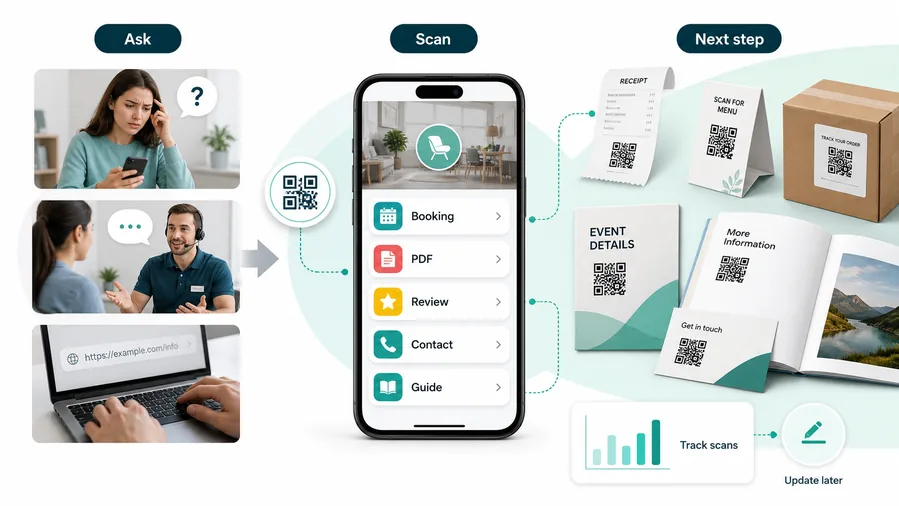
Turn local signs, receipts, cards, and packaging into useful next steps
A QR code for local business is useful when a customer already has context from a receipt, sign, package, appointment card, shelf tag, invoice, menu, flyer, or business card. It can open websites, maps, reviews, booking pages, coupons, menus, catalogs, contact cards, forms, social profiles, and support pages. Shops, service providers, solo operators, neighborhood brands, and small business owners can use QR codes to make offline moments easier to act on.
The value is not the QR code itself; it is the moment you place it in. A receipt can ask for a review. A window sign can show hours, maps, or offers after closing. A business card can save contact. A package insert can invite reorder. A service invoice can open support or referral. A table card can open menu, booking, or feedback. Each placement should have one obvious job. QR Code Lab helps create print-ready codes, dynamic links, and scan analytics for those touchpoints.
QR Code Lab creates URL QR codes only. It does not process payments, manage orders, collect forms, run bookings, provide professional advice, or operate business software. The linked site, booking, review, payment, or form platform handles the real customer action.
Local business utility
Use local business QR codes to turn nearby attention into the next useful customer action
Practical benefitsA local business QR code should not simply say “scan me.” It should help customers order, book, review, join, pay, claim an offer, find details, or contact the business while they are already near the store or service moment.
The code opens a vague homepage
A generic homepage can work for brand awareness, but it often forces customers to hunt for booking, reviews, menus, offers, support, or payment.
Local scans are strongest when the next action is obvious.
The code opens the action that fits the moment
A receipt can ask for a review, a table card can open a menu, a flyer can claim an offer, and a service card can open support or repeat booking.
For customers, the strongest QR code use cases are usually the repetitive questions and next actions people already have. QR Code Lab helps turn those moments into clear buttons, files, forms, microlanding pages, editable destinations, and measurable scan activity.
More reviews at the right moment
Ask after checkout, pickup, appointment, delivery, or completed service when the customer can judge the experience.
Faster booking and ordering
Send people directly to appointment slots, order forms, menus, availability, quote requests, or local pickup pages.
Cleaner offers and loyalty signup
Use windows, receipts, flyers, and cards for coupons, loyalty programs, event invites, and repeat-visit prompts.
Better support after the sale
Link receipts, packaging, invoices, or service cards to contact, warranty, instructions, feedback, and troubleshooting.
Local QR works when the scan saves effort immediately
The best code answers the customer’s current question: What can I order, book, claim, pay, review, learn, or fix right now?
Restaurants and venues
Menus, Wi-Fi, booking, reviews, loyalty signup, event details, and feedback can live exactly where guests already pause.
Books and education
Bonus PDFs, ZIP files, worksheets, source files, updates, examples, and reader feedback can sit behind a single page-level QR code.
Retail and packaging
Care guides, warranty, setup instructions, reorder links, product education, recipes, safety notes, and reviews can follow the item home.
Services and events
Booking, contact save, registration, schedules, maps, check-in, forms, portfolio links, and follow-up pages become reachable without manual searching.
Local business QR codes should make the next action obvious
Use the QR code as a shortcut to a customer outcome, not as decoration on every printed surface.
Local placement
Place local business QR codes where the customer already has a reason to scan
PlacementLocal QR placement should match the customer’s physical moment: entering, waiting, checking out, unboxing, reviewing, paying, booking, or asking for help.

A QR code in a random corner rarely explains itself
Customers may notice the code, but they will not scan unless the printed CTA makes the value clear.
A QR should sit near the action it supports.
The placement continues the customer journey
Use windows for hours and offers, counters for signup or payment, receipts for reviews, packaging for support, and service cards for repeat booking.
The scan should feel like the next natural step.
What just happened?
Purchase, appointment, pickup, delivery, consultation, meal, repair, quote, or product use.
What should happen next?
Order, book, review, pay, claim offer, join loyalty, get support, read instructions, or contact the business.
Is the phone naturally available?
Receipts, tables, waiting areas, packaging, and follow-up cards usually beat moving doorways or crowded sidewalks.
Is the value clear in two seconds?
The printed CTA should name the exact result: book now, leave review, pay invoice, claim coupon, view menu, or get support.
Window or entrance
Show hours, booking, offer, menu, quote request, event details, or local contact.
Counter or checkout
Prompt reviews, loyalty signup, payment, receipt preferences, pickup orders, or private feedback.
Receipt or invoice
Open review, support, payment, reorder, warranty, or next appointment.
Table card or waiting area
Use for menus, Wi-Fi, booking, service details, upsells, or feedback while customers pause.
Flyer or mailer
Lead to a local offer, campaign page, event registration, quote request, or landing page.
Product packaging
Open instructions, warranty, care notes, reorder, support, recipes, or product education.
Service card
Connect completed work to care tips, repeat booking, support, invoice, and review paths.
Vehicle or yard sign
Use only with a clear CTA and a destination that works from quick outdoor attention.
Local QR placement should reduce customer effort
If the customer has to guess why the code exists, the placement or CTA is not ready.
Local growth paths
Connect local business print to booking, ordering, reviews, loyalty, payments, and support
Local growthFor local businesses, QR codes are most useful when they bridge physical moments to digital actions customers already want to take.

Turn attention into appointments or quote requests
Use window signs, cards, mailers, and service handouts to open booking pages, availability, quote forms, and callback requests.

Move customers directly to menu, pickup, or product pages
Use counters, tables, flyers, packaging, and receipts for menus, pickup orders, product details, service packages, or reorder pages.

Ask after the customer has experienced the service
Use receipts, thank-you cards, invoices, and packaging to request reviews while keeping private feedback easy to find.

Capture repeat-visit interest at checkout
Link checkout signs and receipts to loyalty signup, coupons, SMS list, event invites, and next-visit offers.

Open trusted payment or invoice pages
Use QR payment shortcuts on invoices, counters, and service cards with clear business name, provider, and payment purpose.

Help customers after the sale
Connect products, receipts, and service handouts to instructions, warranty, troubleshooting, contact, and replacement requests.

Local customers scan when the value is immediate
The QR should answer the obvious next question: Can I book this, order it, claim it, pay for it, review it, or get help with it?
Local print stays useful when the destination is editable
Dynamic QR lets owners update hours, offers, menus, booking pages, payment links, seasonal campaigns, and support pages without replacing every sign.
Use separate codes when the business needs separate answers
Local scan reading
Read local business scans by placement so print decisions improve
AnalyticsLocal QR analytics should help compare attention across windows, counters, receipts, flyers, packaging, invoices, and service cards without pretending to explain every sale.

All scans become one vague number
A single QR code can show total interest, but it cannot tell whether the window sign, counter card, receipt, flyer, package, or invoice produced the scan.
Use one shared code only when comparison is not needed.
Each placement becomes a practical signal
Separate dynamic QR codes let you compare local placements while keeping the customer experience simple.
Scan data is directional, not full revenue attribution, but it is useful for deciding what to print again.
Scan volume
See how many scans each placement received in the selected period.
Time and device
Check when customers scanned and which device or browser opened the destination.
Broad location
Use approximate location signals to compare local campaigns without treating them as exact identity data.
Placement comparison
Compare windows, counters, receipts, flyers, packaging, invoices, and service cards side by side.
Name codes before printing
Use clear names such as window-offer, counter-loyalty, receipt-review, flyer-spring, invoice-pay, or package-support.
Compare attention before spending more on print
Use scan results to decide whether a counter card, mailer, receipt message, or window sign deserves another run.
Keep expectations grounded
Use scan data to compare attention and timing; orders, payments, bookings, and reviews still need their own systems.
Books and printed content
Learn whether readers open bonus pages, downloads, updates, or feedback forms from book pages.
Local QR analytics are most useful when each placement has a name
Good naming turns scan totals into decisions the business can actually use.
Cheap customer touchpoints
Use QR codes to increase useful contact without adding a full software stack
Use local business QR codes on receipts, window decals, business cards, flyers, shelf tags, packaging, appointment cards, invoices, menus, product tags, review cards, and referral cards. The CTA should be specific: leave review, book appointment, get coupon, open menu, view catalog, save contact, request quote, or get support. A generic homepage QR usually wastes the strongest part of the scan: the customer already has context.
Dynamic QR codes help when offers, booking links, menus, catalogs, forms, and support pages change after printing. Scan analytics can show which offline materials deserve another print run. That gives a small business practical feedback without needing a complex CRM or ad platform.
Match the destination to the customer’s next likely action. Someone scanning a receipt may be ready for a review or coupon. Someone scanning a window sign may need hours or maps. Someone scanning packaging may want reorder details. When the code is for support or payment, make the business name and action visible before asking for any information.
Editable local print
Keep local business QR destinations current after signs, receipts, and flyers are printed
DynamicLocal business print changes slowly, but offers, hours, menus, booking pages, payment links, and support paths can change quickly. Dynamic QR protects printed materials from going stale.
Old print can point customers to the wrong action
A static QR is fine when the destination is permanent, but many local pages change: menus, offers, booking calendars, holiday hours, payment providers, and support forms.
A wrong destination wastes attention at the exact customer moment the print was meant to capture.
One printed code can keep opening the current page
Dynamic QR lets owners update the destination behind windows, receipts, mailers, packaging, invoices, table cards, and service handouts.
This is especially useful when a printed piece stays in circulation for weeks or months.

Seasonal offers
Update coupons, events, promotions, local campaigns, and landing pages without reprinting flyers.
Booking and ordering
Change calendars, menus, pickup forms, availability, service packages, and quote pages as operations shift.
Payments and invoices
Point printed invoices or counter signs to current provider pages while payment confirmation stays with that provider.
Support and reviews
Keep feedback, warranty, contact, review, and troubleshooting paths current after the sale.
Use dynamic QR when local print may outlive the current destination
If the business would hate reprinting the piece when a link changes, make the code editable from the start.
Local trust
Make local business QR codes look official before customers scan
TrustA local QR code can appear on doors, counters, receipts, tables, flyers, packages, and invoices. Customers should know who owns it and what will happen before they scan.

Vague scan copy
A bare QR code with no CTA can feel suspicious or pointless, especially on payment, Wi-Fi, review, or support placements.
Watch for similar-looking domains, long URLs, login or verify keywords, and pages asking for credentials after an unexpected scan.
Outdated destinations
Old offers, wrong hours, broken booking pages, and retired payment links make the business look careless.
A trustworthy QR should not make the final destination mysterious, especially on posters, labels, menus, parking signs, or event materials.
Untrusted payment paths
Payment shortcuts need the business name, provider, amount context, and support path clearly visible.
Before paying, check the domain, HTTPS, amount, recipient, and whether the destination matches the place or brand that printed the QR.Check the scan path like a first-time customer
Scan from the real printed placement and confirm the first screen matches the promise beside the QR code.
The current detailed report is a static URL analysis. It helps reveal the encoded content and basic URL risk signals, but it does not guarantee that a destination is safe and does not replace browser, antivirus, payment, or bank security checks.Decoded content
See the raw value inside the QR before opening it.
Content type
Recognize URL, Wi-Fi, mailto, phone, SMS, vCard, or plain text.
URL risk signals
Review HTTPS, shorteners, IP addresses, long URLs, encoded characters, query parameters, and sensitive keywords.
Destination report
For URL codes, view final URL fields, static redirect report fields, domain fields, TLS placeholders, page metadata fields, and risk reasons.
Make your own QR codes easier to trust
A safe-looking QR code is not only about security. It is also about reducing uncertainty for the scanner. Use clear destination text, a branded landing page, normal HTTPS domains, and a visible explanation of what happens after scanning.






