
QR Code Generator for Business - Professional Codes & Links
Create business QR codes for websites, reviews, vCards, menus, payments, Wi-Fi, invoices, receipts, storefront signs, packaging, and support. Build clean, branded codes for real customer touchpoints.
Free QR code generator
Create a QR code online
Generate QR codes for websites, email, phone numbers, vCards, Wi-Fi, plain text, forms, PDF files, and campaign links. Customize colors, add a logo or frame, then download a print-ready PNG or SVG.
Choose QR code type
Website QR code, Email QR code, Phone QR code, vCard QR code, Wi-Fi QR code, Text QR code, SMS, WhatsApp, event, and download links.
Add your content
Enter your website URL, contact details, message, phone number, location, or file destination before generating the QR code.
Customize and download
Adjust QR colors, error correction, logo, frame, size, and margin. Generate QR Code, Download PNG, Download SVG, or Save and track scans.
Business scan paths
Make every printed business touchpoint easier to act on
A business QR code is useful when a customer, guest, buyer, or visitor should not have to type a URL, search your name, or ask staff for the next step. It can open websites, reviews, vCards, menus, Wi-Fi access, invoices, receipts, support pages, booking links, payment pages, product information, storefront offers, and contact cards. The code turns a printed surface into a direct mobile action.
For a business, the benefit is practical reach without a complicated integration. A card can save a contact. A receipt can ask for feedback. A package insert can open support or reorder. A table sign can open a menu. A storefront decal can show hours after closing. A trade show flyer can open a lead form. QR Code Lab helps create print-ready codes, dynamic destinations, branded designs, and scan analytics for these everyday business moments.
QR Code Lab creates QR codes and tracks scans. It does not run your payment system, booking software, POS, review platform, CRM, or support desk. Those tools handle the actual customer action, while QR Code Lab makes the printed access point easier to manage and measure.
Low-cost customer touchpoints
Use business QR codes to connect print, products, staff, customers, and operations to the next action
Practical benefitsA business QR code is strongest when it reduces friction in a real workflow: open a form, save a contact, book a meeting, pay an invoice, view a file, scan a label, join a campaign, or get support.
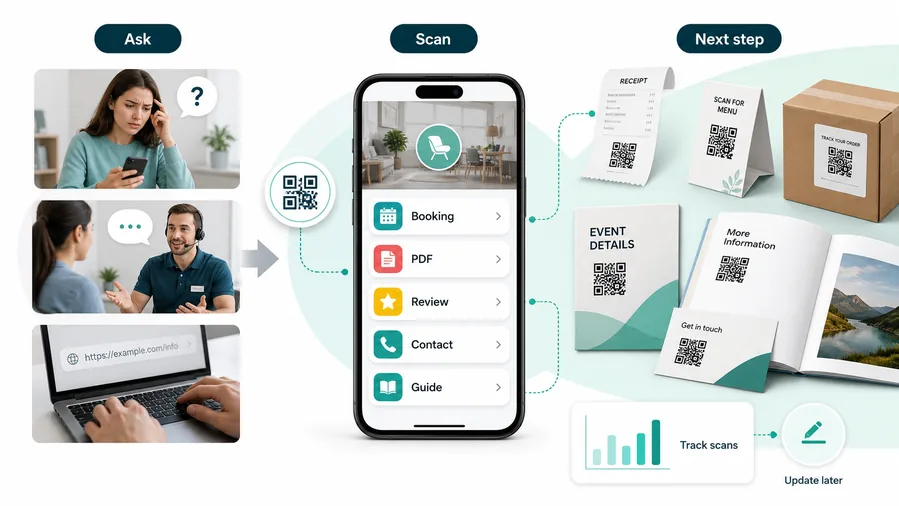
Disconnected print slows business workflows down
Cards, brochures, invoices, labels, manuals, posters, and trade show materials often ask people to type, search, email, or wait for staff.
That delay turns simple actions into missed leads, support tickets, stale documents, and hard-to-measure campaigns.
A focused QR code makes the action immediate
A clear QR destination can move someone directly from the printed touchpoint to the correct page, form, file, payment, booking, support flow, or campaign.
For customers, the strongest QR code use cases are usually the repetitive questions and next actions people already have. QR Code Lab helps turn those moments into clear buttons, files, forms, microlanding pages, editable destinations, and measurable scan activity.
Shorten the path from print to action
Use QR codes on cards, proposals, signs, packages, invoices, and handouts to open the exact business workflow.
Keep printed materials current
Use editable destinations for forms, files, offers, calendars, support pages, catalogs, and payment links that may change.
Support customers without repeated explanations
Send people to onboarding, instructions, warranty, booking, troubleshooting, FAQs, and contact paths.
Measure physical campaigns more clearly
Use separate tracked QR codes for events, branches, teams, products, channels, and print placements.
Business QR should start from the job the scanner is trying to finish
Decide whether the scan should create a lead, open a file, save contact, start payment, request support, book a meeting, or identify a product.
Restaurants and venues
Menus, Wi-Fi, booking, reviews, loyalty signup, event details, and feedback can live exactly where guests already pause.
Books and education
Bonus PDFs, ZIP files, worksheets, source files, updates, examples, and reader feedback can sit behind a single page-level QR code.
Retail and packaging
Care guides, warranty, setup instructions, reorder links, product education, recipes, safety notes, and reviews can follow the item home.
Services and events
Booking, contact save, registration, schedules, maps, check-in, forms, portfolio links, and follow-up pages become reachable without manual searching.
A business QR code should have one operational job
If the code cannot be named by its action and placement, the destination is probably too vague.
Business QR use cases
Choose business QR use cases by workflow, not by novelty
Use casesUse the QR code where it saves time, removes typing, connects physical materials to live information, or makes a printed placement measurable.

Lead capture and booking
Send business cards, brochures, event booths, and direct mail to quote forms, demos, calendars, and sales pages.
Best for: sales teams, agencies, consultants, local services
Product and packaging support
Open setup guides, warranty, registration, safety notes, manuals, reorder pages, and troubleshooting from labels or inserts.
Best for: products, ecommerce, retail, hardware, CPG
Documents and files
Link printed materials to PDFs, spec sheets, catalogs, compliance docs, onboarding files, and updated resources.
Best for: B2B sales, operations, education, field teams
Payments and invoices
Route invoices, estimates, counters, and appointment cards to trusted payment pages, deposits, balances, and receipts.
Best for: services, events, clinics, contractors, studios
Support and feedback
Help customers report issues, request help, leave private feedback, review, return, or get warranty support.
Best for: customer service, product teams, local businesses
Internal operations
Use QR codes for asset tags, SOPs, checklists, training, maintenance logs, inventory forms, and staff handoffs.
Best for: operations, warehouses, facilities, field service
Events and trade shows
Route booth signs, badges, handouts, and follow-up cards to demos, offers, resources, and post-event nurture.
Best for: events, conferences, sales teams, vendors
Campaign measurement
Use separate dynamic QR codes when teams need to compare channels, branches, print pieces, locations, or offers.
Best for: marketing teams, franchises, agencies, retailKeep the use case tied to a real business outcome
The best business QR codes are easy to name: book demo, pay invoice, open manual, claim offer, request support, or scan asset.
Business placement flow
Choose the QR destination by the action the customer is ready to take
Useful placements include business cards, invoices, receipts, packaging, storefront signs, product labels, table tents, appointment cards, brochures, service stickers, event booths, and counter signs. CTAs should say save contact, book appointment, view menu, leave review, pay invoice, get support, join rewards, open catalog, or request quote. A specific label helps people understand why scanning is worth it.
Dynamic QR codes are helpful when business pages, campaigns, staff contacts, menus, coupons, and support links change. You can update the destination after printing instead of throwing away cards, signs, or labels. Scan analytics can compare touchpoints like receipts, storefront decals, package inserts, and trade show flyers, which helps you see where offline materials actually create action.
Start with the customer moment. Someone at a counter may scan loyalty or review. Someone holding a product may scan support. Someone reading a flyer may scan a quote form. The better the match, the less the QR code feels like a gimmick and the more it feels like useful service.
After-print control
Keep business QR destinations editable when forms, files, offers, and workflows change
DynamicBusiness print often outlives the page behind it. Dynamic QR protects cards, brochures, labels, manuals, invoices, and signs when destinations move.
A fixed QR can freeze an old business process in print
A static QR is fine for permanent data, but it cannot follow moved forms, retired PDFs, changed payment pages, old offers, or updated support workflows.
That becomes expensive when the code is already on cards, labels, manuals, signage, packaging, or invoices.
An editable QR keeps printed business assets alive
Dynamic QR lets teams update landing pages, forms, files, catalogs, payment links, support paths, and campaigns while the printed code stays the same.
The business keeps the physical asset useful while the destination follows the current workflow.

Sales and marketing
Update demos, calendars, offers, landing pages, case studies, and event follow-up.
Files and documents
Replace PDFs, catalogs, specs, compliance docs, manuals, and onboarding files.
Payments and support
Change invoice links, booking pages, warranty paths, contact forms, and support resources.
Operations
Maintain SOPs, asset records, checklists, training, and internal forms after print.
Use dynamic QR when the printed asset will outlive the destination
If the page, file, form, offer, or payment link may change, editable QR protects the business from reprints and broken workflows.






