
QR Code for Nonprofits - Donations, Volunteers & Events
Create nonprofit QR codes for donations, volunteer forms, campaigns, events, petitions, membership pages, newsletters, community outreach, supporter actions, and printed appeals.
Free QR code generator
Create a QR code online
Generate QR codes for websites, email, phone numbers, vCards, Wi-Fi, plain text, forms, PDF files, and campaign links. Customize colors, add a logo or frame, then download a print-ready PNG or SVG.
Choose QR code type
Website QR code, Email QR code, Phone QR code, vCard QR code, Wi-Fi QR code, Text QR code, SMS, WhatsApp, event, and download links.
Add your content
Enter your website URL, contact details, message, phone number, location, or file destination before generating the QR code.
Customize and download
Adjust QR colors, error correction, logo, frame, size, and margin. Generate QR Code, Download PNG, Download SVG, or Save and track scans.
Offline supporter action
Use nonprofit QR codes to turn printed outreach into one clear action
Nonprofit QR codes can open donation pages, volunteer signup forms, petitions, event registration, membership pages, newsletters, campaign landing pages, impact reports, community outreach resources, sponsorship pages, and emergency appeal pages. They are useful for charities, advocacy groups, churches, fundraising teams, volunteer coordinators, campaign managers, and small nonprofits.
The practical benefit is focus. A flyer, poster, booth card, bulletin, direct mail piece, or campaign sign can ask for one action and make that action immediate. The QR code should not hide the purpose; it should make the purpose easier to complete. A supporter should know whether they are donating, volunteering, signing up, reading an impact report, or joining a campaign before they scan.
QR Code Lab creates QR codes for the destination you choose. It does not process donations, store donor data, manage volunteers, host petitions, run campaigns, send newsletters, or replace your CRM. Those actions happen on your linked platform, and the wording around the QR code should make that clear when money or personal information is involved.
For trust, keep the organization name and action visible on the printed piece. A clear QR code can reduce friction, but the cause and credibility still do the real work.
Nonprofit action moments
Use nonprofit QR codes when print should turn goodwill into a specific action
Nonprofit QRA nonprofit QR should not simply point to a homepage. It should help supporters donate, volunteer, register, learn, subscribe, give feedback, or find the right campaign while the mission is already in front of them.

Make the next supporter action clear
Use QR codes on appeal letters, event programs, donor cards, lobby signs, volunteer tables, impact reports, direct mail, posters, and community handouts when one action should be easy to take.
The CTA should say donate, volunteer, register, join the list, sponsor a need, or read the impact story.
Match the destination to the campaign context
A fundraising letter may need a donation page, a volunteer fair may need signup, a church bulletin may need giving and events, and an impact report may need the story behind the numbers.
Supporter trust improves when the scan matches the printed promise.
Keep campaigns editable after materials circulate
Dynamic QR helps when donation pages, volunteer forms, event links, emergency campaigns, newsletter tools, impact reports, or giving platforms change after printed materials are distributed.
Nonprofit print often stays in circulation after campaign details change.A nonprofit QR should protect trust and reduce action friction
Supporters scan because they already care about the mission. The destination should confirm the organization, explain the action, and make the next step simple on a phone.
Use separate codes for donor appeals, volunteer drives, events, programs, direct mail, and community signs when reporting matters.Donation path
Open a trusted giving page with clear purpose, campaign context, and payment provider boundary.
Volunteer flow
Route people to roles, dates, locations, requirements, forms, and contact details without a search.
Event action
Connect flyers, programs, and signs to registration, schedule, map, reminders, and follow-up.
Impact context
Use QR codes to show stories, reports, photos, updates, and proof behind the printed appeal.
Supporter journey
Choose nonprofit QR destinations by the supporter moment
Supporter actionsDifferent nonprofit materials create different kinds of intent. The strongest QR destination is the one that matches what the supporter is ready to do right now.
A general homepage wastes campaign attention
Supporters should not have to search again after scanning from a specific appeal, event, program, or volunteer table.
A broad destination weakens trust and makes the printed CTA feel unfinished.
A focused destination turns intent into follow-through
Use donation pages for appeals, volunteer forms for service moments, event pages for programs, and impact stories when proof matters.
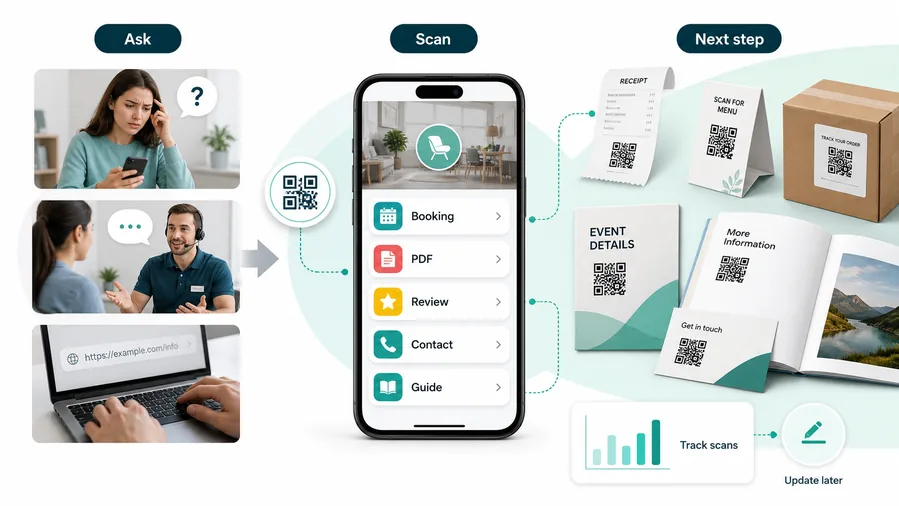
For customers, the strongest QR code use cases are usually the repetitive questions and next actions people already have. QR Code Lab helps turn those moments into clear buttons, files, forms, microlanding pages, editable destinations, and measurable scan activity.
More completed donations
Send supporters from appeals, signs, and programs to the exact giving page with campaign purpose and trusted checkout context.
Cleaner volunteer signup
Connect tables, flyers, and community boards to roles, time slots, training, location notes, and contact paths.
Better event follow-up
Use programs, badges, and handouts for schedules, RSVP, speaker files, reminders, feedback, and post-event updates.
Stronger impact storytelling
Let supporters scan printed reports, thank-you cards, and lobby signs to see stories, photos, updates, and outcomes.
A cheap layer of extra customer contact
QR codes increase useful touch frequency without a CRM project, mobile app, custom integration, or staff training. One printed code can open a guide, download, booking page, feedback form, review request, support path, or updated resource. The customer feels helped, not chased.
Restaurants and venues
Menus, Wi-Fi, booking, reviews, loyalty signup, event details, and feedback can live exactly where guests already pause.
Books and education
Bonus PDFs, ZIP files, worksheets, source files, updates, examples, and reader feedback can sit behind a single page-level QR code.
Retail and packaging
Care guides, warranty, setup instructions, reorder links, product education, recipes, safety notes, and reviews can follow the item home.
Services and events
Booking, contact save, registration, schedules, maps, check-in, forms, portfolio links, and follow-up pages become reachable without manual searching.
Nonprofit QR should make support easier and more credible
Choose the destination that removes the next obstacle without making the supporter guess what happens after the scan.
Nonprofit placement
Place nonprofit QR codes where the supporter already understands the ask
PlacementNonprofit QR placement should follow the real-world moment: donor letter, event program, church bulletin, volunteer table, lobby sign, impact report, community poster, or thank-you card.

A visible QR is not enough when the ask is vague
A code on a poster or letter can be easy to see and still underperform if supporters do not know whether it opens giving, volunteering, events, or information.
The placement should name the action and make the organization recognizable.
Put the QR beside mission, proof, and next step
Use the QR where supporters have just read the appeal, seen the need, attended the event, or learned the impact.
The CTA should connect the mission moment to a specific action.
What did the supporter just see?
Appeal, need, service opportunity, event, impact story, sermon, report, community notice, or thank-you message.
What action is appropriate now?
Donate, volunteer, register, join list, request help, learn more, give feedback, or contact the organization.
Does the page preserve trust?
Show the organization name, campaign purpose, payment provider, privacy expectation, and contact path clearly.
Will campaign details change?
Use dynamic QR for emergency appeals, events, forms, donation pages, volunteer needs, and seasonal programs.
Appeal letter
Open the campaign donation page, impact story, pledge form, or recurring giving path.
Event program
Connect attendees to giving, schedule, speakers, feedback, volunteer signup, or follow-up resources.
Volunteer table
Open role details, signup forms, training notes, location requirements, and coordinator contact.
Church bulletin
Route to giving, event registration, small groups, prayer requests, newsletters, or community help.
Lobby sign
Show current campaigns, needs, impact stories, volunteer opportunities, and visitor information.
Impact report
Add stories, photos, videos, financial context, outcomes, and ways to continue supporting.
Community poster
Open assistance forms, event pages, donation drives, maps, resource lists, or contact paths.
Thank-you card
Send donors to impact updates, newsletter signup, recurring giving, volunteer paths, or shareable stories.
Nonprofit QR placement should respect trust and urgency
Use the code where the supporter has enough context to take a meaningful next step.
Campaign trust
Make the organization, action, and destination obvious before people scan
Use nonprofit QR codes on flyers, posters, event booths, direct mail, donation cards, church or community bulletins, campaign signs, volunteer tables, gala programs, sponsor materials, impact displays, and thank-you cards. The CTA should say donate, volunteer, sign up, read the impact report, join the newsletter, sponsor, or register for the event.
Place the QR code where the supporter already understands the mission. A gala program can support the evening appeal. A volunteer table can open signup. A direct mail card can open the official donation page. A poster can support an emergency campaign. A thank-you card can invite people to read the impact report or share the campaign. The code should make the next step easier, not replace the story.
Dynamic QR codes help when campaigns rotate, events pass, or outreach pages change. Tracking scans can show which printed materials created interest, while your donation, form, petition, or CRM platform measures completed actions. QR Code Lab provides the QR route and scan signal; it does not confirm donations, volunteer approvals, petition signatures, or member records.
Donation boundary
Use QR codes for trusted donation links, not payment processing
DonationsQR Code Lab can create the QR code, manage the destination, and show scan activity. The donation platform handles funds, receipts, refunds, donor records, tax notes, and disputes.

Open the correct giving page
Use QR codes to reduce typing for campaigns, emergency appeals, recurring giving, sponsorships, event donations, and memorial gifts.
Make the purpose clear before checkout
The printed CTA and landing page should explain the campaign, organization, amount options, and what the supporter is funding.
Keep scan data separate from donation records
A scan shows interest in the giving page, but donation completion, donor identity, receipts, and settlement live inside the payment or fundraising platform.
Donation processing stays with the fundraising provider
QR Code Lab is not a payment processor, donor database, bank, wallet provider, escrow service, or merchant of record.
A QR scan does not prove that a donation was completed.Separate scan interest from donation confirmation
Use QR Code Lab to get supporters to the right giving page, then use the fundraising provider to confirm the money moved.






