
Website URL QR Code Generator for Links & Landing Pages
Create website URL QR codes for landing pages, product pages, menus, stores, blogs, portfolios, forms, and campaigns. Turn any clean link into a scannable QR code for print fast today.
Free QR code generator
Create a QR code online
Generate QR codes for websites, email, phone numbers, vCards, Wi-Fi, plain text, forms, PDF files, and campaign links. Customize colors, add a logo or frame, then download a print-ready PNG or SVG.
Choose QR code type
Website QR code, Email QR code, Phone QR code, vCard QR code, Wi-Fi QR code, Text QR code, SMS, WhatsApp, event, and download links.
Add your content
Enter your website URL, contact details, message, phone number, location, or file destination before generating the QR code.
Customize and download
Adjust QR colors, error correction, logo, frame, size, and margin. Generate QR Code, Download PNG, Download SVG, or Save and track scans.
Website and link QR codes
Use a URL QR code when the scan should land on one clear web destination
A website URL QR code is the most flexible QR format because it can point to almost any page people can open in a browser: a landing page, menu, product page, booking form, PDF, portfolio, support article, event page, checkout link, blog post, online store, review page, or campaign destination. It is the right choice when the scan should continue into a web experience rather than trigger a native phone action like joining Wi-Fi, starting an SMS, placing a call, or saving a contact.
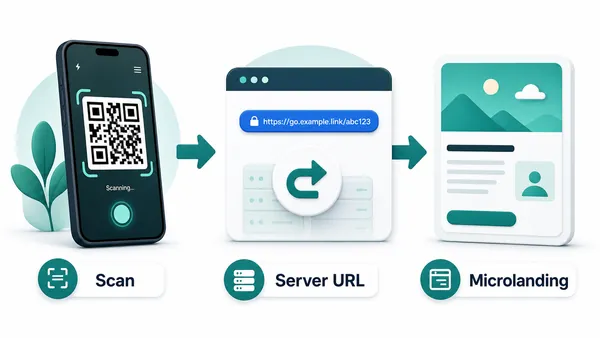
The important decision is whether the URL should be static or dynamic. A static URL QR code contains the final destination directly inside the QR pattern. It is simple, fast, and has no redirect layer, but if the page moves or the campaign changes, the printed QR code cannot be edited. A dynamic QR code from QR Code Lab stores a managed URL in the QR pattern first, then redirects visitors to the current destination. That managed layer lets you change the final URL later and collect scan analytics.
Use static for stable links you fully control and do not need to measure. Use dynamic for printed materials, campaigns, packaging, books, flyers, menus, and any QR code that may need a different destination after it leaves your hands.
Example: a website QR for a printed service card
The code should open the service page promised by the card, not leave the customer searching through a general homepage.
- Encoded content
- A complete HTTPS URL. https://example.com is a documentation example, not a service page supplied by QR Code Lab.
- Visitor check
- Open the intended address in a signed-out browser and confirm that redirects, language and mobile layout lead to the promised information.
- Change decision
- If the address must be replaceable after printing, use a managed dynamic destination before publishing the card.
Changing a website does not rewrite a static QR. UTM parameters describe a campaign to the destination analytics system; they do not by themselves create QR Code Lab scan tracking.
Website link moments
Use a website URL QR code when the scan should open one clear web destination
URL QRA website QR should remove typing and send scanners to the exact page promised by the print: landing page, product page, form, menu, guide, booking page, campaign, or resource.
Send people to the exact page, not a search task
Use URL QR codes on flyers, signs, packaging, manuals, business cards, posters, receipts, and campaigns when one web page continues the printed message.
The CTA should name the destination: open menu, view guide, book, register, claim offer, or learn more.
Match the URL to the physical context
A product label may need setup, a poster may need tickets, a business card may need booking, and a flyer may need a campaign page. The scan should not land on a generic homepage unless discovery is the goal.
Specific landing pages make URL QR codes feel intentional.
Keep printed links editable when pages move
Dynamic QR helps when campaign URLs, product pages, forms, PDFs, menus, booking pages, or landing pages may change after the code is printed.
A URL is easy to change online, but not inside a static printed QR pattern.A website QR should make the web page feel like the next step
The scanner has already seen the printed promise. The URL destination should confirm that promise immediately and make the main action easy on a phone.
Use dynamic QR for long-lived print, campaigns, forms, files, menus, and product pages that may change.Exact destination
Open the page, form, file, product, booking, menu, or campaign that matches the printed CTA.
Mobile fit
Make sure the first screen loads quickly and shows the main action without searching.
Print context
Use different codes for different placements when the destination or reporting needs differ.
Editable control
Use dynamic QR when the final URL may move, expire, or need a fallback later.
Choose static URL QR for final links and dynamic QR for links that may change
URL choiceA static URL QR stores the final web address inside the pattern. A dynamic URL QR stores a managed link first, so the printed code can keep working when the final page changes.
Static URL QR is direct and final
A static URL QR contains the final web address in the QR pattern, so the phone can open that page without a managed redirect.
Use it for permanent URLs where the page, domain, and path are unlikely to change.
The tradeoff is permanence: after printing, QR Code Lab cannot edit the destination or collect scan analytics.
Dynamic URL QR is editable and measurable
A dynamic URL QR sends scanners through a managed link before opening the current destination.
That lets you replace a landing page, update a form, change a campaign URL, fix a typo, or route to a fallback without reprinting.
Use it for campaigns, product pages, menus, PDFs, events, and any printed material that may outlive the first URL.
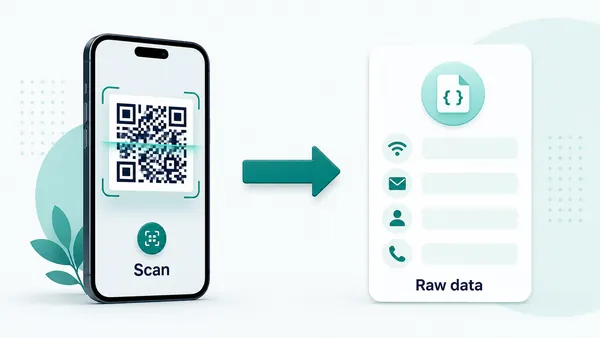
Quick decision
After-print control
Use dynamic QR when website destinations may move after print
DynamicPrinted URL QR codes often outlive landing pages, forms, product pages, menus, campaign URLs, PDFs, and event pages. Dynamic routing keeps the code useful when the web changes.
A fixed URL can break when the page moves
Static QR is fine while the exact web address remains final.
If the page path changes, a form closes, a campaign ends, or a PDF moves, the printed code keeps opening the old URL.
Editable routing keeps printed links current
Dynamic QR lets the same printed code open the current page, form, menu, file, or fallback destination.
It also helps compare scans by campaign, material, placement, or channel when reporting matters.

Campaign landing pages
Move print traffic from teaser to launch, offer, signup, reminder, or evergreen destination.
Forms and bookings
Update registration, quote, appointment, survey, and booking links when workflows change.
Product and support pages
Keep labels, manuals, packaging, and flyers connected to current guides, specs, support, and warranty.
Menus and files
Replace PDFs, menus, downloads, and resource pages without reprinting the QR code.
Use dynamic when the website path has a shelf life
If the printed code may stay visible longer than the first URL is guaranteed, keep the destination editable.
URL scan UX
Make the URL scan land on the page the print promised
Scan UXA website QR is only useful when the destination confirms the printed promise quickly and works well on a phone.
Use direct URLs for one clear destination
Landing page, product, menu, formA direct page works when every scanner should see the same specific destination.
The first screen should repeat the offer, product, event, resource, or action printed beside the code.
Use a landing page when the scan needs context
CTA, buttons, files, contact, fallbackA short mobile page can explain the action, show primary buttons, and offer fallback links when a raw destination would feel abrupt.
This is useful for public print, campaigns, product packaging, and mixed audiences.
Use dynamic routing for change and reporting
Campaign, placement, analytics, fallbackA managed link protects printed materials when URLs move or campaign phases change.
It also keeps scan reporting tied to the QR code instead of relying only on website analytics.
Does the first screen match the CTA?
The page should immediately confirm what the scanner expected: menu, form, offer, file, booking, guide, or product.
Is the URL mobile-safe?
Check speed, layout, buttons, file behavior, login friction, and whether the main action is visible.
Will the URL change later?
Use dynamic QR for campaigns, product pages, forms, files, menus, and long-lived print.
The URL scan should remove typing, not create another search
Choose the destination that continues the printed promise with the fewest steps.
Destination quality
The destination page matters as much as the QR code image
A URL QR code only removes the typing step. After the scan, the page still has to do the work. If the destination is slow, confusing, not mobile-friendly, full of popups, or asks for too much information too early, the QR code may scan perfectly and still fail as a user experience. The scanner is often holding a phone in a physical moment, so the first screen needs to make sense immediately.
Before printing, open the exact destination on a phone and check the first screen. Can the visitor understand where they landed? Is the main action visible without pinching or hunting? Does the page match the physical context: a poster, receipt, product label, table tent, book page, menu, flyer, or business card? If the QR code promises a coupon, menu, map, file, or booking page, do not send people to a broad homepage and make them search.
For dynamic QR codes, analytics become useful here. If people scan but do not continue, the problem may not be the QR code. It may be the page you sent them to, the CTA beside the code, or the timing of the placement.