
QR Code for Schools - Forms, Lessons, Events & Campus Info
Create school QR codes for forms, assignments, classroom resources, events, calendars, cafeteria menus, campus maps, parent communication, visitor info, Wi-Fi, and notices.
Free QR code generator
Create a QR code online
Generate QR codes for websites, email, phone numbers, vCards, Wi-Fi, plain text, forms, PDF files, and campaign links. Customize colors, add a logo or frame, then download a print-ready PNG or SVG.
Choose QR code type
Website QR code, Email QR code, Phone QR code, vCard QR code, Wi-Fi QR code, Text QR code, SMS, WhatsApp, event, and download links.
Add your content
Enter your website URL, contact details, message, phone number, location, or file destination before generating the QR code.
Customize and download
Adjust QR colors, error correction, logo, frame, size, and margin. Generate QR Code, Download PNG, Download SVG, or Save and track scans.
School communication
Use school QR codes when families, students, and staff need the right resource fast
School QR codes can open forms, assignments, lesson resources, event registration, calendars, cafeteria menus, campus maps, parent updates, newsletters, permission slips, library resources, student support pages, club information, sports schedules, and guest Wi-Fi information. They are useful for teachers, administrators, office staff, parent coordinators, librarians, coaches, and campus communication teams.
The best school QR code is tied to a real school workflow. A hallway sign can open a map or event page. A parent packet can open forms or updates. A classroom poster can open recurring resources. A library display can open reading lists or research links. A cafeteria sign can open the menu. Avoid making one code do everything when the physical context already tells you what people need.
QR Code Lab creates the QR destination and printable code. It does not host student records, collect school data, manage attendance, grade work, or replace approved school systems. Keep privacy, age, permissions, and district processes in mind before linking to forms that collect personal information.
A clear school QR code saves time for families and staff. It should use simple words, work on mobile, and send people straight to the resource named beside the code.
School communication moments
Use school QR codes to connect families, students, and staff to the right resource
School QRA school QR should remove typing and searching from common campus moments: forms, lessons, events, newsletters, calendars, assignments, maps, payments, permission slips, and parent communication.
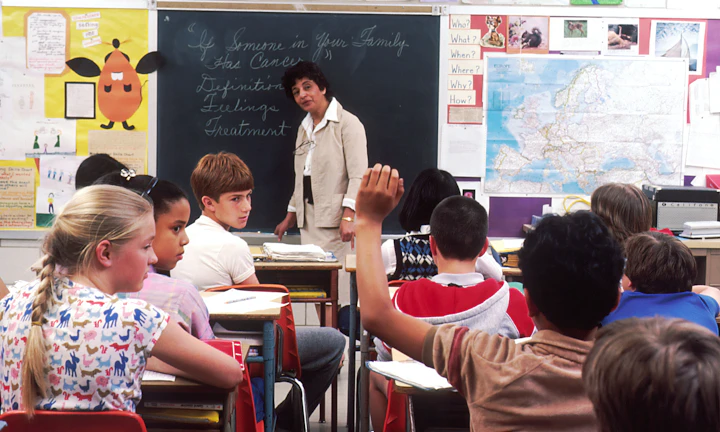
Put the right resource beside the school task
Use QR codes on worksheets, classroom posters, parent letters, hallway signs, event programs, library notices, office counters, and bus or pickup materials when one resource should be easy to open.
The CTA should say open assignment, fill form, view calendar, register, download guide, or contact office.
Match the destination to the audience
Students may need a lesson file, parents may need a form or event detail, teachers may need resources, and visitors may need maps, office hours, or contact information.
School QR works when the first screen confirms the exact task.
Keep printed school communication current
Dynamic QR helps when forms, calendars, assignment links, event details, parent notices, pickup instructions, and resource files change after handouts or signs are printed.
School schedules move faster than paper handouts.A school QR should reduce communication friction
The scanner may be a parent in a hurry, a student at a desk, a visitor in a hallway, or a teacher distributing a handout. The QR should open the exact resource for that moment.
Use separate QR codes for classrooms, forms, events, offices, libraries, and campus signs when reporting or ownership differs.Parent forms
Open permission slips, registration, surveys, payments, pickup notes, calendars, and contact paths.
Classroom resources
Connect worksheets, posters, textbooks, and assignments to files, videos, answer checks, and instructions.
Campus navigation
Use signs and handouts for maps, office hours, events, lunch, library, nurse, and visitor information.
Editable updates
Use dynamic QR when dates, forms, resources, and school notices may change after print.
Learning resource access
Connect school print to the exact resource students or parents need
EducationSchool QR codes are strongest when a worksheet, notice, classroom poster, event program, or parent letter opens the matching file, form, video, calendar, map, or instruction without a search.

Attach resources to classroom work
Use QR codes on worksheets, handouts, textbook pages, and posters to open videos, examples, practice files, answer checks, or differentiated activities.

Make parent forms easier to complete
Send families to permission slips, registration forms, surveys, payments, emergency contact updates, pickup notes, and event signups.

Keep event information reachable
Use flyers and programs for schedules, maps, speaker notes, volunteer forms, reminders, and post-event feedback.

Support multilingual and accessible communication
Link printed notices to translations, audio, plain-language versions, large-print files, or additional explanations.

Help visitors navigate campus
Open maps, office directions, parking, check-in instructions, bell schedules, and contact pages from signs or handouts.

Connect libraries and labs to digital materials
Use shelf signs, lab stations, and resource cards for catalogs, tutorials, safety notes, booking, and help docs.

Update assignments without reprinting
Dynamic QR helps when due dates, files, correction notes, videos, or assignment links change after handouts are distributed.

Reduce office repeat questions
Place QR codes where families ask the same questions about calendars, forms, lunch, transport, events, and policies.
Students and parents should land on the right school resource immediately
The QR code should remove typing, searching, and guessing by opening the exact page, file, form, or explanation connected to the printed material.
School teams can update destinations without reprinting handouts
Dynamic QR codes help when assignment links, due dates, correction files, calendars, forms, videos, or parent notices may change after materials are printed.
Put the QR beside the school moment
School workflow fit
Use school QR codes for repeat communication pain points
School actionsThe most useful school QR codes reduce the small frictions that repeat all year: finding forms, opening assignments, checking events, navigating campus, and keeping families updated.
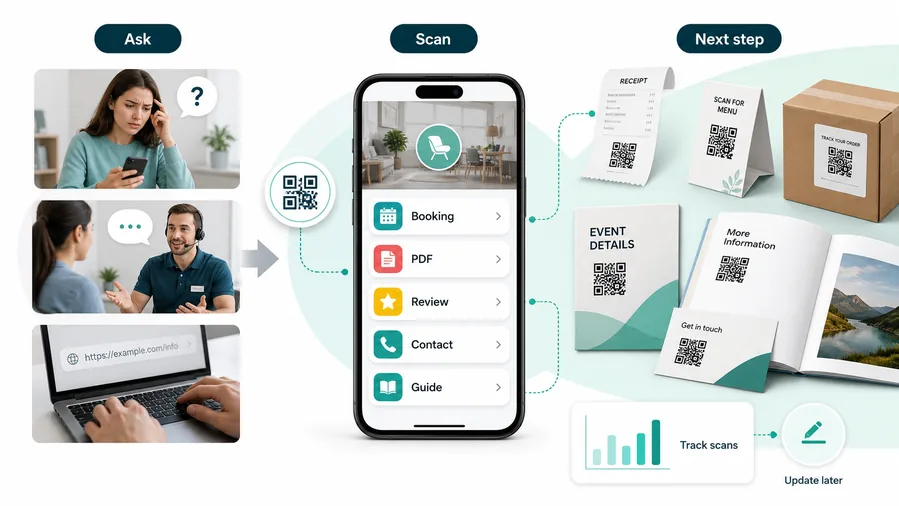
A generic school homepage sends families searching again
Parents and students scan because they need a specific form, lesson, map, or event detail.
A broad homepage wastes the advantage of placing the QR on the exact printed material.
A focused destination makes the printed notice useful
Use a form page for forms, lesson resource for assignments, event page for programs, and campus map for signs.
For customers, the strongest QR code use cases are usually the repetitive questions and next actions people already have. QR Code Lab helps turn those moments into clear buttons, files, forms, microlanding pages, editable destinations, and measurable scan activity.
Fewer missed forms
Connect parent letters and office signs to permission slips, registration, surveys, payments, and emergency updates.
Cleaner learning access
Attach videos, files, answer checks, examples, and instructions directly to worksheets and classroom materials.
Better event participation
Use flyers and programs for RSVP, schedules, maps, volunteer forms, reminders, and feedback.
Less office repetition
Place QR codes near recurring questions about calendars, pickup, lunch, transport, policies, and visitor directions.
A cheap layer of extra customer contact
QR codes increase useful touch frequency without a CRM project, mobile app, custom integration, or staff training. One printed code can open a guide, download, booking page, feedback form, review request, support path, or updated resource. The customer feels helped, not chased.
Restaurants and venues
Menus, Wi-Fi, booking, reviews, loyalty signup, event details, and feedback can live exactly where guests already pause.
Books and education
Bonus PDFs, ZIP files, worksheets, source files, updates, examples, and reader feedback can sit behind a single page-level QR code.
Retail and packaging
Care guides, warranty, setup instructions, reorder links, product education, recipes, safety notes, and reviews can follow the item home.
Services and events
Booking, contact save, registration, schedules, maps, check-in, forms, portfolio links, and follow-up pages become reachable without manual searching.
School QR should make the next task easier for the exact audience
Choose the destination by whether the scanner is a student, parent, teacher, visitor, or staff member in that moment.
School placement
Place school QR codes where the task is already clear
PlacementSchool QR placement should follow the real audience moment: worksheet, parent notice, classroom poster, hallway sign, event flyer, library shelf, office counter, or campus map.

A school QR is weak when it hides the task
A QR code on a notice may be ignored if parents or students do not know whether it opens a form, file, calendar, or general website.
The CTA should name the resource and audience clearly.
Put the QR beside the form, lesson, event, or direction it supports
Use QR codes where typing a URL would be annoying and the digital resource is directly connected to the printed material.
The scan should remove effort, not add another step.
Who is scanning?
Student, parent, teacher, visitor, volunteer, staff member, or event attendee.
What task are they trying to finish?
Submit form, open lesson, check event, find room, read policy, download file, contact office, or get help.
Does the destination match the printed material?
Confirm the form, file, calendar, map, or notice matches the exact handout or sign.
Will the resource change?
Use dynamic QR when dates, forms, assignments, calendars, and files may be updated.
Worksheet
Open video, example, practice file, answer check, reading, or assignment instructions.
Parent notice
Send families to forms, translations, calendars, payments, permission slips, or contact pages.
Classroom poster
Link to reference sheets, tutorials, safety steps, study guides, or class resources.
Event flyer
Open RSVP, schedule, map, volunteer signup, speaker notes, reminders, and feedback.
Office counter
Provide registration, pickup rules, lunch info, transport, nurse forms, and policies.
Library shelf
Open catalogs, reading lists, book trailers, research guides, or booking forms.
Campus sign
Guide visitors to maps, check-in, parking, office hours, and room locations.
Newsletter
Connect updates to forms, calendars, event pages, resources, and translated versions.
School QR placement should reduce searching for students and families
Use the code where the printed material already explains why the digital resource matters.
Campus placement
Put school QR codes where the audience already has a reason to act
Use school QR codes on classroom posters, handouts, newsletters, entrance signs, event flyers, ID badges, library displays, parent packets, cafeteria signs, office windows, club posters, sports schedules, orientation materials, bus information sheets, and campus maps. The printed CTA should name the action: open calendar, submit form, view map, sign permission slip, read update, or access resources.
Think about who is scanning. Parents may scan from a refrigerator note later at home. Students may scan during class or in a hallway. Staff may scan at a check-in table. A good school QR code respects that context with a short destination, clear label, and no surprise login unless the school process requires it.
Dynamic QR codes are useful for school-wide materials because calendars, forms, menus, event links, and parent updates change often. Scan analytics can show whether families and students are reaching the resource, but they should not be treated as a full measure of attendance, participation, or learning. QR Code Lab tracks the scan path; school platforms handle the actual records and workflows.
School scan UX
Make the school scan open a simple mobile resource, not a full website maze
Scan UXStudents, parents, and visitors often scan under time pressure. The destination should confirm the task immediately and make the next action easy on a phone.
Use direct links for one clear school task
Form, file, video, map, calendarA direct destination works when the printed material promises one form, lesson file, video, calendar, map, or policy.
The first screen should match the handout or sign so scanners know they reached the right place.
Use a short hub when one notice needs several actions
Event, parent packet, office infoA small mobile hub can group forms, schedule, map, contacts, translations, and reminders without sending families through the whole school website.
This is useful for events, parent packets, office counters, and visitor signs.
Use dynamic routing when school information changes
Dates, forms, assignments, calendarsSchool links change when dates move, files update, forms close, or instructions need correction.
Dynamic QR keeps the printed material useful without redistributing every handout.
Does the page match the audience?
Use student, parent, visitor, or staff language depending on who scans the code.
Is the action clear on mobile?
Forms, files, videos, maps, and calendars should open quickly with the main button visible.
Can the school update the destination?
Use dynamic QR when the same printed material may need new files, dates, forms, or instructions.
A school scan should finish a task faster
Choose the destination that removes typing, searching, and confusion for the scanner in that exact moment.






