
QR Code Generator for Books, KDP Interiors & Reader Extras
Create print-ready QR codes for books, KDP interiors, paperbacks, hardcovers, journals, planners, and workbooks. Link readers to bonuses, author pages, series hubs, downloads, and newsletters.
Free QR code generator
Create a QR code online
Generate QR codes for websites, email, phone numbers, vCards, Wi-Fi, plain text, forms, PDF files, and campaign links. Customize colors, add a logo or frame, then download a print-ready PNG or SVG.
Choose QR code type
Website QR code, Email QR code, Phone QR code, vCard QR code, Wi-Fi QR code, Text QR code, SMS, WhatsApp, event, and download links.
Add your content
Enter your website URL, contact details, message, phone number, location, or file destination before generating the QR code.
Customize and download
Adjust QR colors, error correction, logo, frame, size, and margin. Generate QR Code, Download PNG, Download SVG, or Save and track scans.
Reader bonus layer
Add useful digital extras to a printed book without breaking the reading flow
A book QR should open one resource that belongs at that point in the reading experience: a chapter answer key, companion audio, a map or an author update. Choose the destination before placing the code in the layout.
A workbook exercise and a back-matter newsletter invitation are different reader tasks. Give each a specific caption and first screen instead of sending every scan to a general author homepage.
QR Code Lab creates the code and, for a managed dynamic URL, supports destination changes and scan reporting. Your chosen destination remains responsible for files, newsletter consent, purchases and publishing-platform requirements.
Example: a workbook answer key without a signup barrier
Put the code beside the exercise it supports. The printed caption and the first screen should agree about the chapter, edition and resource.
- Printed caption
- Chapter 4 answer key - open the worked solutions.
- First screen
- The book title, edition and Chapter 4 solutions, with the promised file or readable answers immediately available.
- Proof check
- Scan the physical proof near the binding and confirm that the correct chapter opens without an unexpected login or purchase.
Host and maintain the answer key in the destination you control. QR Code Lab does not create the worksheet or manage a KDP listing. Use an editable destination if that resource address may change after printing.
Book reader journey
Connect a printed book to reader resources without crowding the page
Book QRA book QR code should earn its place in the cover, back matter, margin, workbook, or insert by opening a specific resource: bonus files, updates, corrections, audio, videos, author links, or the next book.

Give readers a digital layer that belongs to the book
Use QR codes for companion downloads, maps, worksheets, source files, playlists, sample chapters, recipes, study guides, corrections, or support pages tied to the exact book.
The destination should confirm the title and deliver the promised resource quickly.
Support different book formats and reader jobs
Fiction readers may want bonus scenes or series order; nonfiction readers may need worksheets, templates, videos, updates, or references; KDP authors may need flexible links that survive print runs.
Book QR content should match genre and reader intent.
Avoid locking long-lived books to short-lived pages
Books can stay in circulation for years while retailer links, files, forms, and author platforms change. Dynamic QR helps printed books keep pointing to the current destination.
The older the print run may live, the more important editable control becomes.A book QR should make the reader feel rewarded for scanning
The scan should continue the reading experience: the right title, the right context, and the exact next resource the printed page promised.
Do not send every reader to a generic homepage when the book promised a specific file, bonus, or update.Inside pages
Use for exercises, examples, source links, videos, glossary notes, and corrections.
Back matter
Offer newsletter signup, next book, reviews, reader group, and author follow-up.
Cover or jacket
Open trailer, sample chapter, retailer choices, press kit, or series page.
Workbooks and manuals
Send readers to templates, files, updates, troubleshooting, and support.
Books, KDP, and author bonuses
Give book readers the exact extra promised on the page
Reader bonus hubA book QR code can keep printed pages clean while opening downloads, worksheets, corrections, videos, audio, templates, examples, source files, author updates, and reader support.
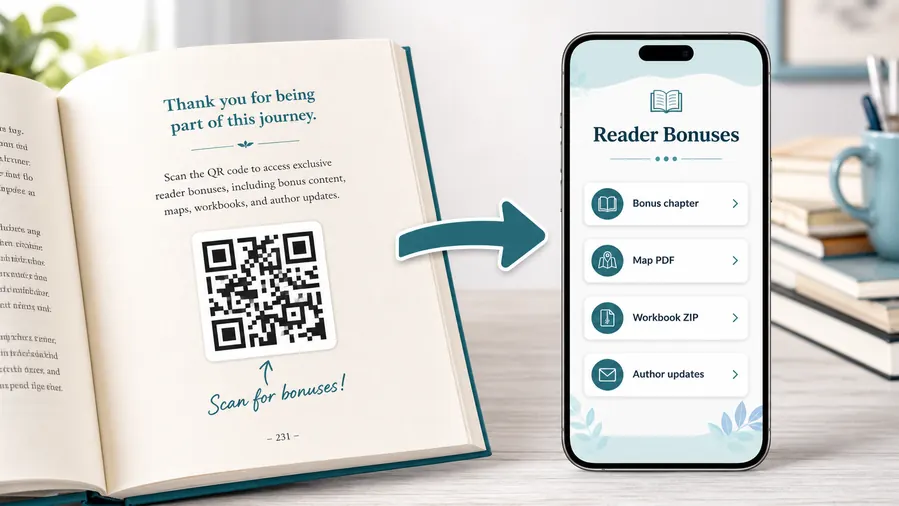
Use a destination that confirms the book before the action
The first screen should show the title, edition, or series context and then make the file, bonus, signup, correction, or support path easy to choose on a phone.
Readers should not have to search a general author or publisher site for the resource named in print.Downloads and worksheets
Link to PDF worksheets, templates, source files, audio, image packs, maps, recipes, exercises, or classroom files.
Corrections and updates
Use dynamic destinations for errata, updated examples, changed URLs, replacement files, and version-specific notes.
Author and series follow-up
Send readers to newsletter signup, series order, bonus chapters, next book, reviews, and reader communities.
Support and accessibility
Open transcripts, large-print resources, translations, troubleshooting, contact paths, and help pages when the book needs extra support.
Newsletter and next-book previews
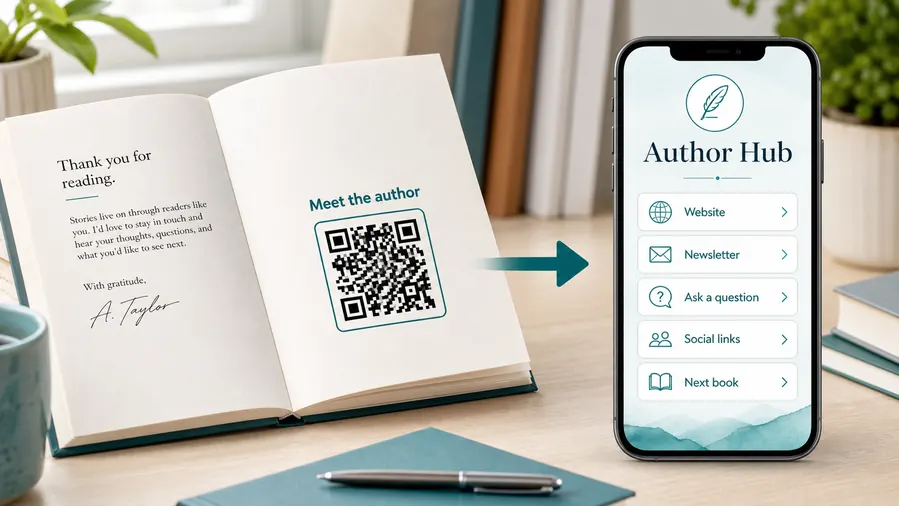
A QR code near the author note or final chapter can invite readers into a newsletter, preorder page, series hub, or sample of the next book.
Feedback and author contact
Let readers report errors, ask questions, join a beta-reader list, or send private feedback without publishing a personal email address in the book.
Books make broken links expensive
Once books are printed, a wrong or expired destination can remain in circulation for years. Dynamic QR gives the author or publisher room to update the resource without reprinting.
Put book QR codes where the reader expects the resource
Place the code beside the exercise, chapter ending, resource list, back matter, cover copy, or insert that explains the benefit.
Book print
Proof book QR codes before the print run locks them in
Print readyBook QR codes must survive paper, trim, binding, margin space, reader handling, and long circulation. Test the printed page or cover, not just the design file.

Make the printed code easy to scan from a book page
Give the QR enough size, quiet zone, and contrast for the page, cover, insert, or bookmark where it appears.
Avoid placing the code too close to the gutter, trim edge, fold, glossy glare, or busy illustration.
Test the reader destination before publication
Scan a printed proof and confirm that the page opens fast, matches the title, and delivers the promised resource.
If the linked resource may change, use a dynamic destination before the print run goes out.
Use a reader page when one book QR needs several actions
A direct file link is fine for one permanent download. A reader page is better when the book needs files, corrections, author signup, reviews, and support together.
The printed code stays simple while the destination organizes the next steps.
Workbook page
Open templates, answer files, examples, video lessons, corrections, and support.
Back matter
Send readers to newsletter, series order, reviews, next book, and author updates.
Cover or jacket
Link to trailer, sample chapter, retailer options, media kit, and campaign page.
Book insert
Offer bonus material, launch rewards, maps, playlists, or event follow-up.
Print book QR codes only after the destination is ready
A QR code in a book can live for years, so the scan path must be clear, durable, and tested before publication.
Long print life
Use dynamic QR when book resources may change after publication
DynamicPrinted books can outlive websites, file hosts, retailer pages, author platforms, and launch campaigns. Dynamic QR keeps the printed code useful when the destination needs to move.
The printed book cannot follow a moved resource
A static QR can keep opening an old file, expired form, moved retailer page, or broken author link.
That mistake stays in every copy already printed.
The same book QR can point to the current resource
Dynamic QR lets the author or publisher update bonuses, corrections, downloads, signup pages, and campaign links after the book ships.
The physical page stays the same while the reader destination stays alive.

Corrections and errata
Update mistakes, changed URLs, examples, source files, and version notes.
Reader downloads
Move worksheets, templates, audio, maps, playlists, ZIP files, and companion PDFs.
Author platform
Change newsletter, series page, reader group, event calendar, and review paths.
Retail and launch links
Redirect from preorder to buy-now, from launch bonus to evergreen reader page, or from one retailer path to another.
Use dynamic when the book will outlive the first link
If a broken destination would disappoint readers after print, keep the QR editable.
KDP and print care
Make the book QR readable, useful, and worth scanning
Use book QR codes for bonus chapters, audio files, printable worksheets, answer keys, maps, illustrations, source notes, author contact pages, reader feedback, preorder links, series pages, classroom resources, and companion downloads. The CTA should explain the reader benefit clearly. Scan for bonus worksheets is stronger than scan me because the reader knows what they get.
For print, test size, contrast, quiet zone, and paper finish before ordering a larger run. Avoid placing the code too close to the binding, trimming edge, or heavily textured background. If the book will be printed in black and white, test the exact file in black and white. Dynamic QR codes are helpful for books because links can change after the print run. Scan analytics can show whether readers use chapter resources, back matter links, or bonus pages, while downloads, reviews, and newsletter signups remain in the external platforms you choose.
For KDP and short-run print, test with a physical proof whenever possible. A code that works in a PDF preview can behave differently on matte paper, cream paper, or near the spine.






