
Text QR Code Generator for Notes, Labels & Short Messages
Create plain text QR codes for notes, safety instructions, coupon phrases, classroom prompts, reference IDs, product labels, and internal messages without a web link or hosting today.
Free QR code generator
Create a QR code online
Generate QR codes for websites, email, phone numbers, vCards, Wi-Fi, plain text, forms, PDF files, and campaign links. Customize colors, add a logo or frame, then download a print-ready PNG or SVG.
Choose QR code type
Website QR code, Email QR code, Phone QR code, vCard QR code, Wi-Fi QR code, Text QR code, SMS, WhatsApp, event, and download links.
Add your content
Enter your website URL, contact details, message, phone number, location, or file destination before generating the QR code.
Customize and download
Adjust QR colors, error correction, logo, frame, size, and margin. Generate QR Code, Download PNG, Download SVG, or Save and track scans.
Related QR code generators
Plain text payload
Use a text QR code when the message itself should live inside the code
A text QR code stores plain text directly in the QR pattern. It does not need to open a website, mail app, phone dialer, map, or social profile. The scanner simply receives the note, instruction, reference, code, label, classroom prompt, internal message, safety reminder, equipment ID, coupon phrase, or short offline-readable detail. That makes it useful when the information should be available immediately and should not depend on a live webpage.
Text QR codes are useful for operations, education, labels, event logistics, warehouse references, product notes, classroom activities, safety reminders, simple printed instructions, and internal workflows. A teacher can hide a prompt on a worksheet. A warehouse team can attach a reference note. A venue can show short instructions. A product label can display a small code or handling message without sending the user online.
The trade-off is capacity and flexibility. The more text you put inside a QR code, the denser the pattern becomes and the harder it can be to scan at small print sizes. If the content is long, changes often, needs formatting, or should include files, images, buttons, or analytics, use a URL or microlanding page instead.
Plain text scan moments
Use text QR when the message itself is the destination
Plain textA text QR code stores the message directly inside the QR pattern. It is best for compact instructions, IDs, notes, prompts, labels, access details, or offline handoffs that should appear without opening a website.

Put short durable information inside the code
Use text QR for stable notes such as classroom prompts, equipment references, coupon phrases, locker instructions, asset IDs, simple safety reminders, booth notes, or internal handoff details.
The value is direct reading, not destination management.
Keep the payload small enough to scan well
Long text makes the QR pattern denser, which can hurt scanning at small sizes or on rough print. If the message needs paragraphs, formatting, files, or frequent updates, use a URL instead.
Plain text QR works best when the content is compact.
Use text QR only when editing is not required
Because the text lives in the printed pattern, QR Code Lab cannot change it after export or collect scan analytics from that direct native payload.
If the information may change, link to an editable page.The scanner should receive the message immediately
A text QR code is not a shortcut to a web page. It is the content. That makes it useful for offline, operational, classroom, event, and labeling moments where the message is short and final.
Do not use text QR as a place to hide long copy that should be a mobile page.Write for the small screen
Use concise wording, clear line breaks when needed, and only the information the scanner needs at that moment.
Avoid sensitive secrets
Plain text can be shown by any scanner. Do not encode private credentials, payment details, or information that should be access-controlled.
Test the printed density
Scan the final size and surface because longer text creates more modules and needs more physical space.
Switch to URL for anything living
If the content should change, include links, show files, track scans, or use layout, send scanners to a web page instead.
Choose static text QR only for short final information
DecisionText QR is naturally static because the message is encoded directly in the QR pattern. Use it when the content is compact and final; use a URL or dynamic QR when the information may change or needs a richer destination.
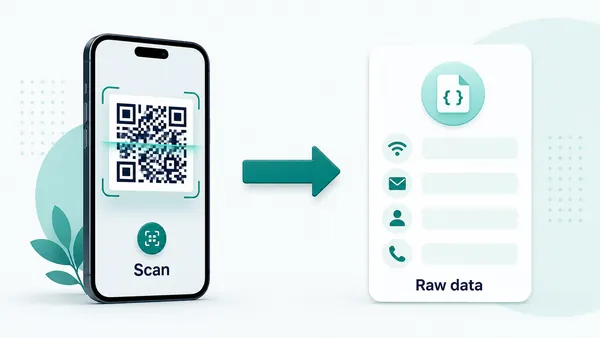
Static text QR contains the full message
A static text QR code stores the actual text in the QR pattern, so the scanner can read the message without a managed redirect or hosted page.
This is useful for short instructions, reference IDs, classroom prompts, label notes, coupon phrases, equipment information, and small offline handoffs.
The tradeoff is permanence. After printing, QR Code Lab cannot edit the message, shorten it, format it as a page, or collect scan analytics from that direct payload.
Dynamic QR belongs to changing or richer information
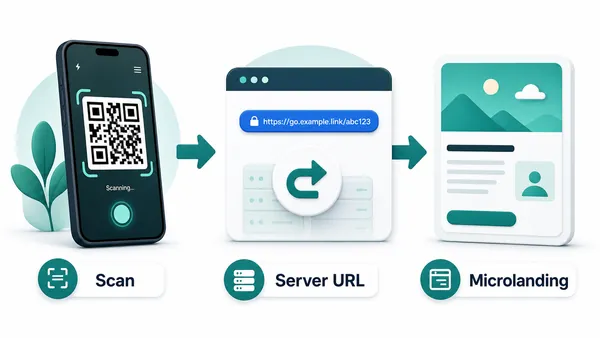
A dynamic QR code stores a managed URL first, then redirects scanners to a page you can update later.
Use that approach when the message may change, when the content is long, when files or buttons are needed, or when scan reporting matters.
For many real-world jobs, a short printed QR label plus a focused mobile page is clearer than forcing too much text into the QR pattern itself.
Quick decision
Text QR print check
Check text QR density before printing small codes
Print readyThe more text you encode, the denser the QR pattern becomes. A text QR code must be tested at the final printed size, especially on labels, cards, worksheets, equipment tags, or packaging.

Keep the message compact before export
Short text produces a cleaner QR pattern and gives phones more tolerance for small size, imperfect lighting, and printed material texture.
Remove unnecessary words before generating the code. If the message needs formatting, sections, files, or regular edits, link to a page instead of encoding everything directly.
Test the exact printed size and surface
Scan a proof from the final material, not only from the design screen. Labels, folded inserts, glossy packaging, classroom sheets, and tiny cards can all change scan reliability.
Check quiet zone, contrast, ink spread, surrounding artwork, and whether the scanned message is readable on the first phone screen.
Use a mobile page when the message needs structure
A text QR is strongest when the content is the whole answer. If the scanner needs instructions with headings, links, downloads, images, language options, or contact paths, a landing page will usually serve them better.
The printed QR can stay simple while the destination presents the complete information in a readable mobile layout. That also gives you a path to update the content later.
Equipment or asset label
Encode a short ID, handling note, inspection reminder, storage instruction, or internal reference.
Classroom prompt
Show a compact activity instruction, discussion question, station clue, or offline task note.
Event or booth note
Reveal a short code, Wi-Fi hint, room note, staff instruction, or visitor prompt without requiring a web page.
Packaging or card message
Add a simple care note, batch reference, coupon phrase, or internal handoff detail when the text is final.
Print text QR only after the payload scans cleanly
If the code becomes too dense or the message feels cramped on a phone, move the content to a URL and keep the QR pattern simpler.
Plain text scan experience
Make the scan reveal a clean readable message
Scan UXA text QR code should display information that is easy to understand immediately. The scanner should not receive a wall of text, a confusing code, or sensitive details with no context.
The phone shows the encoded message
Instruction, ID, prompt, label note, coupon phraseWhen the QR contains plain text, the scanner app or camera interface decides how to display that message.
Write the content so it makes sense even in a simple system preview. Avoid relying on layout, styling, buttons, or links that a plain text QR cannot provide.
Short text works for stable internal handoffs
Asset ID, storage note, classroom station, event instructionPlain text QR is useful when the reader needs one compact piece of information at the physical point of use.
It is less useful when the message needs context from a database, user account, file, or regularly updated source.
Use a page when the message needs more than text
Files, forms, images, updates, analytics, formattingIf the scanner needs a richer experience, a URL QR or dynamic QR is the better route.
A mobile page can provide headings, downloads, contact actions, images, translations, and future edits while the printed QR remains clean.
Can the scanner understand it instantly?
The message should be short, self-contained, and connected to the printed context beside the QR code.
Is the content safe to reveal?
Anyone who scans can read the text, so avoid secrets, private customer data, payment details, and access information that should be protected.
Would a URL serve this better?
If you need updates, layout, links, files, forms, images, translations, or analytics, use a web destination instead of plain text.
Text QR is for compact final messages
Use it when direct display is the benefit. Use URL or dynamic QR when the scanner needs an experience, not just a note.
Short and stable
Plain text QR codes are best for compact information that will not change
Use text QR for small durable payloads: a locker instruction, equipment ID, coupon phrase, classroom prompt, label note, short safety message, internal reference, event clue, pickup code, or simple note that should appear right after scanning. Keep the wording concise. If the scanner has to read a long paragraph on a tiny phone screen, a text QR code is probably the wrong format. Plain text works best when the message is clear in a few sentences.
Because the text is stored directly inside the code, QR Code Lab cannot count scans or update the message after printing. That direct behavior is the advantage and the limitation. It can be simple, private, and fast for fixed notes, but it is a poor fit for campaigns, changing offers, file downloads, forms, or anything you want to measure.
Before printing, test the final size. Text-heavy QR codes become visually dense, especially on stickers, labels, and small classroom materials. If scan reliability starts to suffer, shorten the text or move the content to a web page. The simplest text QR is usually the most reliable one, and it is easier for scanners to understand.