
Dynamic QR Code Generator with Tracking & Scan Analytics
Create dynamic QR codes with editable destinations, scan tracking, device data, timing, and location insights. Measure posters, packaging, menus, flyers, events, and campaigns in dashboards.
Free QR code generator
Create a QR code online
Generate QR codes for websites, email, phone numbers, vCards, Wi-Fi, plain text, forms, PDF files, and campaign links. Customize colors, add a logo or frame, then download a print-ready PNG or SVG.
Choose QR code type
Website QR code, Email QR code, Phone QR code, vCard QR code, Wi-Fi QR code, Text QR code, SMS, WhatsApp, event, and download links.
Add your content
Enter your website URL, contact details, message, phone number, location, or file destination before generating the QR code.
Customize and download
Adjust QR colors, error correction, logo, frame, size, and margin. Generate QR Code, Download PNG, Download SVG, or Save and track scans.
Editable and measurable
Use dynamic QR codes when print needs control after launch
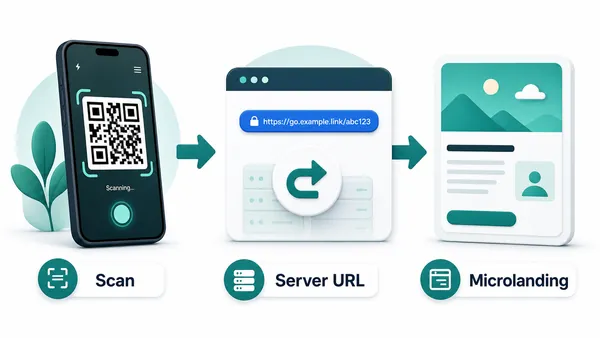
A dynamic QR code contains a managed URL first. When someone scans, QR Code Lab receives the scan, records useful analytics, and redirects the visitor to the current destination. That redirect layer is what makes editing and tracking possible. It is the right choice when the printed code should stay useful even if the final link, file, menu, campaign, or landing page changes later.
This is most useful for printed materials that are expensive, distributed, or hard to replace: flyers, posters, packaging, menus, labels, manuals, books, event signage, table cards, stickers, and campaign assets. If the destination changes later, the printed QR image can stay the same while the final URL is updated in the dashboard. That is the main practical value: fewer reprints and more control after launch.
The trade-off is that dynamic QR codes behave like web links. They are not the same as native Wi-Fi, vCard, email, SMS, or phone QR codes that can open direct device actions. Use dynamic when control, measurement, or future edits matter more than a native action.
Example: update a printed destination and interpret its scans
A printed campaign may start with one offer and later use another. A managed dynamic QR keeps its encoded tracking URL while the saved destination is updated.
- Before printing
- Save the managed code and verify its tracking URL and initial destination. Do not assume an unsaved static URL is editable.
- After an update
- Scan the original printed code again and verify the new destination; do not replace it with a newly generated static code.
- Reading results
- Compare scans for the same saved code and period. Confirm purchases, bookings or submissions in the destination system.
Scans are not automatically unique people or completed conversions. Managed links depend on the service and applicable account limits; review the current plan before a long print campaign.
Choose static or dynamic QR by whether tracking and destination control matter
Tracking choiceStatic QR opens fixed data directly. Dynamic QR adds a managed link layer that enables destination updates, scan reporting, and campaign comparison after the code is printed.
Static QR opens the final data directly
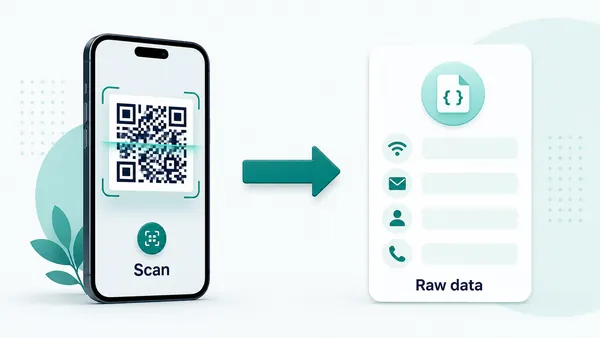
A static QR code contains the final data inside the QR pattern, so the phone can open the destination or native action directly.
This works well for fixed Wi-Fi, phone, email, SMS, vCard, calendar, plain text, or permanent URL payloads.
Because nothing passes through a managed QR Code Lab link after the scan, the destination cannot be changed and scan history cannot be measured.
Dynamic QR adds tracking and editable routing
A dynamic QR code stores a managed URL first, records useful scan signals, and then redirects the scanner to the current destination.
That redirect layer makes it possible to compare scan volume, timing, device/browser signals, broad location, campaign codes, and print placements.
Use it when analytics, campaign comparison, or destination control are more important than a direct native device action.
Quick decision
After-print control
Use dynamic QR when tracking and destination edits matter after launch
DynamicTracked QR codes are useful when the printed code should survive URL changes and also report how different campaigns, placements, or materials perform.
A fixed QR code cannot explain what happened after print
A static QR can open the final destination, but it cannot show scan volume, timing, device signals, broad location, or which printed placement produced interest.
If the campaign URL changes later, the printed code keeps sending people to the old destination.
A managed QR code turns each scan into a useful signal
Dynamic QR lets QR Code Lab receive the scan, record useful reporting signals, and redirect people to the current destination.
Use separate codes for posters, packages, table cards, branches, partners, or campaigns when comparison matters.

Campaign links
Change landing pages, UTM URLs, offers, or forms while keeping printed materials live.
Placement comparison
Separate codes by poster, flyer, table card, package, booth, branch, or partner material.
Content updates
Replace PDFs, menus, guides, signup pages, or microsites without reprinting the QR code.
Post-launch cleanup
Spot zero-scan codes, expired destinations, unexpected locations, and scans after a campaign should have ended.
Use dynamic when the scan should teach you something
If reporting or destination control is part of the job, build the campaign with dynamic QR from the start.
Scan analytics
Read dynamic QR scan data as campaign evidence, not perfect attribution
AnalyticsQR tracking helps compare attention across placements and campaigns, but it should be used honestly: scans show engagement signals, not guaranteed sales, signups, or identity.

All placements collapse into one total
A single dynamic QR code can show total scan interest, but it cannot explain whether the poster, package, branch, table card, email signature, or booth produced it.
Use one shared code only when comparison is not important.
Each placement becomes a readable signal
Separate dynamic QR codes let you compare campaign materials without changing the scanner experience.
The result is still scan analytics, not full revenue attribution, but it is far more useful than guessing.
Scan volume
Review how many scans each dynamic QR code received during the selected period.
Time and device
Check when people scanned and which device, browser, or operating system opened the destination.
Broad location
Use approximate location signals to notice regional or placement patterns without treating them as exact identity data.
Code comparison
Compare campaign codes side by side when teams, materials, locations, or channels need their own readout.
Print campaign reporting
Compare posters, flyers, table cards, handouts, packages, and event signs by scan activity.
Branch and partner tracking
Use separate QR codes when locations, partners, resellers, or field teams need their own results.
Offer and landing page tests
Compare scan interest across campaign messages, placements, or destination versions.
Operational review
Find dead periods, unexpected scan patterns, expired destinations, and codes that still get attention after launch.
Name codes by campaign and placement before launch
Tracking is useful only when code names match the real materials and decisions the team wants to compare later.
Campaign decisions
Tracking helps print become something you can improve
Without scan data, printed QR campaigns are mostly guesswork. You may know where a flyer or poster was placed, but you do not know whether anyone scanned it, when interest happened, or which materials deserve another run. Dynamic tracking gives directional signals: scan volume over time, device and browser data, broad location signals, and scan history.
Those signals are not the same as full customer journey analytics, and they should not be treated as magic revenue proof. They are enough to compare placements, notice weak destinations, and make better print decisions. A code on a receipt may scan better than a code on a door because the customer has the phone ready. A table card may beat a poster because the moment is better.
Name each dynamic QR clearly, use separate codes for important placements, and review the scan data beside the real-world context. That is how tracking turns print into a campaign you can improve. The clearer the naming, the easier it is to understand the report later and share it with a team.






