
Phone Number QR Code Generator for Click-to-Call Leads & Ads
Create phone number QR codes that open the caller app with your number ready to dial. Use them on business cards, flyers, signs, vehicles, brochures, support print, and local ads now.
Free QR code generator
Create a QR code online
Generate QR codes for websites, email, phone numbers, vCards, Wi-Fi, plain text, forms, PDF files, and campaign links. Customize colors, add a logo or frame, then download a print-ready PNG or SVG.
Choose QR code type
Website QR code, Email QR code, Phone QR code, vCard QR code, Wi-Fi QR code, Text QR code, SMS, WhatsApp, event, and download links.
Add your content
Enter your website URL, contact details, message, phone number, location, or file destination before generating the QR code.
Customize and download
Adjust QR colors, error correction, logo, frame, size, and margin. Generate QR Code, Download PNG, Download SVG, or Save and track scans.
Click-to-call QR
Use a phone QR code when the next action should be a call, not a form
A phone number QR code stores a tel action so the scanner phone can open the dialer with your number ready to call. It is useful when the fastest path is a conversation: emergency contacts, local service calls, quote requests, appointment desks, clinic reception, restaurant reservations, real estate signs, vehicle graphics, support labels, contractor cards, and printed business materials. The point is simple: remove typing and make the call easy at the exact moment someone wants to talk.
This is different from a website QR or contact card. The scan does not explain your business, show a full profile, or collect a form response by itself. It prepares the call, and the user still decides whether to tap the call button. That confirmation is important because a QR code should not silently place a call without the person choosing to continue. It should feel like a shortcut, not a surprise.
Use clean phone formatting, include the country code when the audience may be international, and test the QR on a few devices. A number that looks familiar on a flyer can still become awkward if it is missing a regional prefix, extension instructions, opening hours, or the correct support line.
Click-to-call moments
Use a phone number QR code when the scan should start a call from print
Call QRA phone number QR should remove typing when someone is ready to call: service request, booking, emergency contact, property inquiry, local ad, appointment card, support label, or sales follow-up.
Turn offline intent into a ready phone call
Use phone QR codes on business cards, service vans, property signs, appointment cards, receipts, flyers, equipment labels, hotel materials, clinic notices, and local ads when calling is the natural next step.
The CTA should say call now, book by phone, call support, or speak with an agent.
Make the call purpose clear before the dialer opens
The print should tell scanners who they are calling, what the number is for, expected hours, urgency, language, department, or whether SMS or form would be better.
A call QR works best when the caller knows why to call.
Use another destination when calls need structure
If the team needs order numbers, attachments, consent, routing, appointment slots, or written details, a form, booking page, or contact hub can be better than a raw phone call.
Calls are fast; forms and booking links are cleaner when data matters.A phone QR should make calling easier only when calling is the right action
The scanner may be standing near a storefront, holding a receipt, looking at a property sign, or reading support instructions. The QR should reduce friction and set the right expectation before the dialer opens.
Use phone QR for urgent or personal contact; use forms, booking, or chat when the workflow needs structured information.Direct call
Open the phone dialer with the correct number for sales, support, booking, service, or emergency contact.
Call context
Print the department, hours, language, urgency, or reason to call beside the code.
Routing choice
Use a contact hub when people should choose call, SMS, booking, form, chat, or support docs.
Operational fit
Do not send scanners to a phone number if the team cannot answer at the moment people scan.
Use static phone QR for a final number and dynamic QR when the contact path may change
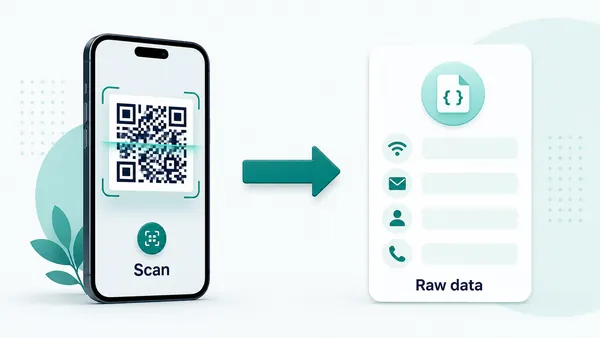
Call setupA phone QR can store a direct tel link in the code. Use dynamic routing when the printed material may need a different number, department, booking page, form, or support path later.
Static phone QR opens the dialer directly
A static phone QR stores the phone action in the QR pattern, so most phones can open a call prompt without a web page.
This is useful for stable numbers on business cards, appointment cards, service labels, local ads, and support materials.
The tradeoff is permanence: after the code is printed, the number cannot be edited in QR Code Lab.
Dynamic QR is better when the contact route may change
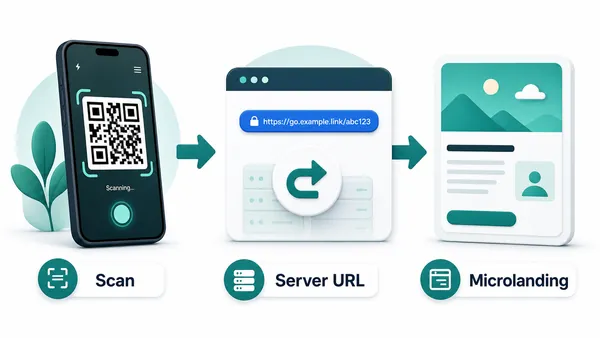
A dynamic QR can route scanners to the current contact page, phone number, booking page, form, SMS link, or support hub.
That is useful when teams, departments, hours, call centers, campaigns, or service areas change after materials go live.
Use dynamic when the printed code needs flexibility or when scan reporting by placement matters.
Quick decision
Call scan UX
Make the phone QR scan prepare people for the call before the dialer opens
Scan UXA phone QR should reduce typing, but the printed context still has to explain who receives the call, when to call, and what information the caller should have ready.
Use direct phone links for clear call intent
Sales, support, booking, serviceA direct phone QR works when the scanner is ready to call and the number is stable.
Print the call purpose and hours beside the QR so people know what happens before the dialer opens.
Use a hub when several contact paths matter
Call, SMS, form, booking, chatA contact page can show phone, SMS, booking, quote form, email, chat, and support resources in one mobile view.
This is better when different scanners need different departments or levels of urgency.
Use forms or booking when the call would be inefficient
Quote, appointment, order, support ticketCalls are not ideal when the team needs photos, order numbers, consent, addresses, or appointment slots.
Route to a form or booking page when structure improves the response.
Is the number correct and reachable?
Check country code, extension, hours, department, language, and whether someone can answer when people scan.
Does the printed CTA explain the call?
Use call support, call to book, call sales, or call emergency contact instead of vague scan copy.
Would a form or booking page work better?
Use structured destinations when details, scheduling, routing, or attachments matter more than speed.
The phone scan should create a better conversation
Use phone QR when immediate human contact is the value; use a managed path when the request needs structure.
Call placement
Place phone QR codes where calling is the natural next action
PlacementPhone QR placement works when the scanner is ready to speak to someone: after seeing a service offer, property sign, support label, appointment reminder, local ad, or urgent instruction.

A call QR is weak when the need to call is unclear
A visible phone QR may be ignored if people do not know who they will call or why calling is better than reading, booking, or submitting a form.
The placement should create a clear call reason.
Put the QR where the conversation should start
Use phone QR near service offers, emergency instructions, sales prompts, property inquiries, appointment reminders, and support labels.
The CTA should set the expectation before the phone app opens.
What just created call intent?
Service need, appointment, property interest, urgent support, local ad, sales offer, booking question, or equipment issue.
Who should answer?
Sales, support, booking desk, emergency contact, branch, agent, technician, clinic, or front desk.
What should the caller prepare?
Order number, address, product model, appointment time, property ID, symptoms, or service details.
Is calling available now?
Print hours or use a contact hub when calls are not always answered.
Business card
Open the right sales, personal, or service number after a direct introduction.
Property sign
Let prospects call an agent, booking desk, or property manager from the listing location.
Service vehicle
Turn local attention into a quote or urgent service call.
Appointment card
Help clients call to reschedule, ask questions, or reach the front desk.
Support label
Route equipment users to help while the model, location, or issue is in front of them.
Hotel material
Connect guests to front desk, concierge, shuttle, room service, or emergency contact.
Clinic notice
Let patients call reception, booking, or urgent contact with clear hours and expectations.
Local flyer
Turn neighborhood interest into a call for quote, booking, delivery, or consultation.
Phone QR placement should respect urgency and availability
Use it where a call saves effort and the team is prepared to answer.
Call intent
Place call QR codes where talking is easier than typing
Phone QR codes work best on materials where the visitor already has a clear reason to speak with you: a broken appliance label, a service van, a repair flyer, a clinic desk sign, a property board, a contractor card, a restaurant window, a local business poster, or a product support sticker. If the visitor needs to compare details first, a landing page, vCard, or website QR may be better than sending them straight to the dialer.
The text around the code should set expectations. “Call reception,” “Request a quote,” “Call emergency support,” “Book by phone,” or “Speak to the installer” is clearer than “scan me.” If the number has business hours, a language option, or an extension, say so nearby. A scan is fast, but a failed or confusing call still wastes the customer’s time.
Static phone QR codes are direct and familiar, but they do not give scan analytics and cannot be edited after printing. If phone routing may change, or if you want to measure printed campaign scans, use a dynamic QR that opens a call-focused landing page or contact page first. That page can also show hours, backup contacts, and next steps.