
Email QR Code Generator for Mailto, Support & Contact Forms
Create email QR codes that open a prefilled message with recipient, subject, and body. Useful for support, resumes, sales, booking requests, invoices, printed contacts, and forms today.
Free QR code generator
Create a QR code online
Generate QR codes for websites, email, phone numbers, vCards, Wi-Fi, plain text, forms, PDF files, and campaign links. Customize colors, add a logo or frame, then download a print-ready PNG or SVG.
Choose QR code type
Website QR code, Email QR code, Phone QR code, vCard QR code, Wi-Fi QR code, Text QR code, SMS, WhatsApp, event, and download links.
Add your content
Enter your website URL, contact details, message, phone number, location, or file destination before generating the QR code.
Customize and download
Adjust QR colors, error correction, logo, frame, size, and margin. Generate QR Code, Download PNG, Download SVG, or Save and track scans.
Mail app shortcut
Open a prepared email instead of asking people to copy an address
An email QR code is useful when the next action should happen in the visitor’s mail app. The QR can contain the recipient, an optional subject line, and optional body text, so the user scans and starts from a prepared draft instead of typing an address from a printed card, package, flyer, sign, receipt, author page, support sheet, or event handout. It is a small shortcut, but it can prevent typos and make contact feel less like a chore.
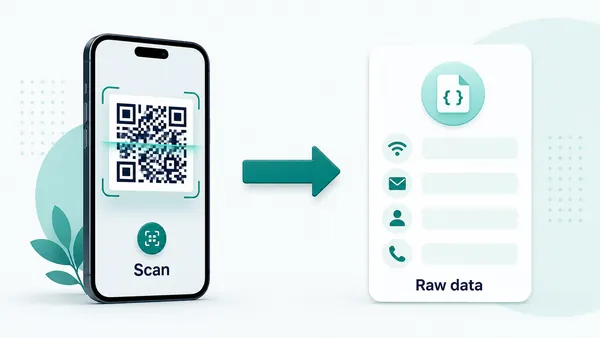
For static email QR codes, that mailto data is stored directly inside the QR pattern. This keeps the scan direct and familiar on most devices: the phone can open a draft in the default mail app, with the address and subject already filled. The trade-off is important. Because the data is inside the QR code, QR Code Lab cannot count scans or edit the destination later. If the inbox changes after printing, the printed code has to be replaced.
Use email QR codes for support requests, sales inquiries, event questions, feedback cards, job applications, product follow-up, author contact, office signs, and service desks. If you need structured answers, file uploads, routing, consent, or analytics, a dynamic QR code that opens a form or microlanding page is usually a better fit.
Email action moments
Use an email QR code when the scan should open a ready-to-send message
Mailto QRAn email QR code should remove typing at the exact moment someone needs to contact you: support request, quote inquiry, booking question, application, feedback, or document submission.
Turn printed interest into a composed email
Use email QR codes on business cards, flyers, receipts, manuals, packaging, classroom sheets, event programs, property signs, service vans, and support cards when the next step is a message.
The CTA should say what the email is for: request a quote, ask support, send documents, or book a call.
Prefill the parts people usually get wrong
A good mailto QR can include the recipient, subject, and starter body so the scanner does not mistype the address or send an empty message with no context.
Better defaults mean better emails.
Use a form or landing page when email is too loose
If the team needs required fields, attachments, routing, consent, order numbers, or structured support data, a form destination may work better than a raw email draft.
Email is fast; forms are cleaner when structure matters.An email QR should make the message easier to send correctly
The scanner may be standing at a counter, holding a manual, reading packaging, leaving an event, or looking at a service card. The QR should open the right contact path with enough context to act.
Use email QR for simple communication and a form QR when you need validation, routing, privacy notices, or required fields.Prefilled recipient
Open the correct email address without asking people to type or copy it from print.
Useful subject
Include a subject that tells the team where the message came from and what the scanner needs.
Starter body
Prompt for order number, product, event, property, deadline, or support details when helpful.
Structured fallback
Use forms when the message needs required fields, attachments, routing, consent, or ticketing.
Use static email QR for simple mailto actions and dynamic QR when the contact path may change
Email setupEmail QR codes are usually static because the mailto action can live directly in the QR. Use dynamic when the printed code may need to switch from email to a form, help desk, booking page, or updated contact route later.
Static email QR opens a native email draft
A static email QR can store the recipient, subject, and starter body directly in the QR pattern, so the phone opens the user’s email app.
This works well for simple inquiries, support questions, quote requests, feedback, document submission, and contact cards where the address is stable.
The tradeoff is permanence: after printing, the recipient, subject, and body cannot be changed without making a new QR code.
Dynamic QR is better when email may not stay the right path
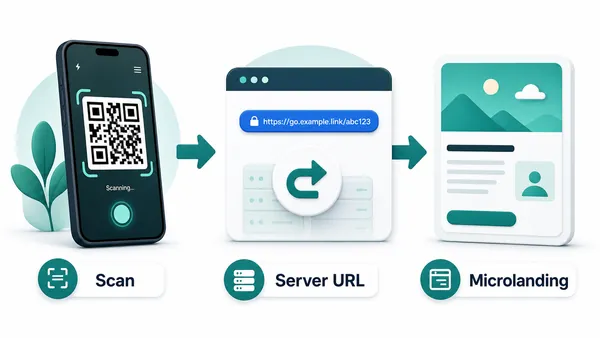
A dynamic QR can first open a managed destination, then route scanners to email, a contact form, help desk, booking page, or support hub.
That is useful when teams, inboxes, required fields, privacy copy, ticketing systems, or routing rules may change after the code is printed.
Use dynamic when the contact experience needs updates or scan reporting, not when a simple fixed mailto link is enough.
Quick decision
Email scan UX
Make the email scan open a message people can send without editing everything
Scan UXA mailto QR should save effort, not create a confusing blank draft. The scanner should understand who receives the email, why the subject exists, and what details to add.
Use mailto when a quick message is enough
Support, quote, booking, feedback, contactMailto QR codes work best when the scanner simply needs to open their email app and send a short message.
Prefill the recipient and subject, then use the body to ask for only the details that matter.
Use a form when the team needs structured details
Order number, attachments, consent, routingA form can require fields, route requests, collect consent, accept attachments, and reduce incomplete emails.
This is often stronger for support, quotes, applications, property inquiries, and service requests.
Use a landing page when several contact paths exist
Email, phone, chat, docs, bookingSome scans need a choice: email the team, call, open docs, book a slot, submit a ticket, or find the right department.
A managed page can present those options without forcing one inbox to handle every situation.
Is the subject useful to the recipient?
Use a subject that identifies the product, event, service, property, or support context.
Is the body prompt short and helpful?
Ask for the details the team actually needs, without making the draft feel like a long form.
Would a form be safer than email?
Use a form for required fields, attachments, private data, consent, ticketing, or routing.
Email QR should reduce typing and improve message quality
Use the simplest contact path that helps the scanner send a useful message and helps the team respond.
Clear contact intent
Write the email QR around one clear reason to contact you
The best email QR codes do not simply expose an address. They reduce uncertainty. A prefilled subject such as “Product support request,” “Event question,” “Wholesale quote,” “Book club invitation,” “Resume follow-up,” or “Service estimate” helps the visitor understand what will happen and helps your team sort replies later. It also tells the scanner that the message is welcome, which matters when people hesitate to contact a business or creator.
Keep the prefilled body short and useful. A light prompt like “Hi, I scanned the QR code and need help with…” can be enough. If the visitor has to delete half the message before sending it, the QR code is creating friction instead of removing it. Do not ask for sensitive information in a prefilled email unless your process genuinely needs it and the user understands why.
When the question needs multiple fields, consent, file uploads, order numbers, or tracking, send the scan to a mobile-friendly form instead. Email QR is best for direct human contact; forms and microlanding pages are better for structured workflows. That keeps the email route simple, personal, and easy to finish from a phone.