
Menu QR Code Generator for Restaurants, Cafés & Takeout
Create menu QR codes for restaurants, cafés, bars, food trucks, hotels, events, pop-ups, and takeout menus. Use them on tables, counters, windows, delivery bags, and printed cards.
Free QR code generator
Create a QR code online
Generate QR codes for websites, email, phone numbers, vCards, Wi-Fi, plain text, forms, PDF files, and campaign links. Customize colors, add a logo or frame, then download a print-ready PNG or SVG.
Choose QR code type
Website QR code, Email QR code, Phone QR code, vCard QR code, Wi-Fi QR code, Text QR code, SMS, WhatsApp, event, and download links.
Add your content
Enter your website URL, contact details, message, phone number, location, or file destination before generating the QR code.
Customize and download
Adjust QR colors, error correction, logo, frame, size, and margin. Generate QR Code, Download PNG, Download SVG, or Save and track scans.
Digital menu access
Make the current menu easy to open at the exact dining moment
A menu QR code is useful when guests need the current menu without waiting, touching shared paper, or typing a website address. It can open a restaurant menu, cafe menu, bar list, takeout menu, delivery page, PDF menu, ordering page, allergen notes, seasonal specials, room service menu, or landing page with several guest actions. Restaurants, cafes, bars, hotels, food trucks, caterers, and hospitality teams can use it anywhere the guest is deciding what to order.
The destination should match the situation. A table tent should open the dine-in menu. A window sticker can open takeout or hours. A receipt can open loyalty or review flow. A hotel room card can open room service. A food truck sign can open the menu and payment link. QR Code Lab helps you create a printable code, update the destination when the menu changes, and see which placements are actually scanned.
QR Code Lab does not process orders, accept payments, manage reservations, or update menu inventory. Those actions happen in the linked menu, ordering, booking, or payment system. The QR code simply makes the right guest path easier to reach.
Example: a table menu that opens without staff credentials
A table QR should open the current menu directly. A link that works for a signed-in manager may show a login, expired file or wrong venue to a guest.
- Guest test
- Open the destination while signed out and confirm the venue, language, current prices and readable menu on a phone.
- Printed caption
- View the menu. If ordering is not available at the destination, do not promise table ordering beside the code.
- Menu changes
- A stable URL can serve an updated menu. Use a managed dynamic URL if the destination address itself must be replaceable after printing.
QR Code Lab links to your menu; it is not a restaurant ordering, payment or menu-management system. Those actions depend on the destination provider you choose.
Restaurants, cafes, and bars
Make the menu QR useful before the guest reaches staff
Guest-first flowA menu QR code should open the current menu, prices, specials, allergens, ordering notes, and service expectations from the table, counter, flyer, or takeaway material where the guest is already deciding.
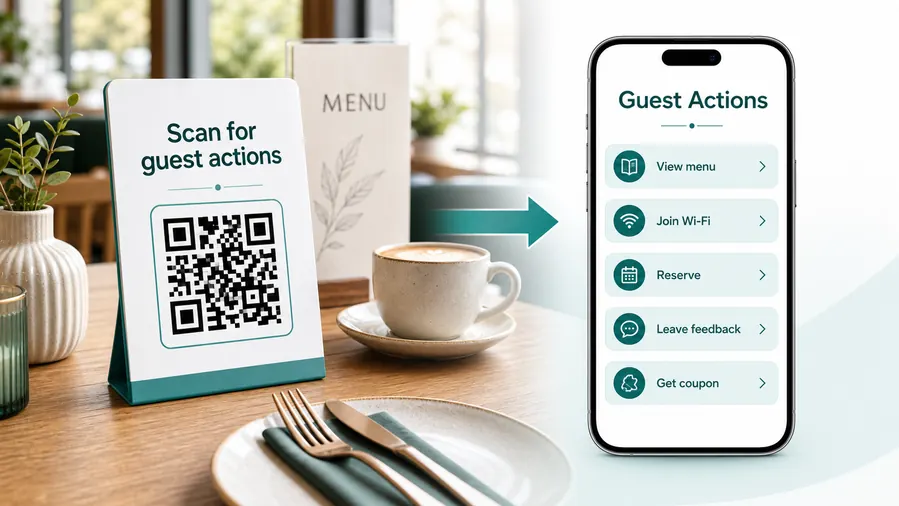
A menu scan should reduce questions, not create a detour
Guests scan because they want to choose quickly. The destination should load fast, show the right menu for the location or service time, and make the next step obvious: browse, order, ask staff, or save the menu for later.
Open the current menu for this location
Use table tents, counter signs, window decals, flyers, and takeaway packaging to send guests to the exact dine-in, takeaway, delivery, bar, brunch, or event menu they need.
Show specials and sold-out items clearly
A digital menu can keep daily specials, seasonal dishes, limited items, and sold-out notes current while printed cards stay simple.
Make allergens and dietary notes easier to find
Use the destination for ingredient notes, allergens, vegetarian options, spice level, preparation notes, and staff contact when guests need confirmation.
Connect menu browsing to ordering when appropriate
If online ordering is available, make the order button visible and explain pickup, table ordering, delivery, or counter service expectations before guests submit.
Support repeat visits from takeaway materials
Packaging, bag stickers, and receipts can point to the latest menu, reorder link, loyalty signup, review page, or seasonal offer after the guest leaves.
Keep staff from repeating the same answers
Clear menu QR pages reduce repeated questions about hours, ingredients, prices, service charge, ordering method, and where to find the right menu.
At the table
Menu, Wi-Fi, ordering, ask-for-help, specials.
While waiting
Drinks, dessert, event calendar, story behind the dish.
After payment
Review, private feedback, coupon, reservation.
Takeaway or delivery
Reorder link, loyalty signup, coupon, feedback.
Use dynamic QR when the destination may change
Menus, specials, reservation tools, coupons, review flows, seasonal campaigns, and ordering links change. A dynamic QR code keeps the printed code stable while letting you update where it sends the guest.
Do not make the guest solve your whole website
Most guests scan because they want one next action, not a tour of the restaurant site. If the QR code opens a hub, keep the first buttons aligned with the place where the code appears: menu at the table, review or coupon on the receipt, reorder or feedback on packaging.
Menu placement
Place menu QR codes where guests are ready to choose
PlacementMenu QR placement should help before the guest asks staff: at the table, in the queue, at the counter, on the window, or on takeaway materials after the meal.

The code appears only after guests ask for the menu
If the QR is hidden or placed too far from the decision moment, staff still have to explain where the menu lives.
A menu QR should be visible where people naturally pause, sit, wait, or browse.
The QR sits beside the menu decision
Use table tents for dine-in, counter cards for quick service, window signs for passersby, and packaging for reorder or review actions.
The printed caption should say what opens: menu, specials, order, allergens, drinks, or takeaway.
Which menu does this guest need?
Dine-in, takeaway, delivery, bar, brunch, event, catering, and late-night menus may differ.
Can guests scan from the real distance?
Table tents, window decals, and menu boards need different QR size and contrast.
Does the first screen match the service moment?
A seated guest, queueing customer, and takeaway buyer should not all land on the same confusing page.
What changes most often?
Use dynamic QR for prices, specials, sold-out items, hours, links, and seasonal menus.
Table tent
Best for dine-in menu, specials, allergens, ordering notes, and staff help.
Counter or queue sign
Useful for quick menu browsing, pickup, order-ahead, and service expectations.
Window or sidewalk sign
Helps passersby check menu, hours, booking, delivery, and current offers.
Takeaway packaging
Use for reorder, loyalty, reviews, care notes, seasonal menus, and follow-up offers.
Poster or event sign
Best where people pause: registration line, booth, waiting area, seat back, schedule board, or exit path. Weak when people only pass at speed.
Business card
Useful after a conversation because the person already knows why they might save a contact, open a portfolio, book a call, or follow up.
Window sign
Good for after-hours menus, booking, pickup instructions, or quick offers. Avoid complex actions when the person is outside and just walking by.
Cover or front label
Use it only when the promise is immediate and clear. Otherwise the better scan moment is often inside the material or after the first interaction.
Menu QR placement should make ordering easier
Put the code where the guest is already choosing, then make the destination match the menu and service flow.
Menu update control
Use dynamic QR when menu details change after printing
DynamicRestaurant menus change more often than printed signs. Dynamic QR keeps table tents, flyers, window decals, packaging, and counter cards useful when prices, specials, hours, availability, or ordering links move.
Old menu cards can promise the wrong item or price
Static menu links are fine only while the destination remains final. Restaurants often change dishes, prices, allergens, ordering links, and service hours.
When old cards keep circulating, guests may see stale information before staff can explain the change.
The same printed QR can open the current menu
Dynamic QR lets the restaurant update the destination while printed table tents, window signs, flyers, and packaging stay in use.
That is useful for seasonal menus, sold-out items, event menus, delivery links, and holiday hours.

Daily specials and sold-out items
Update limited dishes, unavailable items, featured drinks, and chef specials without replacing print.
Prices and service hours
Change prices, fees, opening hours, brunch windows, late-night menus, and holiday schedules.
Ordering links
Move guests between table ordering, delivery, pickup, booking, catering, or external order pages.
Takeaway follow-up
Redirect packaging scans to reorder, loyalty, review, seasonal offer, or new menu pages.
Use dynamic when the menu is a living document
If the QR will live on restaurant print while the menu changes, keep the destination editable.
Menu format
Choose the menu destination based on how guests will use it on a phone
A PDF menu is easy to prepare, but it must be readable on a phone. Tiny print, wide pages, and heavy files can make guests pinch, zoom, and give up. A mobile web menu or ordering page is usually better when prices, availability, allergens, specials, or delivery options change often. For simple cafes or printed backup menus, a clean PDF can still work if the layout is designed for small screens.
Use menu QR codes on table tents, window stickers, counter signs, bar cards, receipts, takeout bags, delivery inserts, food truck signs, hotel room cards, and event catering menus. The CTA should say open menu, order online, view specials, see allergens, or room service menu. Test the code at the real scan distance and lighting before printing in volume. Dynamic QR codes are especially useful for menus because a seasonal item, sold-out dish, new ordering link, or holiday schedule can change without reprinting every table card.
Name each code by placement in QR Code Lab, such as patio table tent, front window, hotel room card, or takeout bag insert. Later, the scan report is much easier to understand.






