
Learn QR Codes - Static, Dynamic, Design & Print Basics
Learn how QR codes work, when to use static or dynamic links, and how to design codes for print, packaging, menus, signage, campaigns, analytics, and reliable mobile scanning today.
Learning guide path
Understand how QR codes work before choosing static data, dynamic URLs, print settings, and tracking
This page is a learning guide, not just a generator landing page. QR codes store data as a pattern of modules that scanners read with help from positioning marks and error correction. At a practical level, that data can be direct content such as Wi-Fi, text, phone, email, or contact details, or it can be a URL that opens a web destination.
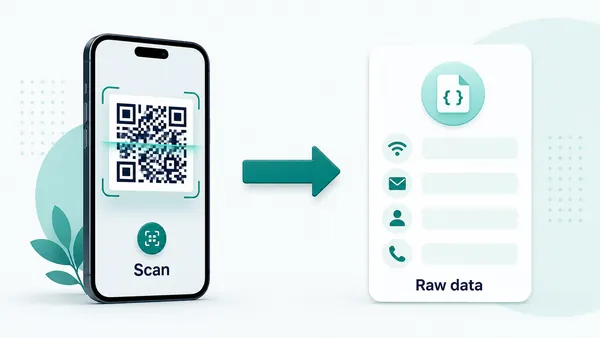
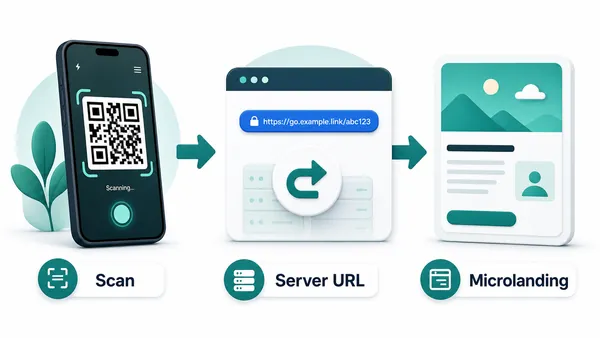
Static QR codes place the final data directly in the code. Dynamic QR codes usually encode a managed URL first, then redirect to the current destination. That redirect layer makes updates and scan analytics possible, but it also changes the user experience. A dynamic QR behaves like a web link, while many static formats can trigger native phone actions such as joining Wi-Fi or saving a contact.
Good QR use also depends on print quality, placement, privacy expectations, and trust. A beautiful QR code still fails if it is too small, low contrast, printed on glare, missing quiet zone, or placed where people cannot comfortably scan. Learning these basics helps you choose a QR setup that works in the real world, not only in a preview.
Decide between static and dynamic QR before you publish the code
DecisionStatic and dynamic QR codes can look identical on the page, but they behave differently after scanning. The right choice depends on whether the destination is final, whether the code will be printed, and whether scan reporting matters.
Static QR is direct and permanent
A static QR code stores the final value inside the QR pattern itself. The phone reads the code and opens the URL, Wi-Fi prompt, contact card, phone action, email, SMS, calendar event, or plain text directly.
That direct behavior is useful when the data is stable and the code does not need reporting or destination changes later.
The limitation is simple: once the static QR code is exported, the printed pattern cannot be edited by QR Code Lab. If the destination changes, the code has to be replaced.
Dynamic QR is editable and measurable
A dynamic QR code stores a managed URL first, then sends scanners to the destination currently assigned in QR Code Lab.
That managed layer lets you update a PDF, page, form, menu, campaign URL, or file after the QR code has already been printed or shared.
Dynamic QR is the safer choice for campaigns, packaging, posters, menus, events, long-lived documents, and any workflow where scan history or later edits are useful.
Quick decision
QR learning path
Choose the QR concept you need before choosing a tool
LearnMost QR decisions become easier once you separate destination type, static versus dynamic behavior, print conditions, scan experience, and tracking expectations.
URL QR code
Use for websites, landing pages, menus, product pages, portfolios, booking pages, and campaign pages.
Best dynamic when links may changePDF / File QR code
Use for menus, manuals, worksheets, bonus materials, brochures, certificates, ZIP archives, and checklists.
Dynamic is safer for printvCard QR code
Use for business cards, badges, counters, portfolios, sales materials, and follow-up contact details.
Static opens native contact saveWi-Fi QR code
Use for cafes, hotels, offices, classrooms, venues, rental spaces, and guest networks.
Usually best as staticForm QR code
Use for feedback, registrations, quote requests, surveys, support requests, applications, and check-in.
Dynamic helps forms evolveWhatsApp / messaging QR
Use when the next step is a conversation: support, sales, booking, delivery questions, or consultation.
Prefilled messages reduce frictionMaps QR code
Use for venues, offices, stores, events, pickup points, property listings, booths, and meeting locations.
Great for physical destinationsSocial QR code
Use for Instagram, TikTok, YouTube, X, LinkedIn, Behance, creator pages, and community profiles.
Best when relationship continuesPayment link QR code
Use for invoices, tips, donations, event payments, deposits, checkout pages, and payment requests.
Make amount and context clearNative action?
Wi-Fi, vCard, email, phone, and SMS often work best when the action is encoded directly, especially if the native phone interface matters.
Editable or measurable?
Use a dynamic QR code when the destination may change, files may be replaced, campaigns need analytics, or printed material must stay useful later.
Several actions?
Use a microlanding page when one scan should offer buttons, files, contact, feedback, booking, social links, or multiple next steps.
The useful question is what happens after the scan
A QR code is not only an image. It is a promise about the destination, the device behavior, the printed context, and the next action.
After-scan experience
Learn QR codes as a scan path, not just a pattern
Scan UXA QR code works only when the scanner understands why to scan, the phone reads the pattern, and the destination makes sense on a mobile screen.
Static QR usually lets the device handle the action
Wi-Fi, vCard, phone, email, SMS, calendar, textWhen the QR code stores direct data, the phone decides whether to show a Wi-Fi prompt, contact-save screen, dialer, email client, SMS composer, calendar event, browser, or plain text result.
That makes static QR useful for stable native actions, but the creator still has to test the encoded data and explain the scan result clearly in print.
Dynamic QR adds destination control
Editable URL, PDF, form, campaign page, menuWhen a dynamic QR code is scanned, QR Code Lab receives the request and redirects the visitor to the current destination assigned to that code.
That managed step enables editing and scan analytics, but the final page still needs to load quickly, match the printed promise, and work well on a phone.
Microlanding pages organize several actions
Buttons, files, images, contact, feedbackA microlanding page is useful when one scan needs to offer more than one clear action: download a file, save a contact, open a map, view instructions, send feedback, or book.
The goal is to reduce decision friction after the scan, not to send people into a desktop page that was never designed for the moment.
Does the printed promise match the first screen?
If the caption says menu, map, registration, PDF, warranty, or contact, that action should be obvious immediately after scanning.
Can the phone scan it in real conditions?
Size, contrast, quiet zone, glare, distance, material, and placement matter more in print than in a clean preview.
Is the destination still maintainable later?
Use dynamic QR when the page, file, form, offer, or campaign may need updates after the code is already distributed.
Good QR education ends in a better publishing decision
Learn the behavior first, then choose the code type, destination, design, and placement that match the real scan moment.
Best-practice learning flow
Think of QR codes as a bridge between a physical moment and a specific mobile action
A QR code is most useful when the physical context already creates intent. A table card can open a menu. A book page can open bonus material. A package label can open instructions. A receipt can open support or feedback. A poster can open registration. The QR code should not merely exist on the design; it should answer what the person needs at that exact moment.
For printing, test at real size, preserve contrast, keep the quiet zone clean, avoid decorative changes that damage readability, and scan from the likely distance. For tracking, remember that direct static payloads do not pass through a server, while dynamic URL QR codes can be measured because the scan opens a managed redirect first.
For privacy and trust, make the destination clear before asking users for sensitive information. If a code opens payment, login, forms, or personal data collection, the page should look official and explain what is happening. QR Code Lab can help manage URL destinations and scan reporting, but the final website, form, payment page, or app must still earn the scanner confidence.






