
QR Code for Hotels - Guest Wi-Fi, Menus & Review Links
Create hotel QR codes for guest Wi-Fi, room guides, menus, check-in, amenities, maps, concierge info, reviews, events, local offers, service requests, and in-room print cards.
Free QR code generator
Create a QR code online
Generate QR codes for websites, email, phone numbers, vCards, Wi-Fi, plain text, forms, PDF files, and campaign links. Customize colors, add a logo or frame, then download a print-ready PNG or SVG.
Choose QR code type
Website QR code, Email QR code, Phone QR code, vCard QR code, Wi-Fi QR code, Text QR code, SMS, WhatsApp, event, and download links.
Add your content
Enter your website URL, contact details, message, phone number, location, or file destination before generating the QR code.
Customize and download
Adjust QR colors, error correction, logo, frame, size, and margin. Generate QR Code, Download PNG, Download SVG, or Save and track scans.
Guest service access
Use hotel QR codes to make guest information easy to reach without calling the front desk
Hotel QR codes can open guest Wi-Fi, room guides, digital menus, spa booking, amenity information, maps, concierge details, local recommendations, review links, event schedules, policy pages, emergency information, checkout instructions, or feedback forms. They are useful for hotels, boutique hotels, resorts, hostels, vacation rentals, serviced apartments, and hospitality marketers.
The best hotel QR code is matched to the guest moment. A room card can open Wi-Fi or the room guide. A table tent can open a menu or ordering page. A lobby sign can open maps, events, or concierge information. A checkout card can open reviews or private feedback. Guests should not have to hunt through a general website when they only need one service.
QR Code Lab creates and tracks QR codes for the destinations you choose. It does not operate hotel systems, manage bookings, process payments, send guest messages, run room service, or replace your PMS or booking engine. Keep each destination current, mobile-friendly, and clear about what the guest can do next.
Used well, QR codes reduce repeated front-desk questions while still keeping the experience helpful and human. They should make simple self-service easier, not hide support from guests who need staff help.
Guest service moments
Use hotel QR codes to make guest requests easier at the exact moment they happen
Hotel QRA hotel QR should reduce front-desk friction and help guests find Wi-Fi, menus, room service, spa booking, local guides, checkout, feedback, and support without searching or calling for every small question.
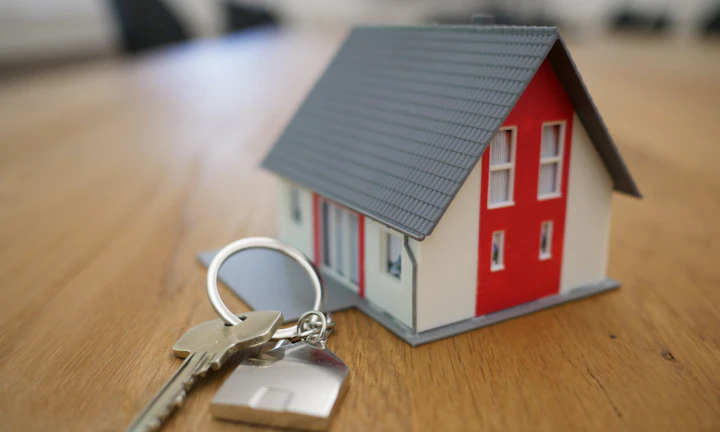
Put guest information where guests already pause
Use QR codes in rooms, lobby signs, key-card sleeves, table tents, elevators, welcome cards, spa desks, restaurant menus, and event spaces when guests need quick service context.
The CTA should name the action: join Wi-Fi, order room service, book spa, request towels, or explore local guide.
Match the destination to the hotel area
A room QR may need Wi-Fi and service requests, a restaurant QR may need menus and booking, a lobby QR may need maps and local guide, and an event QR may need schedules or venue help.
One generic page rarely serves every hotel moment well.
Keep guest-facing print editable after operations change
Dynamic QR helps when menus, hours, amenities, spa offers, local recommendations, event schedules, forms, and service instructions change after signs or cards are printed.
Hotels change daily; room print changes slowly.A hotel QR should remove one guest question at a time
Guests scan because they want something now: internet, food, directions, towels, spa time, checkout, transportation, event details, or help. The destination should be short, mobile, and specific to that location.
Use separate QR codes for rooms, lobby, restaurant, events, spa, and printed cards when reporting or operations differ.Room service context
Open Wi-Fi, menu, requests, checkout, support, amenities, and house rules from in-room materials.
Venue flow
Use restaurant, spa, lobby, meeting room, and event QR codes for the action that belongs in that area.
Operational updates
Keep hours, menus, offers, staffing notes, maintenance updates, and local recommendations editable.
Guest trust
Use branded pages and clear CTAs so guests know the code belongs to the property.
Hotel guest network
Make hotel Wi-Fi access easy without blurring the security boundary
Wi-FiA hotel Wi-Fi QR can remove password typing, but the network design still decides guest isolation, bandwidth, device access, and whether staff or POS systems stay protected.
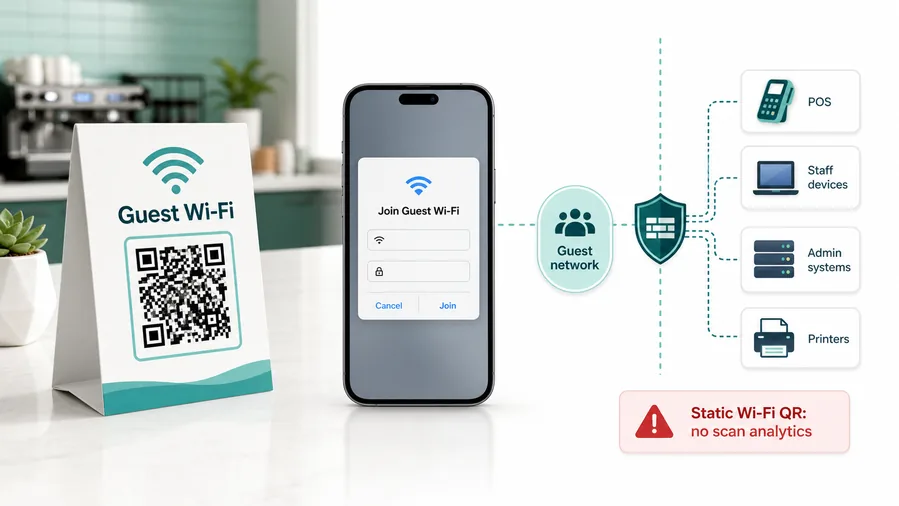
Use native Wi-Fi QR for the join prompt
A static Wi-Fi QR can store SSID, encryption type, and password so phones show the built-in join-network prompt from a room card or lobby sign.
Dynamic QR can explain Wi-Fi instructions, but native joining depends on the encoded Wi-Fi payload.Use a guest page when instructions matter
Some properties need room number notes, bandwidth policy, support contact, device limits, conference access, or troubleshooting beside the Wi-Fi details.
A short guest page can reduce front-desk questions without pretending to control the router.Rotate and separate guest credentials
Anyone who can photograph a room card or lobby sign can share the network details until the password changes.
Use router, access point, firewall, and PMS/IT policy for real isolation.Treat printed hotel Wi-Fi QR codes like shared passwords
A QR code makes access easier for guests and easier to copy. Keep staff devices, POS systems, cameras, and back-office tools off the guest network.
QR Code Lab can create the access shortcut; hotel network controls provide the protection.Wi-Fi QR reduces typing; hotel IT sets the boundary
Use the QR for guest convenience and use network settings to protect internal systems and service quality.
Hotel guest journey
Use hotel QR codes for high-value guest moments, not every surface
Guest actionsThe best hotel QR codes remove small friction points: joining Wi-Fi, ordering food, booking amenities, requesting service, finding local recommendations, or giving feedback while the stay is still fresh.
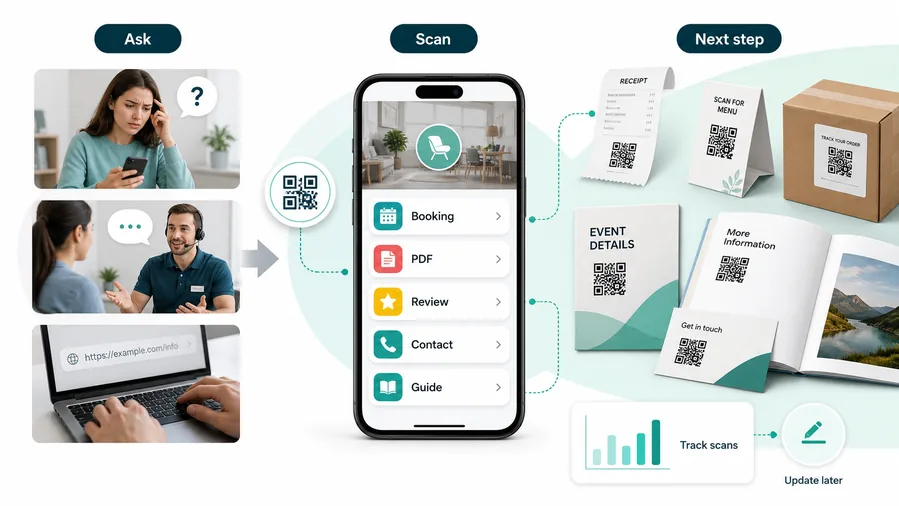
One generic hotel QR makes guests hunt again
A single catch-all page can become another directory if it mixes every service, policy, offer, and form without context.
Guests scan from a specific place, so the first screen should match that place.
Area-specific QR codes feel like service shortcuts
Room, lobby, restaurant, spa, event space, and elevator placements each have different guest intent.
For customers, the strongest QR code use cases are usually the repetitive questions and next actions people already have. QR Code Lab helps turn those moments into clear buttons, files, forms, microlanding pages, editable destinations, and measurable scan activity.
Room comfort
Open Wi-Fi, room service, towel requests, checkout, TV guide, maintenance, and front-desk contact from in-room cards.
Food and amenities
Connect menus, reservations, spa booking, pool rules, gym hours, breakfast details, and special offers to the right hotel area.
Local discovery
Help guests find maps, transportation, nearby dining, attractions, partner offers, and hotel recommendations without another search.
Feedback and recovery
Invite feedback, housekeeping notes, issue reports, and reviews while the experience can still be improved.
A cheap layer of extra customer contact
QR codes increase useful touch frequency without a CRM project, mobile app, custom integration, or staff training. One printed code can open a guide, download, booking page, feedback form, review request, support path, or updated resource. The customer feels helped, not chased.
Restaurants and venues
Menus, Wi-Fi, booking, reviews, loyalty signup, event details, and feedback can live exactly where guests already pause.
Books and education
Bonus PDFs, ZIP files, worksheets, source files, updates, examples, and reader feedback can sit behind a single page-level QR code.
Retail and packaging
Care guides, warranty, setup instructions, reorder links, product education, recipes, safety notes, and reviews can follow the item home.
Services and events
Booking, contact save, registration, schedules, maps, check-in, forms, portfolio links, and follow-up pages become reachable without manual searching.
Hotel QR should feel like helpful service, not signage clutter
Keep the code where it solves a guest question and use dynamic destinations when operations change.
Hotel placement
Place hotel QR codes where the guest already needs that service
PlacementHotel QR placement should follow the guest journey: room, lobby, restaurant, spa, elevator, meeting space, event desk, parking area, or printed welcome material.

A hotel QR is weak when it asks guests to guess the purpose
A QR on a wall or card without a clear service promise can feel like another generic sign.
Guests should know whether the scan opens Wi-Fi, menu, booking, guide, feedback, or support before they scan.
Put the QR at the point of guest need
In-room QR should solve room needs; restaurant QR should solve food choices; lobby QR should solve directions, transport, and local guidance.
The best placement reduces a call, queue, search, or confusing handoff.
Where is the guest standing or sitting?
Room, bed, desk, lobby, restaurant table, elevator, spa desk, meeting room, parking area, or checkout counter.
What question did the place create?
Wi-Fi, menu, hours, amenities, room request, directions, transportation, event schedule, checkout, or feedback.
Who owns the response?
Front desk, housekeeping, restaurant, spa, events team, concierge, maintenance, or management.
Will the information change often?
Use dynamic QR for menus, hours, offers, events, local guides, staffing notes, and service forms.
Guest room card
Open Wi-Fi, room service, housekeeping requests, checkout, amenities, and support.
Key-card sleeve
Give arrival essentials: Wi-Fi, map, breakfast, parking, app, and front-desk contact.
Lobby sign
Route to local guide, transport, amenities, event info, map, or concierge requests.
Restaurant table
Open menus, ordering, allergens, booking, specials, and feedback.
Spa or gym desk
Send guests to booking, hours, service menu, rules, waivers, or packages.
Elevator or hallway
Show amenity locations, event rooms, breakfast hours, checkout info, or emergency guidance.
Meeting room
Open agenda, Wi-Fi, speaker files, feedback, maps, and event support.
Checkout counter
Collect feedback, reviews, loyalty signup, receipt downloads, or return-stay offers.
Hotel QR placement should reduce guest effort
Use each code where it can answer the question the guest already has in that area.
Hospitality placement
Put each hotel QR code where the guest already needs that service
Use hotel QR codes on lobby signs, room cards, key-card sleeves, elevator posters, restaurant tables, front desk materials, in-room welcome books, spa cards, event boards, local guide pages, conference signs, pool notices, and checkout cards. Avoid one universal QR code if guests really need different actions in different places.
Placement should follow the guest journey. In the room, guests need Wi-Fi, housekeeping notes, room guide, or TV instructions. At the restaurant, they need menu, ordering, or allergen details. In the lobby, they may need maps, concierge info, events, or transport. At checkout, they may be ready for reviews, feedback, or loyalty signup.
Dynamic QR codes are useful for menus, events, offers, local guides, room guides, and policy pages that change. Static Wi-Fi QR codes are convenient for credentials, but they should be kept accurate and protected by a proper guest network. Scan analytics can show which printed placements guests actually use, while hotel systems handle bookings, orders, payments, and guest data.
For critical information such as safety, accessibility, or emergency contacts, keep a non-QR fallback visible so guests are never blocked by a dead phone.
Hotel scan UX
Make hotel QR destinations short, branded, and specific to the guest moment
Scan UXA guest scanning from a room card, menu, lobby sign, or event space should immediately see the service that belongs there, not a desktop-style directory.
Use area-specific pages for repeated guest needs
Room, restaurant, lobby, spa, eventArea pages can open the exact service list guests need in that place, with fewer choices and clearer ownership.
This works well for room service, Wi-Fi, menus, local guide, spa booking, and event support.
Use direct links when one action is clearly expected
Wi-Fi, menu, booking, feedbackA direct destination works when the printed CTA promises one action and guests should not choose from a menu of links.
Use it for simple Wi-Fi join prompts, menus, booking pages, review forms, or service requests.
Use dynamic pages when operations change often
Hours, menus, events, local guide, requestsHotels update hours, menus, offers, event schedules, amenities, and local recommendations frequently.
Dynamic QR keeps room cards and signs useful without reprinting every time operations change.
Does the first screen match the placement?
A room QR should not open the same first screen as a lobby, restaurant, spa, or event QR unless the guest intent is truly the same.
Is the page mobile-first and branded?
Guests should recognize the property, understand the service, and tap the main action without zooming or searching.
Can staff handle the action?
Do not promote request forms, chat, booking, or feedback paths unless the responsible team can respond consistently.
A hotel scan should feel like service, not self-service clutter
Use QR destinations that reduce guest effort and make operations easier to route.






