
Book Club QR Code for Reading Guides, Signups & Meetings
Create book club QR codes for reading guides, discussion questions, signup forms, meeting pages, author notes, bonus content, and event updates on books, flyers, and library signs.
Free QR code generator
Create a QR code online
Generate QR codes for websites, email, phone numbers, vCards, Wi-Fi, plain text, forms, PDF files, and campaign links. Customize colors, add a logo or frame, then download a print-ready PNG or SVG.
Choose QR code type
Website QR code, Email QR code, Phone QR code, vCard QR code, Wi-Fi QR code, Text QR code, SMS, WhatsApp, event, and download links.
Add your content
Enter your website URL, contact details, message, phone number, location, or file destination before generating the QR code.
Customize and download
Adjust QR colors, error correction, logo, frame, size, and margin. Generate QR Code, Download PNG, Download SVG, or Save and track scans.
Reading group support
Help every reader reach the same discussion material fast
A book club QR code can open reading guides, discussion questions, signup forms, meeting pages, author notes, bonus content, library resources, school reading materials, bookstore event pages, or a simple group information page. It is useful for authors, publishers, libraries, schools, bookstores, reading groups, and community organizers.
The benefit is shared context. Instead of asking readers to search for a guide, copy a long URL, or remember which file to open, the printed QR takes everyone to the same place. That is helpful for library events, classroom packets, author visits, bookstore displays, community reading projects, and private book clubs where not every reader is comfortable hunting for links.
QR Code Lab creates the QR code and can help keep the printed link flexible with a dynamic destination. It does not host meetings, manage members, collect signups, or moderate discussions. The code should point to the guide, form, event page, or resource your group already uses. Keep the label plain: open questions, join meeting, download guide, or read author notes.
Group reading
Use book club QR codes to keep discussion resources easy to reach
Book clubA book club QR code should help readers open the material they need together: discussion questions, meeting notes, author Q&A, reading schedule, playlist, map, signup form, or shared feedback page.

Put the group resource beside the book or meeting prompt
Use QR codes on book club flyers, bookmarks, library displays, reading guides, table signs, or emails printed for the group so members can open the same resource without searching.
The scan should support the conversation, not distract from it.
Separate discussion, schedule, and follow-up
A meeting guide, reading calendar, author event RSVP, shared notes page, and next-book vote each serve a different moment. QR destinations should match the group action.
Book clubs need clarity more than a crowded link hub.
Keep resources current across meetings
Reading schedules, meeting locations, author links, next-book choices, and group forms can change after flyers are printed. Dynamic destinations keep the same code usable.
Recurring groups benefit from editable links.The QR code should make group reading easier to coordinate
A useful book club destination gives members the right shared reference quickly: questions, dates, notes, author context, signup, voting, or follow-up.
Keep private member lists and contact details out of public printed QR pages.Before the meeting
Open reading schedules, discussion questions, reminders, registration, or location details.
During discussion
Share prompts, author notes, maps, playlists, quotes, or group activity instructions.
Afterward
Collect feedback, vote on the next book, share notes, or promote the next meeting.
Organizer control
Use editable destinations when the group schedule or resource page changes from month to month.
Discussion resources
Give book club members resources that improve the conversation
Group materialsBook club QR codes are strongest when they open shared context: discussion questions, author notes, maps, playlists, timelines, recipes, slides, meeting forms, or next-book voting.
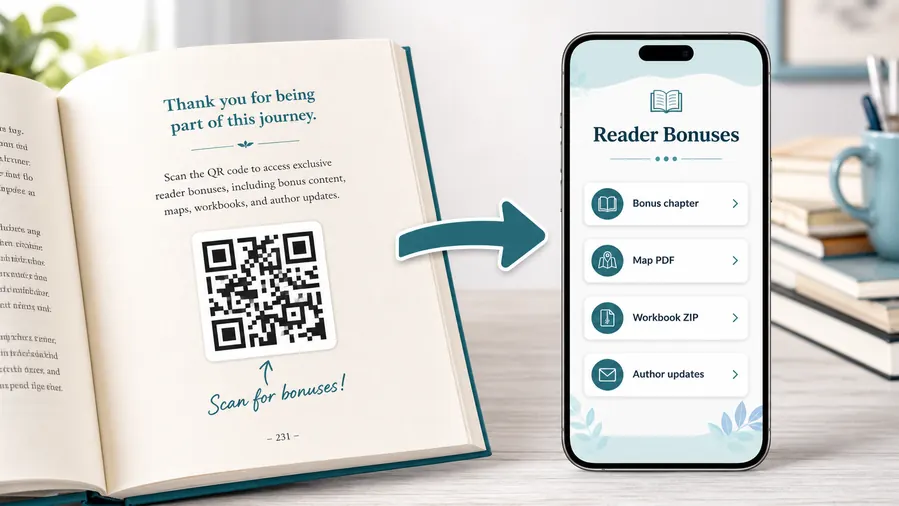
Use file hosting as the simple reader bonus system
For many authors the practical win is not a fancy website. It is a clean place to upload and share the files readers expect after scanning: a PDF bonus chapter, a map, a worksheet, a TXT reading list, or a ZIP archive with templates and printables. QR Code Lab can host the downloadable files behind a mobile micro-landing page, so the reader sees clear buttons instead of hunting through a website or typing a fragile link from the page.
When a file changes, update the hosted file or destination. The printed QR code can stay the same when you use a dynamic QR flow.Discussion guide
Questions, chapter prompts, themes, quotes, author notes, spoiler boundaries, and facilitator instructions.
Meeting coordination
Reading schedule, date, location, RSVP, reminder form, and next-meeting details.
Shared extras
Maps, playlists, recipes, timelines, interviews, source notes, and related reading.
After-meeting follow-up
Feedback forms, next-book voting, shared notes, photos, and author event signup.
Newsletter and next-book previews
A QR code near the author note or final chapter can invite readers into a newsletter, preorder page, series hub, or sample of the next book.
Feedback and author contact
Let readers report errors, ask questions, join a beta-reader list, or send private feedback without publishing a personal email address in the book.
Printed bonus links need a maintenance plan
If the file host, signup form, preorder page, or campaign offer may change, use an editable destination so old books do not point to a dead link.
Place the QR where members prepare or gather
Good spots are a resources page, the end of a chapter that references the bonus, the author note, a workbook exercise, a map page, or the final call-to-action. The code should feel like a useful next step, not a decoration.
Group placement
Place book club QR codes where members prepare, meet, and follow up
PlacementBook club QR placement should match the group moment: discovery on a display, preparation in a guide, discussion at the table, and follow-up after the meeting.

A decorative QR code gives guests no reason to scan
If the invitation only says “scan me,” guests may not know whether it opens RSVP, photos, directions, or a sales page.
The printed promise should be clear enough that scanning feels useful before and during the party.
The QR code answers the question for that exact material
Use RSVP on invitations, directions on arrival notes, photo upload near the party area, and thank-you or album links after the event.
A specific placement keeps the scan from becoming another thing guests have to figure out.
What should guests do before party day?
RSVP, save the date, check the address, answer food questions, or read gift notes.
What will guests need at the venue?
Arrival instructions, activity schedule, Wi-Fi, photo upload, playlist, or game rules.
Can the host update the detail later?
Use dynamic QR when weather, time, parking, venue, or gift information may change.
Is privacy handled thoughtfully?
Avoid exposing children’s details, home addresses, guest lists, or private albums more widely than needed.
Library or bookstore display
Best for signup, meeting date, book details, and group information before members commit.
Reading guide or bookmark
Use for discussion questions, schedule, chapter prompts, author notes, and related resources.
Meeting table card
Good for shared notes, voting, activity instructions, playlists, maps, and quick reference during discussion.
Follow-up handout
Send members to feedback, next-book voting, photos, notes, and upcoming meetings.
Poster or event sign
Best where people pause: registration line, booth, waiting area, seat back, schedule board, or exit path. Weak when people only pass at speed.
Business card
Useful after a conversation because the person already knows why they might save a contact, open a portfolio, book a call, or follow up.
Window sign
Good for after-hours menus, booking, pickup instructions, or quick offers. Avoid complex actions when the person is outside and just walking by.
Cover or front label
Use it only when the promise is immediate and clear. Otherwise the better scan moment is often inside the material or after the first interaction.
Book club QR placement should support the conversation
Use the code where it helps members prepare or coordinate, then keep the destination focused on the group’s next step.
Group scan UX
Make the book club scan useful without derailing discussion
Scan UXMembers may scan before the meeting, during conversation, or afterward. The page should make the primary group resource obvious and keep secondary links from overwhelming the moment.
Members can prepare from one clear guide
schedule, chapters, questions, author contextThe first screen should name the book, meeting, and resource. Members should not have to hunt through a general author or library page.
Use concise sections for reading schedule, questions, and any context needed before discussion.
The QR supports the table conversation
prompts, notes, activity, playlist, mapDuring the meeting, the page should be easy to skim and avoid heavy forms unless the group is voting or submitting notes.
Large buttons and clear headings help members return to the discussion quickly.
Follow-up is organized while interest is fresh
feedback, next-book vote, photos, next meetingAfter the meeting, the same QR or a follow-up code can collect votes, feedback, shared notes, and RSVPs for the next session.
Keep member contact details private and use controlled forms when the group is not public.
Does the page name the book and meeting?
Members should know they opened the right resource before reading any details.
Is the main discussion guide easy to find?
The core prompt or guide should come before extra links, offers, or unrelated author content.
Are group details appropriately private?
Avoid exposing member lists, private locations, or personal contact details on public QR destinations.
A book club QR should make coordination lighter
Use it to keep shared resources in one place while protecting the flow and privacy of the group.
Group reading flow
Place the QR code where readers naturally prepare for discussion
Good placements include book club inserts, library shelf cards, reading guides, bookmarks, event posters, school packets, bookstore displays, meeting handouts, and author pages. Put the QR near the moment of use. A code beside the discussion prompt can open extra questions. A code on a display can open signup. A code in the book can open author notes after the reader finishes.
The destination should not be a messy folder unless the group already understands it. A simple page with questions, meeting time, download links, and next steps is often better. Readers should not have to guess which file belongs to the current book or session.
Dynamic QR codes are useful when meeting dates, signup forms, guides, event pages, or bonus links change. Scan analytics can show which printed materials attract readers to the discussion resources, which helps libraries, bookstores, and authors decide what to print again. It also helps spot weak placements, such as a poster that looks good but rarely sends people to the guide.






