
Author Newsletter QR Code for Reader Signups & Bonuses Online
Create author newsletter QR codes for signup forms, bonus chapters, reader magnets, launch lists, book inserts, bookmarks, event tables, and author pages readers can scan fast online.
Free QR code generator
Create a QR code online
Generate QR codes for websites, email, phone numbers, vCards, Wi-Fi, plain text, forms, PDF files, and campaign links. Customize colors, add a logo or frame, then download a print-ready PNG or SVG.
Choose QR code type
Website QR code, Email QR code, Phone QR code, vCard QR code, Wi-Fi QR code, Text QR code, SMS, WhatsApp, event, and download links.
Add your content
Enter your website URL, contact details, message, phone number, location, or file destination before generating the QR code.
Customize and download
Adjust QR colors, error correction, logo, frame, size, and margin. Generate QR Code, Download PNG, Download SVG, or Save and track scans.
Reader signup path
Turn book interest into a reader list people actually want to join
An author newsletter QR code is useful when the printed book, bookmark, signing table, or launch flyer should do more than say your name. It can open a reader signup form, newsletter landing page, bonus chapter, launch list, reader magnet, preorder update, or author page where readers can choose to stay connected.
The important part is the promise before the scan. Readers do not join a list just because a QR code exists. Give them a clear reason: get the bonus chapter, download the companion file, receive reader notes, hear when the next book releases, or join the launch team. That small line of context makes the QR feel helpful instead of pushy.
QR Code Lab creates the QR code and helps you keep the printed link manageable. It does not collect emails, send campaigns, run automations, or host your email platform. Point the code to the signup page you already trust. Use a dynamic QR code if the reader magnet, launch page, or list provider may change between books.
Reader journey
Use author newsletter QR codes to turn reader interest into permission
Author linksAn author newsletter QR code should make the signup promise clear: release alerts, bonus scenes, reader magnets, event updates, classroom resources, or behind-the-scenes notes readers actually want.

Connect print readers to digital follow-up
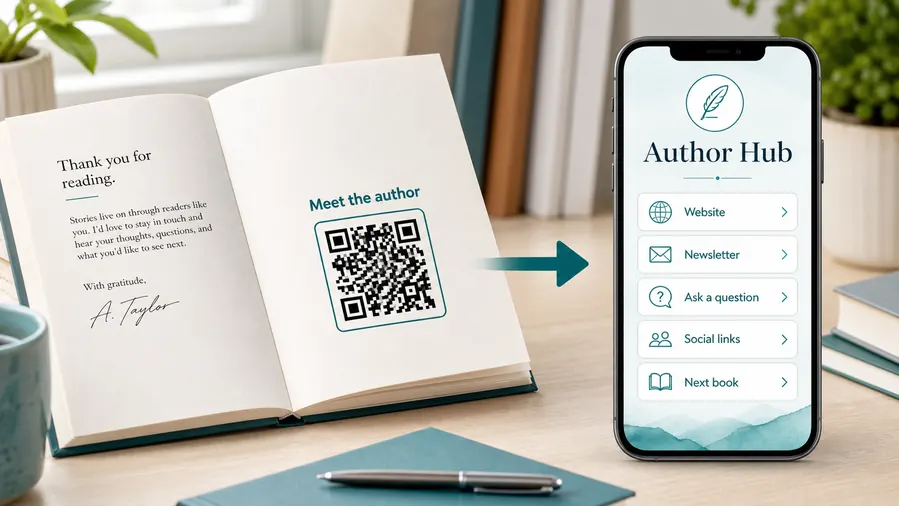
Place QR codes inside books, on back covers, bookmarks, signing cards, flyers, launch posters, or conference materials so readers can move from the physical book to the author relationship while interest is fresh.
The scan should feel like a useful reader extra, not a generic homepage.
Choose one promise for each placement
A newsletter QR, bonus chapter QR, preorder QR, and event QR can all serve different moments. The printed caption should tell readers exactly what they get after the scan.
Specific promises earn more trust than “scan me” without context.
Keep the link useful after launch week
Author campaigns change as books release, bonuses expire, events pass, and reader magnets evolve. Dynamic destinations help printed materials keep sending readers to the current offer.
Printed books and bookmarks often outlive the first campaign URL.A newsletter QR code should earn the email address
The destination should explain the reader benefit before the form. If the printed card promises a bonus, the page should deliver that bonus cleanly after signup.
Do not make readers scan into a vague link hub when the printed promise is specific.Newsletter
Offer a clear reason to subscribe: release alerts, bonus scenes, behind-the-scenes notes, or reader-only updates.
Bonus content
Use QR codes for maps, downloads, worksheets, playlists, artwork, discussion guides, or sample chapters.
Events
Send readers to signing details, launch pages, RSVP forms, bookstore maps, or virtual event links.
Series path
Help readers find the next book, reading order, preorder page, or author catalog without searching.
Book placement
Place author newsletter QR codes after trust has been earned
PlacementNewsletter QR codes work best after a reader has context: at the end of a chapter sample, in back matter, on a bookmark, at a signing table, or beside a bonus offer that explains why joining matters.

A QR code appears without a reader promise
A code dropped onto a cover, poster, or bookmark with no context gives readers no reason to scan.
If the printed caption does not say what they get, the QR becomes decoration instead of a reader path.
The placement explains the next reader benefit
Use “Get the bonus scene,” “Join the release list,” “Find the series order,” “Download the workbook files,” or “RSVP for the signing” beside the code.
The destination should deliver that promise quickly on a phone.
What did the reader just finish?
Back matter can invite reviews, newsletter signup, series order, bonus chapters, or the next book.
What is the event visitor ready to do?
Signing tables and flyers can open event details, preorder pages, author profiles, or mailing list forms.
Does the book type need files?
Workbooks, cookbooks, textbooks, and nonfiction titles often need templates, recipes, worksheets, source notes, or examples.
Is the printed promise specific?
A direct benefit near the QR is more persuasive than a generic scan prompt.
Back matter
Best for newsletter signup, next book links, series order, bonus chapters, review prompts, and reader feedback.
Bookmark or signing card
Good for event traffic, author hubs, release lists, preorder pages, and reader magnet offers.
Workbook or nonfiction page
Use where the reader needs templates, exercise files, examples, audio, worksheets, source notes, or updates.
Launch flyer or poster
Connect campaign traffic to preorder pages, event RSVPs, sample chapters, media kits, and current offers.
Poster or event sign
Best where people pause: registration line, booth, waiting area, seat back, schedule board, or exit path. Weak when people only pass at speed.
Business card
Useful after a conversation because the person already knows why they might save a contact, open a portfolio, book a call, or follow up.
Window sign
Good for after-hours menus, booking, pickup instructions, or quick offers. Avoid complex actions when the person is outside and just walking by.
Cover or front label
Use it only when the promise is immediate and clear. Otherwise the better scan moment is often inside the material or after the first interaction.
Author QR placement should continue the reader moment
Use the QR where the reader already has a reason to act, then make the destination deliver that promise without wandering.
Book marketing placement
Put the signup QR where reader curiosity is already warm
Good placements include back matter, book inserts, bookmarks, launch postcards, event table cards, signing posters, reader group handouts, author business cards, and bonus-content pages. The QR code should appear where the reader is already thinking about the story, the author, or the next book. That moment is much stronger than asking for signup before the reader understands the value.
Keep the destination simple on mobile. A newsletter signup page should explain what the reader gets, ask for only the fields you really need, and confirm the next step clearly. If the QR opens a long page with too many choices, many readers will leave before subscribing.
Use separate dynamic QR codes for important placements when you want to compare results. A bookmark, back matter page, event card, and launch flyer may perform very differently. QR Code Lab scan analytics can show which printed materials bring readers to the signup page, while your email platform measures actual subscriptions. That split keeps the story clear: QR Code Lab shows scan interest, and your email tool shows list growth.
Signup trust
Make author newsletter QR signups clear and respectful
TrustA newsletter QR code asks readers for a relationship, not just a click. The page should explain what they get, collect only the needed information, and avoid surprising them after they scan.

A vague signup promise weakens trust
Tell readers whether they are getting release news, bonus scenes, event updates, teaching resources, discounts, or a reader magnet before asking for an email.
Watch for similar-looking domains, long URLs, login or verify keywords, and pages asking for credentials after an unexpected scan.
Too many fields can stop the moment
Most author newsletter QR flows should ask for an email and perhaps a first name or genre interest. Extra questions can wait until after signup.
A trustworthy QR should not make the final destination mysterious, especially on posters, labels, menus, parking signs, or event materials.
Old print can point to expired offers
Books and bookmarks may circulate long after launch. If the bonus changes, update the destination or keep a useful evergreen signup page.
Before paying, check the domain, HTTPS, amount, recipient, and whether the destination matches the place or brand that printed the QR.Check the signup path before printing reader materials
Scan from the actual book, bookmark, flyer, or event card and confirm the page matches the printed promise.
The current detailed report is a static URL analysis. It helps reveal the encoded content and basic URL risk signals, but it does not guarantee that a destination is safe and does not replace browser, antivirus, payment, or bank security checks.Decoded content
See the raw value inside the QR before opening it.
Content type
Recognize URL, Wi-Fi, mailto, phone, SMS, vCard, or plain text.
URL risk signals
Review HTTPS, shorteners, IP addresses, long URLs, encoded characters, query parameters, and sensitive keywords.
Destination report
For URL codes, view final URL fields, static redirect report fields, domain fields, TLS placeholders, page metadata fields, and risk reasons.
Protect the reader relationship after the scan
A clean signup flow can become part of the author brand. Keep the promise specific, send the expected bonus quickly, and avoid using the QR to push readers into unrelated offers.






