
Book Series QR Code for Reading Order & Author Hubs Online
Create book series QR codes for reading order pages, series lists, author websites, bonus content, newsletters, launch pages, and promos that help readers find the next book fast now.
Free QR code generator
Create a QR code online
Generate QR codes for websites, email, phone numbers, vCards, Wi-Fi, plain text, forms, PDF files, and campaign links. Customize colors, add a logo or frame, then download a print-ready PNG or SVG.
Choose QR code type
Website QR code, Email QR code, Phone QR code, vCard QR code, Wi-Fi QR code, Text QR code, SMS, WhatsApp, event, and download links.
Add your content
Enter your website URL, contact details, message, phone number, location, or file destination before generating the QR code.
Customize and download
Adjust QR colors, error correction, logo, frame, size, and margin. Generate QR Code, Download PNG, Download SVG, or Save and track scans.
Reading order access
Help readers find the next book without searching around
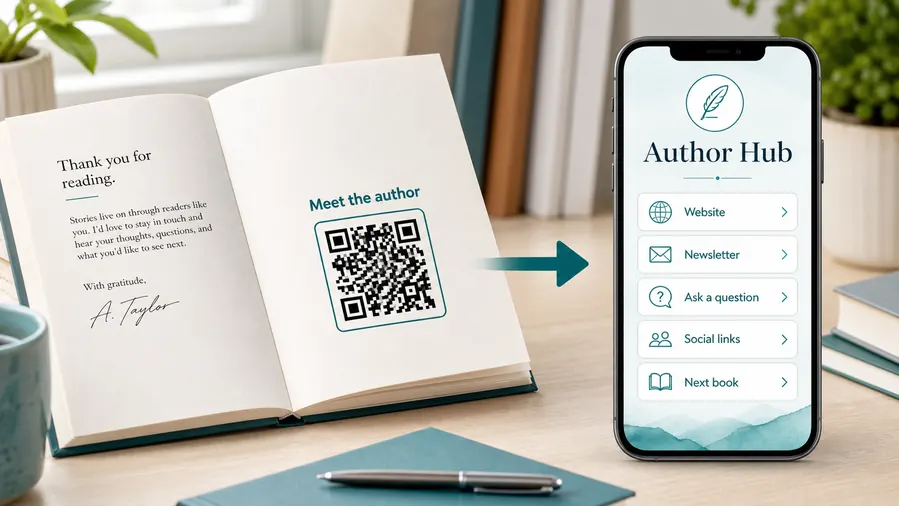
A book series QR code can open a reading order page, series list, author website, bonus content, newsletter signup, launch page, retailer page, or book promo. It is useful for authors, KDP publishers, indie publishers, series authors, bookstores, and book marketers who want readers to continue after one title ends.
Series reading can be confusing when there are prequels, side stories, spin-offs, boxed sets, different retailers, or new releases. A QR code in the back matter, on an insert, or on a bookmark can answer the reader’s next question right away: what should I read next? That is a high-intent moment because the reader has just spent time with the world or author.
QR Code Lab creates the QR code and can keep the printed path flexible with a dynamic destination. It does not host your store, sell books, or manage retailer pages. Point the code to a clear series page with reading order, links, short descriptions, and any bonus or newsletter option that supports the next step.
Reading order
Use book series QR codes to help readers find the right next book
SeriesA book series QR code should reduce reader uncertainty: reading order, next title, preorder page, bonus material, audiobook links, spin-offs, companion stories, or the author’s current series hub.

Put the series path where readers finish or browse
Use QR codes in back matter, on bookmarks, inside box sets, on signing cards, bookstore displays, or launch materials so readers can find the next title without searching.
The best series QR answers “what should I read next?” immediately.
Clarify order, spin-offs, and formats
Series readers may need chronological order, publication order, novellas, companion books, audiobook links, or retailer choices. The destination should organize those paths clearly.
A confused series page costs momentum after a good read.
Keep the series hub current as new books release
New titles, preorder pages, bonus stories, cover updates, and retailer links change over time. Dynamic QR keeps older books pointing to the current series path.
Old print should help sell the current next book.The series QR should preserve reader momentum
Someone scanning from the end of a book is already interested. Send them to a page that makes the next step obvious: next book, full order, preorder, bundle, audiobook, or author list.
Avoid making readers search across multiple retailer pages before they know which title comes next.Back matter
Open the next book, series order, preorder, newsletter signup, or bonus story after the reader finishes.
Bookstore display
Help shoppers understand where this title sits in the series before buying.
Box set or bundle
Link extras, reading guides, companion stories, and author updates for the full collection.
New releases
Move older books toward the newest title, preorder page, or current reader magnet.
Series placement
Place series QR codes where readers ask what comes next
PlacementSeries QR placement works when it appears at the end of a book, beside a display, inside a box set, or on author materials where readers are choosing the next title.

The QR code points to a generic author page
A generic author homepage may bury the series order and lose the reader’s momentum.
If the reader scanned to know what comes next, the destination should answer that first.
The placement opens the next series decision
Back matter should lead to the next book, a display QR should explain where to start, and a box set insert can unlock companion material.
The printed caption should make the next-step promise visible before the scan.
Is the reader finishing or browsing?
Finished readers need the next book; shoppers may need where to start.
Does the series have multiple orders?
Clarify publication order, chronological order, spin-offs, companion novellas, and optional extras.
Will the next book change?
Use dynamic QR when a new release, preorder, or bundle may become the better destination later.
Is the CTA specific?
Use “Find the next book” or “See the series order” instead of a vague scan prompt.
Back matter
Use after the final chapter for next-book links, series order, preorders, and newsletter updates.
Bookmark
Good for series hubs, reading order, author list, and release reminders readers can keep.
Bookstore or library display
Help browsers understand where to start and which titles belong together.
Box set or bundle insert
Open companion extras, reading guides, maps, timelines, and bonus stories.
Poster or event sign
Best where people pause: registration line, booth, waiting area, seat back, schedule board, or exit path. Weak when people only pass at speed.
Business card
Useful after a conversation because the person already knows why they might save a contact, open a portfolio, book a call, or follow up.
Window sign
Good for after-hours menus, booking, pickup instructions, or quick offers. Avoid complex actions when the person is outside and just walking by.
Cover or front label
Use it only when the promise is immediate and clear. Otherwise the better scan moment is often inside the material or after the first interaction.
Series QR placement should protect the next-read decision
Use it where readers naturally ask what comes next, then make the answer immediate.
New release control
Use dynamic QR so older series books can point to the newest next step
DynamicA series changes every time a new book, preorder, box set, audiobook, or companion story is added. Dynamic QR lets older printed books keep sending readers to the current series path.
Old books keep pointing to an outdated series page
Static QR can work for a permanent reading order page.
But if a new title launches, a preorder opens, a retailer page changes, or the author updates the series hub, older copies keep sending readers to the first URL.
The same printed QR can promote the current series path
Dynamic QR lets the author update the destination without changing back matter, bookmarks, box set inserts, or signing cards.
That keeps older books useful for new releases, current bundles, and evergreen reader funnels.

New release promotion
Move scans from older books to the latest title, preorder page, or release announcement.
Reading order updates
Add novellas, spin-offs, box sets, audiobooks, and companion stories as the series expands.
Retailer and format changes
Update buy links, library paths, audiobook pages, bundle offers, and international retailer choices.
Reader list growth
Route engaged series readers to release alerts, bonus stories, ARC news, and author updates.
Use dynamic when the series path will keep evolving
Older books should keep helping readers choose the current next step instead of freezing the series at one moment in time.
Back matter flow
Place the series QR where the reader is deciding what to read next
Good placements include back matter, front matter, inserts, bookmarks, boxed set cards, bookstore shelf signs, launch flyers, reader magnets, and author event materials. The label should be direct: see the reading order, continue the story, start book one, get the next book, or explore the series.
The destination should reduce choices, not create more confusion. If the series has many entries, organize by recommended order. If there are spin-offs, explain where they fit. If availability changes by retailer, send readers to a stable author page instead of printing one fragile store link in every book.
Dynamic QR helps when retailer pages, series order, bonus material, covers, or new releases change. Scan analytics can show which titles or placements send readers into the series page. That helps authors understand which books are doing the best job of moving readers deeper into the catalogue. It also protects older print copies when a new book changes the recommended next step. Old back matter can keep guiding readers correctly.






