
QR Code for Textbooks - Lessons, Quizzes & Resources
Create QR codes for textbooks linking lesson videos, source files, quizzes, answer keys, updates, references, worksheets, and support pages. Add digital learning paths to printed chapters.
Free QR code generator
Create a QR code online
Generate QR codes for websites, email, phone numbers, vCards, Wi-Fi, plain text, forms, PDF files, and campaign links. Customize colors, add a logo or frame, then download a print-ready PNG or SVG.
Choose QR code type
Website QR code, Email QR code, Phone QR code, vCard QR code, Wi-Fi QR code, Text QR code, SMS, WhatsApp, event, and download links.
Add your content
Enter your website URL, contact details, message, phone number, location, or file destination before generating the QR code.
Customize and download
Adjust QR colors, error correction, logo, frame, size, and margin. Generate QR Code, Download PNG, Download SVG, or Save and track scans.
Learning resource path
Connect textbook pages to videos, files, quizzes, updates, and support
A QR code for textbooks is useful when a printed lesson needs digital resources that would be too long or heavy to place on the page. It can open lesson videos, source files, quizzes, answer keys, worksheets, reference pages, simulations, datasets, correction notes, teacher guides, and support pages. The scan gives students and teachers a direct path from the printed topic to the right resource.
Textbook QR codes work best when they are tied to the exact learning moment. A math section can open a worked example. A science chapter can open a video or dataset. A language lesson can open audio. A workbook page can open a worksheet or answer explanation. Back matter can open updates or corrections. QR Code Lab helps create print-ready dynamic codes and scan analytics for textbook resources after printing.
QR Code Lab creates URL QR codes and tracks scans. It does not create lessons, grade quizzes, manage student records, host learning platforms, or provide educational certification. Your LMS, website, file host, video platform, quiz tool, or publisher page provides the actual educational content.
Textbook learning moments
Textbook learning moments schools, teachers, tutors, and training teams with assignments, worksheets, lessons, schedules, feedback, resources, and parent or student follow-up
Learning resourcesUse QR codes to move schools, teachers, tutors, and training teams from worksheets, classroom posters, school handouts, lesson materials, event signs, and training packets to assignments, worksheets, lessons, schedules, feedback, resources, and parent or student follow-up without making students, parents, or attendees type a long URL.
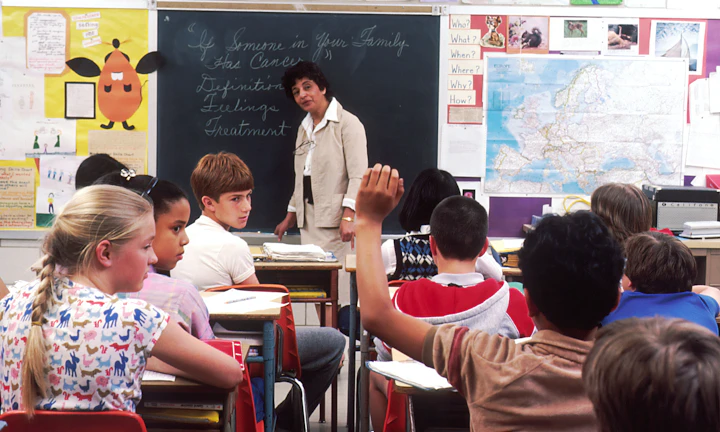
Attach support to the lesson page
Place QR codes beside chapters, examples, exercises, diagrams, and review sections so learners can open the right video, explanation, dataset, source, or worksheet without searching.
The printed CTA should name the resource, not just say scan me.
Keep answers and updates tied to the edition
Use QR codes for answer keys, corrections, errata, teacher notes, extra practice, and revised files that may need updates after the textbook is printed.
Dynamic destinations help when editions stay in classrooms for years.
Give teachers and students cleaner handoffs
QR codes can separate student practice, teacher resources, parent notes, lab instructions, downloads, and assessment support without crowding the printed page.
Separate resources by audience when the next action is different.A textbook QR code should reduce learning friction
The reader is already inside a lesson. The scan should open the resource that makes that exact page easier to understand, practice, teach, or update.
Use specific CTAs: watch example, open worksheet, check answers, download data, view correction, or get teacher notes.Page-specific support
Open the resource tied to the current lesson, chapter, exercise, diagram, or lab.
Edition control
Keep errata, answer keys, downloads, and corrections current after printing.
Student clarity
Avoid sending learners to a broad library when they need one resource.
Teacher handoff
Separate teacher-only notes, classroom files, answer keys, and student practice when needed.
Schools, classrooms, workbooks, and textbooks
Connect textbook pages to the matching learning resource
Learning accessTextbook QR codes are useful when a printed lesson, exercise, diagram, lab, source list, or review page should open the exact video, worksheet, answer key, file, correction, or explanation.

Open lesson videos from the page
Attach short explanations, demonstrations, pronunciation clips, worked examples, or lab walkthroughs to the lesson that needs them.
Release answer keys with the right context
Send students to guided solutions, final answers, or self-check pages tied to chapter, section, edition, and exercise number.

Link worksheets and practice files
Use QR codes for printable practice, differentiated tasks, revision sheets, datasets, templates, and companion files.

Show diagrams, audio, and interactive media
Open enlarged diagrams, source clips, audio, simulations, maps, or demonstrations that do not fit well on paper.

Publish corrections and errata
Keep corrections, broken links, revised examples, and updated references connected to the printed edition.

Separate teacher and student resources
Route teacher notes, answer keys, slide decks, and classroom files away from student-facing practice when needed.

Support parents and independent learners
Open explanations, study plans, translated notes, accessibility resources, and help pages without long URLs.

Update resource links after adoption
Use dynamic QR when files, platforms, editions, or school resource pages may move during the life of the textbook.
Students should land on the resource for this exact page
The scan should remove typing and searching by opening the page, file, answer, video, or explanation promised beside the exercise.
Teachers need resources that remain usable after printing
Dynamic QR helps keep worksheets, answer keys, errata, lab files, and classroom links current across semesters and editions.
Put textbook QR codes beside the learning moment
Books, KDP, and author bonuses
Give textbook readers useful companion material without crowding the printed page
Reader bonus hubA textbook QR code can keep the layout clean while opening worksheets, answer keys, source files, audio, datasets, glossary pages, corrections, and teacher resources.
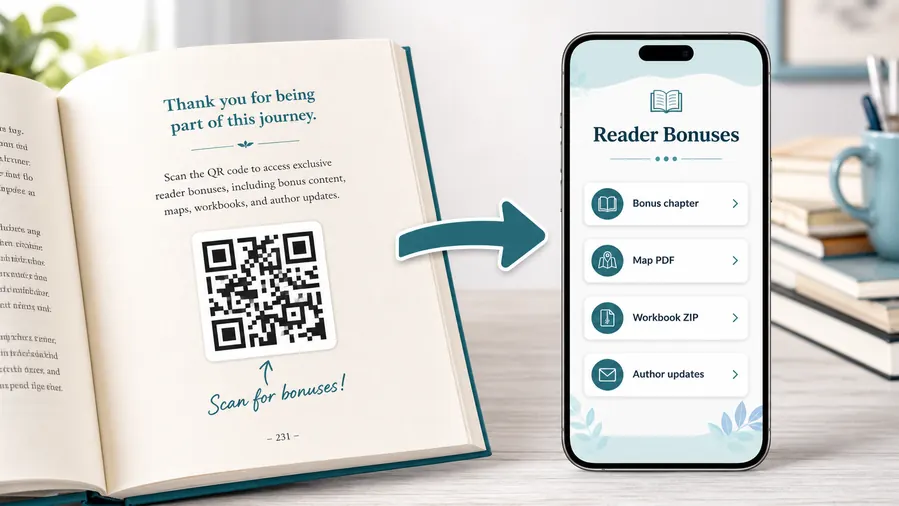
Put companion files where learners can actually use them
Use a mobile-friendly resource page for PDFs, datasets, audio, templates, source files, slide decks, correction notes, and edition-specific downloads.
The printed book should say exactly what the scan opens so students do not accidentally land on teacher-only or spoiler content.Practice and worksheets
Link extra practice, printable tasks, differentiated activities, and revision pages from the lesson that needs them.
Answer keys and explanations
Open guided solutions, final answers, worked examples, and self-check pages tied to the correct edition.
Media and data files
Connect audio, video, images, datasets, code files, maps, and templates without typing long URLs.
Errata and updates
Keep corrections, broken links, new references, and revised resources available after the book is distributed.
Newsletter and next-book previews
A QR code near the author note or final chapter can invite readers into a newsletter, preorder page, series hub, or sample of the next book.
Feedback and author contact
Let readers report errors, ask questions, join a beta-reader list, or send private feedback without publishing a personal email address in the book.
Printed textbooks make wrong resource links expensive
If a download folder, answer page, source file, or correction changes after adoption, dynamic QR can fix the destination without replacing the book.
Place the QR where the resource is expected
Use margins, chapter ends, exercise sets, lab pages, source lists, and back matter so the scan belongs to the learning context.
Textbook print check
Check textbook QR codes before the edition goes to print
Print readyA textbook QR code has to stay readable in margins, captions, worksheets, lab pages, and back matter after trim size, ink, paper, and classroom lighting change the conditions.

Keep the code readable without disrupting the lesson
Match QR size to the textbook trim, keep a clean quiet zone, and avoid placing the code where binding, page curl, or notes will interfere.
Test a printed proof from normal reading distance before sending the edition to print or KDP.
Proof the destination against the exact page
Scan from the printed proof and confirm the resource matches chapter, section, exercise, edition, and printed CTA.
Use vector artwork for professional layouts and avoid decorative treatments that reduce classroom scan reliability.
Use a resource page when one textbook needs several learning actions
A chapter may need video, worksheet, source file, answer key, errata, and teacher notes.
A clear mobile page can separate those actions without crowding the printed page or exposing the wrong resource first.
Lesson page
Open video, glossary, worked example, audio, or diagram expansion.
Exercise set
Link hints, answer key, solution walkthrough, and extra practice.
Lab or project
Open datasets, templates, source files, safety notes, and submission forms.
Back matter
Provide errata, downloads, teacher resources, and edition updates.
Print textbook QR codes only after the learning path is verified
The QR image, printed label, edition, and destination should agree before the book reaches students.
After-print control
Keep textbook resource links editable after the book is printed
DynamicTextbooks often stay in circulation while files, platforms, corrections, and lesson resources change. Dynamic QR protects the printed edition.
A fixed QR can trap an old resource in the book
A static QR is fine for a permanent page, but it cannot follow moved files, revised answer keys, updated videos, or corrected errata.
That is painful when a textbook has already been printed, adopted, or distributed.
An editable QR keeps the edition useful
Dynamic QR lets publishers and educators update worksheets, videos, datasets, answer keys, source links, and corrections without changing the printed code.
The printed page stays stable while the resource behind it improves.

Errata and corrections
Fix answer pages, source links, example notes, and edition updates after release.
Files and media
Replace moved videos, audio, datasets, templates, and download folders.
Teacher resources
Update classroom materials, slides, answer keys, and lesson notes across semesters.
Edition routing
Route older print runs to the right resource while newer editions use updated pages.
Use dynamic QR for textbook resources that may need maintenance
If the destination supports teaching or learning over time, editable control protects the printed book.
Chapter and workbook flow
Place textbook QR codes where digital help makes the printed lesson clearer
Useful placements include chapter openers, worked examples, lab pages, vocabulary sections, source lists, workbook exercises, answer sections, teacher notes, appendix pages, and update notices. CTAs should say watch lesson, download worksheet, open audio, try quiz, get answer explanation, see data, read update, or open teacher guide. Clear labels help students know whether the scan gives help, practice, or reference material.
Dynamic QR codes are practical for textbooks because files, videos, quizzes, and correction notes can move after printing. A publisher or teacher can update the destination while the book stays useful. Scan analytics can show which chapters or resource types receive attention, which helps improve future editions and support materials.
Keep the student experience direct. If the code sits beside a specific exercise, open that exercise support, not a general resource library. If answers are involved, label them clearly so teachers and learners can decide when to scan. For younger students or classrooms, also provide a short printed fallback in case devices are not available.
Scan reporting
Use textbook scan data to understand resource demand by lesson or edition
AnalyticsTracking can show which textbook resources students and teachers actually open, without treating scan totals as learning outcomes.

One textbook-wide code hides the learning context
A single QR can show total interest, but it cannot reveal whether readers wanted videos, worksheets, answers, files, corrections, or teacher notes.
It also cannot compare chapters, editions, classroom handouts, and back matter.
Separate codes make resource use easier to read
Use distinct dynamic codes for lessons, answer keys, downloads, errata, and teacher resources when comparison matters.
Scan data is not proof of comprehension, but it helps identify which resources need attention.
Scan volume
Review which lessons, chapters, resources, or editions receive scans.
Timing
Check use around assignments, releases, semesters, exams, and classroom adoption periods.
Broad location
Use approximate location signals to understand regional or school-market patterns.
Device context
Confirm resource pages, PDFs, media, and downloads work well on student devices.
Lesson support demand
See which pages drive students to videos, examples, hints, or explanations.
Answer-key use
Separate answer and hint codes when self-check behavior matters.
Download reliability
Monitor files, worksheets, datasets, and media resources for continued use.
Edition cleanup
Find old editions or broken resource paths still receiving scans.
Name textbook QR codes by edition, chapter, and resource type
Clear names make reports useful when teachers, authors, or publishers review resource performance later.






