
Book Bonus Content QR Code for Downloads & Reader Extras
Create book bonus content QR codes for extra chapters, worksheets, downloads, videos, templates, audio files, resource pages, and reader magnets inside books or printed inserts today.
Free QR code generator
Create a QR code online
Generate QR codes for websites, email, phone numbers, vCards, Wi-Fi, plain text, forms, PDF files, and campaign links. Customize colors, add a logo or frame, then download a print-ready PNG or SVG.
Choose QR code type
Website QR code, Email QR code, Phone QR code, vCard QR code, Wi-Fi QR code, Text QR code, SMS, WhatsApp, event, and download links.
Add your content
Enter your website URL, contact details, message, phone number, location, or file destination before generating the QR code.
Customize and download
Adjust QR colors, error correction, logo, frame, size, and margin. Generate QR Code, Download PNG, Download SVG, or Save and track scans.
Reader extras
Use a QR code when the book should unlock real companion value
A book bonus content QR code can open extra chapters, worksheets, templates, videos, resource pages, audio files, maps, illustrations, checklists, ZIP downloads, PDF files, or reader magnet pages. It is useful for authors, KDP publishers, nonfiction creators, workbook creators, educators, and book marketers who want the print book to connect with helpful digital material.
The strongest bonus QR codes are not decoration. They solve a real problem the printed page cannot solve well: a workbook needs downloadable templates, a language book needs audio, a fantasy book needs a map, a technical book needs files, a cookbook needs extra photos, or a business book needs worksheets people can reuse. The scan should feel like a useful extension of the book.
QR Code Lab creates the QR code and helps you point readers to the right page or file destination. If your setup uses a microlanding page or hosted download destination, the QR can send readers there. If files may change, use a dynamic QR code so a typo, replaced PDF, or updated ZIP does not force a reprint.
Reader reward
Use book bonus QR codes to deliver the extra material readers were promised
BonusA book bonus QR code should open a specific reader reward: a bonus chapter, map, playlist, workbook file, discussion guide, preorder bonus, template, audio file, or companion download.

Make the bonus obvious before the scan
Print a clear promise near the QR so readers know whether they are getting a sample chapter, worksheet, soundtrack, recipe file, map, source notes, or a reader-only download.
Specific rewards get more trust than “scan for more.”
Host files on a mobile-friendly page
A clean bonus page can explain each file, show the book context, and provide buttons for PDF, audio, ZIP, image, video, or form downloads without exposing a messy folder.
The page should feel like part of the book experience.
Keep printed bonuses useful after files change
Books, bookmarks, and launch cards can circulate for years. Dynamic QR helps when a bonus file moves, a preorder page closes, or a better evergreen reader magnet replaces the first offer.
Long-lived print needs editable destinations.The bonus destination should reward the scan quickly
Readers should land on a page that confirms the book, names the bonus, and makes the download or signup path easy from a phone.
Avoid sending readers to a generic author homepage when the printed copy promised a specific file.Fiction
Bonus scenes, maps, character art, playlists, timelines, pronunciation guides, or series reading order.
Nonfiction
Worksheets, templates, checklists, source notes, charts, references, examples, or exercise files.
Launch
Preorder bonuses, giveaway pages, ARC resources, review links, or reader magnet delivery.
Groups
Book club questions, classroom guides, discussion PDFs, slides, or group feedback forms.
Bonus delivery
Offer book bonuses that feel connected to the reading moment
Reader filesBonus QR codes work when the extra content belongs to the book in hand and the destination makes the reward easy to understand, access, and save.
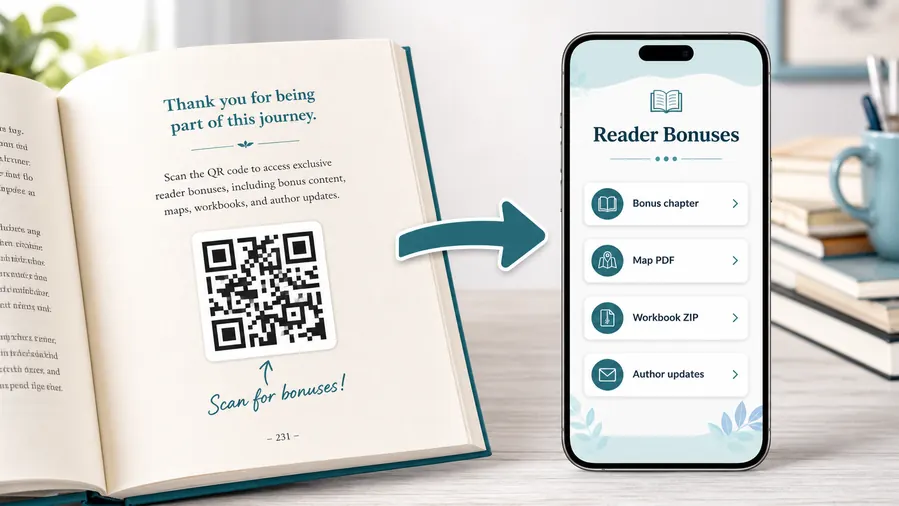
Use file hosting as the simple reader bonus system
For many authors the practical win is not a fancy website. It is a clean place to upload and share the files readers expect after scanning: a PDF bonus chapter, a map, a worksheet, a TXT reading list, or a ZIP archive with templates and printables. QR Code Lab can host the downloadable files behind a mobile micro-landing page, so the reader sees clear buttons instead of hunting through a website or typing a fragile link from the page.
When a file changes, update the hosted file or destination. The printed QR code can stay the same when you use a dynamic QR flow.Fiction extras
Maps, deleted scenes, playlists, timelines, art, reading order, pronunciation guides, and reader-only previews.
Workbooks and nonfiction
Templates, checklists, worksheets, source notes, spreadsheets, examples, audio, and exercise files.
Launch and preorder bonuses
Bonus claim pages, giveaway forms, event RSVPs, sample chapters, and special reader downloads.
Book clubs and classrooms
Discussion guides, author Q&A, lesson plans, slides, group activities, and printable resources.
Newsletter and next-book previews
A QR code near the author note or final chapter can invite readers into a newsletter, preorder page, series hub, or sample of the next book.
Feedback and author contact
Let readers report errors, ask questions, join a beta-reader list, or send private feedback without publishing a personal email address in the book.
Printed bonus links need a maintenance plan
If the file host, signup form, preorder page, or campaign offer may change, use an editable destination so old books do not point to a dead link.
Place bonus QR codes where the reward makes sense
Good spots are a resources page, the end of a chapter that references the bonus, the author note, a workbook exercise, a map page, or the final call-to-action. The code should feel like a useful next step, not a decoration.
Print handoff
Check book bonus QR codes before the file goes to print
Print readyA QR code printed inside a book, on a bookmark, or on a launch card needs enough size, contrast, quiet zone, and destination confidence before the material is distributed.

Test the printed size in the actual layout
A QR that scans on a monitor may fail in a small margin, matte interior page, glossy cover, or bookmark design. Test the final size, ink, and surrounding artwork before print approval.
Keep the quiet zone clear and avoid placing the code too close to folds, page gutters, decorative borders, or heavy background texture.
Scan the destination like a reader
Use a phone, not only a desktop preview. Confirm the page opens the promised bonus, fits the screen, and does not force readers to search for the file.
If the book will stay in circulation, prefer an editable destination for files, signup forms, and campaign pages that may move later.
Use a reader landing page when the bonus has more than one file
A single PDF link is fine for one permanent resource. A landing page is better when readers need several downloads, email signup, book context, instructions, or language-specific files.
The printed QR stays simple while the destination can organize bonuses, updates, next-book links, and support paths.
Back matter
Use for bonus scenes, newsletter signup, series order, reader magnets, reviews, and next-book links.
Workbook page
Connect exercises to templates, audio, spreadsheets, worksheets, examples, and companion files.
Bookmark or launch card
Open preorder bonuses, giveaway pages, author hubs, events, or reader signup offers.
Book club insert
Send groups to discussion questions, author notes, facilitator guides, slides, and feedback forms.
Print the QR only after the reader path is proven
The code, caption, print layout, and bonus destination should work together before the book or card leaves your control.
Long-lived print
Use dynamic QR when book bonus files may change later
DynamicBooks and bookmarks can keep circulating after a launch campaign ends, a file host changes, or a newsletter platform moves. Dynamic QR gives printed reader materials a safer destination.
The printed book keeps pointing to the first file URL
Static QR is fine when the bonus file and destination are permanent.
But if a PDF moves, a signup form changes, a giveaway expires, or the author updates the resource, every printed copy still opens the old address.
The same printed code can open the current bonus page
Dynamic QR lets the author update the destination while the QR in the book, bookmark, or card stays the same.
That matters for reader magnets, launch campaigns, classroom resources, book club guides, and series pages that evolve over time.

Reader magnet updates
Replace or improve bonus scenes, sample chapters, maps, playlists, templates, and companion files without reprinting.
Newsletter platform changes
Move signup traffic to the current list, form, automation, or confirmation page after tools change.
Launch campaign cleanup
Route expired preorder or giveaway traffic to evergreen bonus content, the next book, or an author hub.
Classroom and book club resources
Update discussion guides, worksheets, slides, and group materials as reader support improves.
Use dynamic when the bonus promise should outlive the first URL
For long-lived books and reader materials, editable destination control can protect the reader experience from broken files and expired campaigns.
File access
Make bonus material easy to find without cluttering the book page
Use bonus content QR codes in back matter, chapter ends, workbook pages, resource sections, inserts, bookmarks, classroom editions, and launch postcards. The CTA should say exactly what the reader gets: download worksheets, open templates, watch the video, get the map, hear the audio, or read the bonus chapter. Clear wording helps readers trust the scan.
Keep the destination organized. If the QR opens a file page, name the files clearly and make the first screen mobile friendly. If the material is a ZIP or PDF, explain what it contains before the reader taps download. If the bonus is tied to a newsletter, be honest about the signup step instead of hiding it behind vague wording.
Dynamic QR codes are valuable because bonus files often improve after publication. You can replace a PDF, add a new resource, fix a broken file link, or move the material to a cleaner page. QR Code Lab analytics can also show which book placements are actually sending readers to the bonus content.






