
Author QR Code Generator for Books, Profiles & Events Online
Create author QR codes for websites, book pages, newsletters, reader bonuses, interviews, events, portfolios, and social profiles. Add them to books, cards, and signing tables today.
Free QR code generator
Create a QR code online
Generate QR codes for websites, email, phone numbers, vCards, Wi-Fi, plain text, forms, PDF files, and campaign links. Customize colors, add a logo or frame, then download a print-ready PNG or SVG.
Choose QR code type
Website QR code, Email QR code, Phone QR code, vCard QR code, Wi-Fi QR code, Text QR code, SMS, WhatsApp, event, and download links.
Add your content
Enter your website URL, contact details, message, phone number, location, or file destination before generating the QR code.
Customize and download
Adjust QR colors, error correction, logo, frame, size, and margin. Generate QR Code, Download PNG, Download SVG, or Save and track scans.
Author presence
Give readers one clear path back to the person behind the book
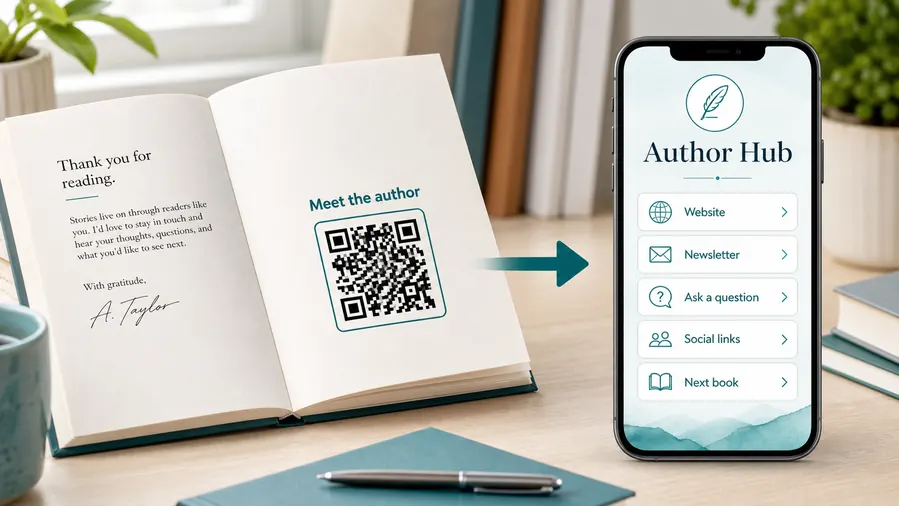
An author QR code can open an author website, book list, newsletter, reader bonus page, event page, portfolio, interview, press page, social profile, or contact page. It is useful when the printed material should support an ongoing reader relationship, not only a single download or one-time promotion.
This is different from a narrow bonus QR or newsletter QR. An author QR is the broader doorway. A reader may want to see your other books, learn the reading order, follow your updates, invite you to an event, find media information, or simply remember your name after a signing, class, conference, or bookstore visit.
QR Code Lab creates URL QR codes and helps you keep that printed bridge easy to scan and, when dynamic, easy to update. It does not build your author website, publish books, manage social profiles, or send newsletters. The value is that your physical book, bookmark, card, or poster can point to the right author destination without asking readers to type a long URL.
Reader journey
Use author QR codes to turn reader attention into the next relationship
Author linksAn author QR code should open the next step readers actually want: newsletter signup, book bonuses, a sample chapter, event details, preorder links, social profiles, or a simple author hub.

Connect print readers to digital follow-up
Place QR codes inside books, on back covers, bookmarks, signing cards, flyers, launch posters, or conference materials so readers can move from the physical book to the author relationship while interest is fresh.
The scan should feel like a useful reader extra, not a generic homepage.
Choose one promise for each placement
A newsletter QR, bonus chapter QR, preorder QR, and event QR can all serve different moments. The printed caption should tell readers exactly what they get after the scan.
Specific promises earn more trust than “scan me” without context.
Keep the link useful after launch week
Author campaigns change as books release, bonuses expire, events pass, and reader magnets evolve. Dynamic destinations help printed materials keep sending readers to the current offer.
Printed books and bookmarks often outlive the first campaign URL.Author QR codes work when the reader understands the reward
The best destination continues the reading moment: join the list for updates, download a bonus, read a sample, view the series order, RSVP for an event, or contact the author team.
Do not make readers scan into a vague link hub when the printed promise is specific.Newsletter
Offer a clear reason to subscribe: release alerts, bonus scenes, behind-the-scenes notes, or reader-only updates.
Bonus content
Use QR codes for maps, downloads, worksheets, playlists, artwork, discussion guides, or sample chapters.
Events
Send readers to signing details, launch pages, RSVP forms, bookstore maps, or virtual event links.
Series path
Help readers find the next book, reading order, preorder page, or author catalog without searching.
Reader bonuses
Offer author bonuses that feel worth the scan
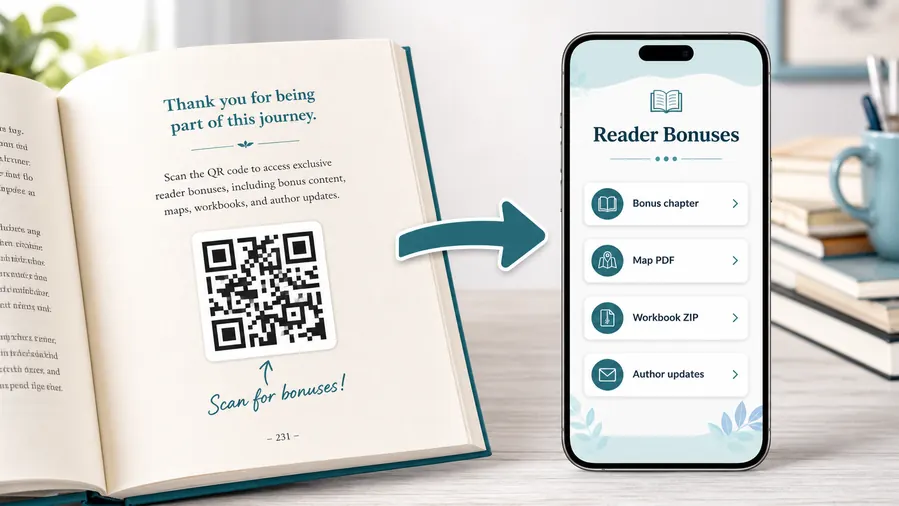
Bonus contentBonus QR codes work when the reader gets something connected to the book: an extra scene, map, playlist, worksheet, discussion guide, sample chapter, preorder bonus, or downloadable companion file.
Use file hosting as the simple reader bonus system
For many authors the practical win is not a fancy website. It is a clean place to upload and share the files readers expect after scanning: a PDF bonus chapter, a map, a worksheet, a TXT reading list, or a ZIP archive with templates and printables. QR Code Lab can host the downloadable files behind a mobile micro-landing page, so the reader sees clear buttons instead of hunting through a website or typing a fragile link from the page.
When a file changes, update the hosted file or destination. The printed QR code can stay the same when you use a dynamic QR flow.Fiction extras
Maps, character art, playlists, deleted scenes, bonus chapters, series timelines, pronunciation guides, or reader-only previews.
Nonfiction resources
Worksheets, checklists, templates, source notes, exercise files, charts, references, or companion downloads.
Launch bonuses
Preorder forms, giveaway pages, event RSVP, bonus claim pages, ARC notes, and reader magnet delivery.
Book clubs and classrooms
Discussion guides, author Q&A, lesson materials, slides, activities, or group feedback forms.
Newsletter and next-book previews
A QR code near the author note or final chapter can invite readers into a newsletter, preorder page, series hub, or sample of the next book.
Feedback and author contact
Let readers report errors, ask questions, join a beta-reader list, or send private feedback without publishing a personal email address in the book.
Printed books need destinations that survive updates
If a bonus file, retailer page, signup form, or launch offer may change, use an editable destination so old print runs do not keep pointing to a dead link.
Place the bonus QR where the reader expects the reward
Good spots are a resources page, the end of a chapter that references the bonus, the author note, a workbook exercise, a map page, or the final call-to-action. The code should feel like a useful next step, not a decoration.
Book placement
Place author QR codes where reader intent is already strong
PlacementThe same author link can feel helpful or intrusive depending on placement. Put the QR near the moment it serves: after the story, on a bookmark, at a signing table, inside a workbook, or beside an event invitation.

A QR code appears without a reader promise
A code dropped onto a cover, poster, or bookmark with no context gives readers no reason to scan.
If the printed caption does not say what they get, the QR becomes decoration instead of a reader path.
The placement explains the next reader benefit
Use “Get the bonus scene,” “Join the release list,” “Find the series order,” “Download the workbook files,” or “RSVP for the signing” beside the code.
The destination should deliver that promise quickly on a phone.
What did the reader just finish?
Back matter can invite reviews, newsletter signup, series order, bonus chapters, or the next book.
What is the event visitor ready to do?
Signing tables and flyers can open event details, preorder pages, author profiles, or mailing list forms.
Does the book type need files?
Workbooks, cookbooks, textbooks, and nonfiction titles often need templates, recipes, worksheets, source notes, or examples.
Is the printed promise specific?
A direct benefit near the QR is more persuasive than a generic scan prompt.
Back matter
Best for newsletter signup, next book links, series order, bonus chapters, review prompts, and reader feedback.
Bookmark or signing card
Good for event traffic, author hubs, release lists, preorder pages, and reader magnet offers.
Workbook or nonfiction page
Use where the reader needs templates, exercise files, examples, audio, worksheets, source notes, or updates.
Launch flyer or poster
Connect campaign traffic to preorder pages, event RSVPs, sample chapters, media kits, and current offers.
Poster or event sign
Best where people pause: registration line, booth, waiting area, seat back, schedule board, or exit path. Weak when people only pass at speed.
Business card
Useful after a conversation because the person already knows why they might save a contact, open a portfolio, book a call, or follow up.
Window sign
Good for after-hours menus, booking, pickup instructions, or quick offers. Avoid complex actions when the person is outside and just walking by.
Cover or front label
Use it only when the promise is immediate and clear. Otherwise the better scan moment is often inside the material or after the first interaction.
Author QR placement should continue the reader moment
Use the QR where the reader already has a reason to act, then make the destination deliver that promise without wandering.
Reader contact
Match the QR destination to the reader’s next natural question
Use author QR codes on book covers, back matter, bookmarks, signing table cards, event posters, postcards, classroom handouts, media kits, business cards, and book club materials. The printed label should say what opens: author site, book list, newsletter, bonus material, events, or contact. A clear label builds trust before the phone comes out.
Think about where the scan happens. At a signing table, the reader may want your website or newsletter. In back matter, they may want the next book. On a media kit, a journalist may want bio, photos, and contact details. One author QR can work, but the best destination depends on the moment.
Dynamic QR codes help when you change websites, launch a new book, update preorder links, replace a media page, or add new reader bonuses. Scan analytics can show which books, inserts, events, or cards create interest, so you can keep improving the print materials that actually send readers back to you. That is especially helpful for authors who reuse bookmarks, table signs, and cards across several events.






