
QR Code for Comic Books - Bonus Art, Stories & Store Links
Create QR codes for comic books linking bonus art, creator notes, issue pages, trailers, webcomics, store pages, convention promos, and extras. Add scan-ready companion content to print.
Free QR code generator
Create a QR code online
Generate QR codes for websites, email, phone numbers, vCards, Wi-Fi, plain text, forms, PDF files, and campaign links. Customize colors, add a logo or frame, then download a print-ready PNG or SVG.
Choose QR code type
Website QR code, Email QR code, Phone QR code, vCard QR code, Wi-Fi QR code, Text QR code, SMS, WhatsApp, event, and download links.
Add your content
Enter your website URL, contact details, message, phone number, location, or file destination before generating the QR code.
Customize and download
Adjust QR colors, error correction, logo, frame, size, and margin. Generate QR Code, Download PNG, Download SVG, or Save and track scans.
Bonus story layer
Open bonus art, trailers, and creator notes from the printed comic
A QR code for comic books is useful when a printed issue should lead to digital extras that fans actually want. It can open bonus art, creator notes, issue pages, trailers, webcomics, store pages, convention promos, alternate covers, process videos, and extra content. Comic creators, indie publishers, webcomic artists, convention sellers, illustrators, and comic shops can use QR codes to connect the printed issue with a larger fan world.
The best comic QR codes add to the story or fandom. Back matter can open sketches. A convention card can open a limited promo. A trailer code can lead readers into the next issue. A creator page can help fans follow the artist. QR Code Lab helps make these links print-ready, updateable, and measurable after the comic is sold or handed out.
QR Code Lab creates URL QR codes only. It does not host artwork, sell comics, manage stores, or publish webcomics. The linked creator site, store, publisher page, webcomic platform, or video host handles the real content and transactions.
Fan extras
Connect comic books to bonus art, side stories, and fan follow-up
Comic extrasA comic book QR code should deepen the reader’s connection: unlock bonus panels, character files, creator notes, digital previews, issue updates, store pages, convention extras, or a fan list.

Turn printed panels into optional story depth
Use QR codes in back matter, variant covers, ads, bookmarks, or issue notes to open bonus art, deleted scenes, character dossiers, worldbuilding, creator commentary, and digital previews.
The code should reward the fan without making the comic page feel like homework.
Make convention and shop follow-up easy
A QR on signing cards, table displays, stickers, and inserts can open a creator page, preorder form, mailing list, digital bundle, store link, or next-issue landing page.
The scan should continue the moment while the fan still remembers the title.
Keep issue links alive after the campaign changes
Dynamic QR helps when store pages, Kickstarter updates, preorder links, bonus files, and reader communities change after issues are printed.
Comic campaigns move fast; printed codes should not trap old launch links.A comic book QR should feel like a fan reward
The reader may be finishing an issue, browsing a shop, meeting a creator, or deciding whether to follow the series. The destination should match that moment with a concrete reason to scan.
Use CTAs like unlock bonus art, read creator notes, preorder issue two, join the fan list, or get convention extras.Story extras
Open bonus panels, lore files, character notes, maps, timelines, and creator commentary.
Creator relationship
Route fans to newsletters, Patreon-style updates, shop pages, signing events, and new releases.
Retail and convention
Use inserts, table signs, posters, and stickers for preorders, bundles, and digital editions.
Campaign updates
Keep crowdfunding, preorder, store, and bonus-file destinations editable after print.
Books, KDP, and author bonuses
Give comic readers bonus material without crowding the issue
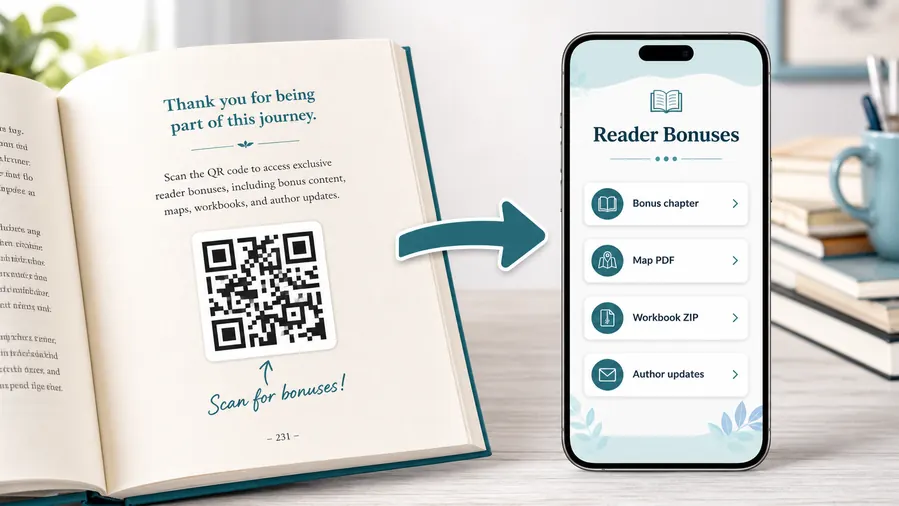
Reader bonus hubA comic QR code can keep the page art clean while sending fans to bonus panels, variant art, lore notes, character files, digital previews, soundtrack links, and creator updates.
Put bonus files where fans can explore them after reading
Use a mobile-friendly page for art packs, wallpapers, scripts, deleted scenes, character dossiers, maps, issue previews, ZIP files, or behind-the-scenes notes.
The printed code should promise the exact fan value, not a vague destination.Bonus art and wallpapers
Link readers to variant covers, process art, wallpapers, printable extras, and gallery pages.
Lore and character files
Open timelines, maps, character profiles, glossary notes, and worldbuilding that would slow down the printed story.
Digital previews and next issue
Send fans to preview pages, preorder links, shop pages, subscription lists, and release updates.
Creator notes and community
Connect readers to commentary, mailing lists, convention schedules, feedback forms, and fan channels.
Newsletter and next-book previews
A QR code near the author note or final chapter can invite readers into a newsletter, preorder page, series hub, or sample of the next book.
Feedback and author contact
Let readers report errors, ask questions, join a beta-reader list, or send private feedback without publishing a personal email address in the book.
Comic issues outlive campaign links
Dynamic QR protects printed comics when preorder pages, bonus folders, crowdfunding updates, shop URLs, or creator platforms change after publication.
Put the QR where it does not fight the art
Back matter, inside covers, ads, inserts, bookmarks, and signing cards usually work better than placing a code in the middle of a story panel.

Comic print check
Check comic QR codes before issues, covers, and inserts go to print
Print readyComic QR codes need enough contrast, quiet zone, and placement discipline so they do not damage the art or fail on glossy covers, dark panels, ads, stickers, or convention materials.

Protect the art and the scan area
Keep the QR code away from dense panels, dark gradients, gutters, binding edges, and busy cover art unless it has a clear quiet zone and strong contrast.
Test the actual printed size on cover stock, interior paper, stickers, and inserts before approving a full run.
Verify the fan destination before print approval
Scan proofs and confirm that the code opens bonus art, next-issue preorder, creator page, store link, convention extras, or digital preview as promised.
Keep a simple issue map so every printed QR has a destination owner and update plan.
Use a focused fan page when the QR offers several extras
A comic QR may need to present bonus art, lore, preorder, shop, creator updates, convention dates, and digital editions from one scan.
A clean mobile landing page keeps those actions organized while the printed issue preserves the art and pacing.
Back matter
Open bonus art, creator notes, next issue, mailing list, and fan resources.
Variant cover insert
Link to process art, artist notes, shop bundles, and collector updates.
Convention card
Send fans to store links, signing follow-up, digital previews, and preorder pages.
Retail poster
Route shop visitors to previews, issue lists, creator pages, and local event details.
Print only after the fan path is ready
The QR image, artwork placement, CTA, and destination should be tested together before the issue, insert, or convention material is distributed.
After-print campaign control
Keep comic QR links alive after preorder, store, and bonus pages move
DynamicComic books, inserts, posters, and convention cards can stay in circulation while campaigns, store links, bonus folders, and event pages change. Dynamic QR keeps the printed code useful.
The issue keeps pointing at an old campaign
A static QR works while the destination is permanent, but comic launch pages, crowdfunding updates, shop listings, and bonus files often move.
Printed issues, posters, and convention cards can keep circulating after the link is no longer the best path.
The same printed code can follow the current fan destination
Dynamic QR lets the creator or publisher move scanners from preorder to shop, from campaign to bonus library, or from event page to series hub.
That protects long-lived issues and lets old print keep supporting new releases.

Preorder to shop
Redirect old issue codes from launch pages to live store pages or bundles.
Bonus file updates
Replace art packs, lore files, wallpapers, scripts, and ZIP downloads behind the same QR.
Convention campaigns
Update table cards, posters, stickers, and signing materials between events.
Series hub changes
Send older issues to the current reading order, new releases, mailing list, or creator page.
Use dynamic QR when comic print should keep supporting the series
If the code will live on issues, covers, inserts, or event materials, editable destinations are usually worth it.
Panel to bonus flow
Place comic QR codes where the story creates curiosity
Use comic QR codes in back matter, issue ads, convention cards, artist alley prints, variant cover inserts, store flyers, creator pages, launch posters, and collector extras. The CTA should say see bonus art, watch trailer, read webcomic, buy next issue, follow the creator, open process notes, or claim convention extra. Put the code where readers expect a bonus or next step, not in the middle of a panel that should stay immersive.
Dynamic QR codes help when store pages, issue pages, convention promos, trailers, or bonus material change after printing. Scan analytics can show whether readers actually use the extras, which can guide future issues, merch, and convention materials. QR Code Lab does not manage sales or fan accounts, but it can show which printed touchpoints send readers into the digital layer. Test the code in the actual printed comic, especially if the art behind it is dark or textured.
For convention sales, separate codes for table cards, prints, and issue inserts can show what fans scan after they leave the booth.
Fan signal reporting
Use scan data to compare comic issues, inserts, and convention materials
AnalyticsTracking is useful when separate QR codes show which issue pages, shop displays, convention cards, posters, variants, or bonus offers create fan action.

All fan scans become one total
A single QR cannot show whether interest came from a back-matter page, convention card, retail poster, variant insert, or creator table display.
That makes it harder to learn which printed touchpoints move fans to the next step.
Each comic placement becomes a signal
Use separate dynamic QR codes for issues, events, shops, variants, campaigns, and bonus downloads when comparison matters.
Scan data is not full sales attribution, but it helps show where fan attention begins.
Scan volume
Compare scans from issues, inserts, bookmarks, posters, convention cards, and shop displays.
Timing
See whether scans happen around launch, conventions, retail placement, or after readers take the issue home.
Device and browser
Check whether bonus files, store pages, previews, and signup forms work well on fan phones.
Broad location
Use approximate signals for convention cities, shop campaigns, and regional fan response.
Issue and variant comparison
Compare which printed issues, covers, and inserts create bonus or preorder scans.
Convention materials
Measure table cards, posters, stickers, signing sheets, and handouts.
Retail displays
Compare shop posters, shelf talkers, bookmarks, and local event materials.
Fan offers
Track bonus art, mailing list, digital preview, and next-issue CTAs separately.
Name comic QR codes by issue, placement, and offer
Tracking works when code names match the real printed material fans scanned.






