
Book Launch QR Code for Preorders, Events & Promo Links
Create book launch QR codes for preorder pages, launch events, review teams, bonus content, author pages, giveaways, trailers, and promo flyers readers can scan quickly online today.
Free QR code generator
Create a QR code online
Generate QR codes for websites, email, phone numbers, vCards, Wi-Fi, plain text, forms, PDF files, and campaign links. Customize colors, add a logo or frame, then download a print-ready PNG or SVG.
Choose QR code type
Website QR code, Email QR code, Phone QR code, vCard QR code, Wi-Fi QR code, Text QR code, SMS, WhatsApp, event, and download links.
Add your content
Enter your website URL, contact details, message, phone number, location, or file destination before generating the QR code.
Customize and download
Adjust QR colors, error correction, logo, frame, size, and margin. Generate QR Code, Download PNG, Download SVG, or Save and track scans.
Launch campaign links
Give every launch material one clear next step
A book launch QR code can open a preorder page, launch event page, review team signup, bonus content page, author page, giveaway, trailer, media kit, or promo flyer destination. It is useful for authors, publishers, launch teams, bookstores, event hosts, and book marketers who need printed materials to move people into the launch funnel.
The key is matching the QR destination to the campaign moment. A poster may send people to an event page. A bookmark may offer a bonus chapter. A reviewer card may open review team instructions. A bookstore table sign may open preorder or purchase links. One code can work for a broad launch page, but separate codes make the message cleaner and the analytics more useful.
QR Code Lab creates QR codes and supports dynamic destinations when launch links change. It does not manage preorders, giveaways, review teams, launch events, or video hosting. Use the platform to make printed launch assets easier to scan, update, and measure, while the real campaign action happens on the destination page you choose.
Launch campaign
Use book launch QR codes to move launch attention into one clear action
LaunchA book launch QR code should support the campaign moment: preorder, buy now, claim a bonus, RSVP for an event, join the reader list, open a media kit, or share the launch page.

Make the campaign promise match the print piece
Launch cards, posters, bookmarks, table signs, conference flyers, and bookstore displays should tell readers exactly what happens after scanning: preorder, bonus claim, event RSVP, sample chapter, or launch updates.
Launch traffic is short-lived, so the main action should be unmistakable.
Route different audiences to the right launch path
Readers may need preorder links, reviewers may need media materials, bookstores may need order information, and event attendees may need RSVP or signing details. Use separate QR destinations when the promise differs.
One generic launch page rarely serves every audience well.
Update the code as the campaign changes
A launch campaign moves from preorder to release day, then to reviews, events, evergreen sales, or the next book. Dynamic QR prevents printed launch materials from freezing the first phase.
The same printed code can keep working after launch week.A launch QR code should capture momentum before it fades
The destination needs a clear headline, one primary action, and enough context to confirm the book, author, offer, and deadline. Launch readers should not land on a general website and wonder what to click.
Use separate codes when you need to compare bookstore, event, social, poster, and street-team placements.Preorder
Send readers to retailer options, preorder bonus claim, release date details, and sample material.
Release week
Open buy links, event schedule, review prompts, share assets, and launch updates.
Events
Use QR codes for signing RSVPs, venue maps, table displays, and post-event follow-up.
After launch
Move expired campaign traffic to evergreen book pages, reviews, reader magnets, or the next title.
Launch reward
Give launch scanners a reason to act now
OfferBook launch QR codes perform better when the destination offers a clear next step with a time-sensitive reason: preorder bonus, sample chapter, giveaway, signing RSVP, launch event, or reader list signup.
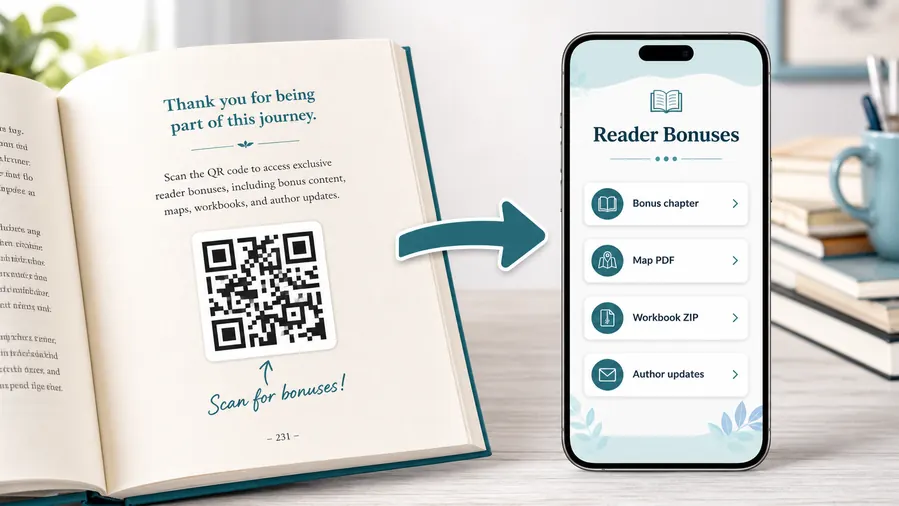
Use file hosting as the simple reader bonus system
For many authors the practical win is not a fancy website. It is a clean place to upload and share the files readers expect after scanning: a PDF bonus chapter, a map, a worksheet, a TXT reading list, or a ZIP archive with templates and printables. QR Code Lab can host the downloadable files behind a mobile micro-landing page, so the reader sees clear buttons instead of hunting through a website or typing a fragile link from the page.
When a file changes, update the hosted file or destination. The printed QR code can stay the same when you use a dynamic QR flow.Preorder campaign
Retailer links, bonus claims, release date, sample chapter, social share assets, and reminder signup.
Launch event
RSVP, venue details, signing schedule, livestream link, bookstore map, and post-event follow-up.
Reviewer and media path
Media kit, author bio, cover images, ARC notes, review guidelines, and contact form.
Street team and local promotion
Flyer links, share pages, campaign assets, giveaway forms, and tracked placement destinations.
Newsletter and next-book previews
A QR code near the author note or final chapter can invite readers into a newsletter, preorder page, series hub, or sample of the next book.
Feedback and author contact
Let readers report errors, ask questions, join a beta-reader list, or send private feedback without publishing a personal email address in the book.
Launch materials expire quickly
Posters, bookmarks, cards, and event signs may keep circulating after release. Dynamic QR helps route old campaign traffic to a current book page instead of an expired form.
Match the launch QR to the campaign material
Good spots are a resources page, the end of a chapter that references the bonus, the author note, a workbook exercise, a map page, or the final call-to-action. The code should feel like a useful next step, not a decoration.
Campaign phases
Use dynamic QR when a book launch moves from preorder to release to evergreen
DynamicBook launch links change fast. A dynamic QR code lets printed materials move from preorder bonus to launch event, buy page, review prompt, reader magnet, or next-book campaign without reprinting.
Old launch materials keep opening expired campaign pages
Static QR is fine when one permanent launch page will stay useful.
But preorder forms close, giveaways end, event pages expire, and retailer links change. Printed cards can keep sending readers into dead campaign paths.
The same launch QR can follow the campaign timeline
Dynamic QR lets you update the destination as the campaign moves through preorder, release week, reviews, events, and evergreen promotion.
That protects bookmarks, flyers, posters, signing cards, and media sheets already in circulation.

Preorder to buy now
Switch the primary destination after release day without wasting printed preorder cards.
Event updates
Update RSVP, livestream, venue, signing schedule, and post-event photo links as details change.
Bonus cleanup
Move expired bonus claim traffic to evergreen reader magnets, newsletter signup, or the current book page.
Next campaign
After launch, route interested readers to reviews, series order, author updates, or the next release.
Use dynamic when launch materials need to stay useful after launch week
A book launch is a moving campaign. Editable QR destinations keep old print from becoming a liability.
Launch timing
Keep launch QR codes flexible because campaign links change fast
Use launch QR codes on posters, bookmarks, inserts, table signs, preorder cards, signing materials, bookstore displays, event programs, press sheets, postcards, and social print pieces. The printed CTA should be specific: preorder the book, join the launch list, watch the trailer, claim the bonus, RSVP to the event, or meet the author.
Book launches change quickly. A preorder page becomes a purchase page. A giveaway closes. A trailer moves. A bonus link is replaced. An event page becomes a replay or photo page. A dynamic QR code lets the printed image keep working through those shifts instead of becoming stale after one campaign phase.
Use separate QR codes for meaningful placements if you want to learn from the launch. QR Code Lab scan analytics can show whether the bookstore display, event poster, signing card, or bookmark created more interest. That helps you plan the next print run with evidence instead of guessing. Clear code names also make it easier to review campaign results after the launch rush is over.
Launch reporting
Track book launch scans by placement, not just total interest
AnalyticsLaunch scan data is useful when each printed material has its own code: bookstore display, event table, bookmark, postcard, media sheet, or street-team flyer.

All launch scans collapse into one total
A shared launch QR code can show that people scanned, but it cannot explain whether the interest came from a signing table, bookstore display, bookmark, or street-team flyer.
Use one shared code only when placement comparison does not matter.
Each launch placement becomes a signal
Separate dynamic QR codes let you compare materials without changing the reader experience.
The result is still scan analytics, not full sales attribution, but it is far more useful than guessing after launch week.
Scan volume
See how many scans each launch material received during preorder, release week, and post-launch windows.
Time and device
Check when readers scanned and which device or browser opened the destination.
Broad location
Use approximate location signals to spot regional interest or event patterns without treating them as exact identity data.
Campaign comparison
Compare bookmarks, posters, table cards, flyers, and media sheets side by side.
Bookstore display review
Compare scans from shelf signs, counter cards, posters, and local event materials.
Event table cleanup
See whether signing cards, QR table signs, or launch party flyers generated attention.
Street-team materials
Separate campaign codes by region, partner, or print asset to understand where promotion created scans.
Post-launch follow-up
Spot old materials that still scan after preorder or event pages should have changed.
Name launch codes before printing campaign assets
Analytics are only useful when code names match the real materials, dates, teams, and placements you want to compare.






