
QR Code for Low Content Books - KDP Extras & Templates Online
Create QR codes for low content books linking bonus templates, tutorials, printable pages, author sites, email signup, updates, and support pages. Add extras to planners, journals, and logs.
Free QR code generator
Create a QR code online
Generate QR codes for websites, email, phone numbers, vCards, Wi-Fi, plain text, forms, PDF files, and campaign links. Customize colors, add a logo or frame, then download a print-ready PNG or SVG.
Choose QR code type
Website QR code, Email QR code, Phone QR code, vCard QR code, Wi-Fi QR code, Text QR code, SMS, WhatsApp, event, and download links.
Add your content
Enter your website URL, contact details, message, phone number, location, or file destination before generating the QR code.
Customize and download
Adjust QR colors, error correction, logo, frame, size, and margin. Generate QR Code, Download PNG, Download SVG, or Save and track scans.
QR solutions for this use case
KDP bonus path
Add useful templates, tutorials, updates, and author links to low content books
A QR code for low content books is useful when a simple printed interior needs digital extras that would be awkward to fit on the page. It can open bonus templates, tutorials, printable pages, author sites, email signup, update pages, support pages, companion resources, refill files, and product instructions. KDP publishers, planner creators, journal creators, logbook authors, activity book publishers, and low content sellers can use QR codes to make a book feel more helpful after purchase.
The strongest low content QR codes give readers something concrete. A planner can offer printable refills. A logbook can open instructions or updates. A habit tracker can open bonus templates. A puzzle or activity book can open answer pages or support. Back matter can connect readers to the author site, future editions, or an email list. QR Code Lab helps create print-ready codes, dynamic destinations, and scan analytics so publishers can see which extras readers actually use.
QR Code Lab creates URL QR codes only. It does not create templates, host downloads, manage KDP listings, or provide publishing services. The linked file host, author website, email platform, or support page provides the actual content.
KDP reader extras
Help low-content book buyers reach downloads, bonuses, instructions, updates, and support
BooksA low-content book QR code should extend the printed product without making the page feel unfinished. Use it for printable extras, habit trackers, templates, instructions, companion files, updates, reader support, and ethical feedback paths.

Give buyers the files that could not fit inside the book
Use QR codes inside journals, planners, puzzle books, logbooks, workbooks, and trackers to open bonus PDFs, printable pages, spreadsheet templates, checklists, and setup instructions.
The scan should feel like added value, not a missing part of the book.
Support the reader after purchase
A hosted page can explain how to use the planner, download updates, report a printing issue, ask a question, or find the next related book.
Reader support matters when the book format is simple but the use case is ongoing.
Keep companion links editable after the book is printed
Dynamic QR helps if bonus files, errata, templates, landing pages, or newsletter destinations change while paperback inventory keeps selling.
For KDP books, the printed code may live for years.A low-content book QR should improve the product experience
The buyer may be tracking habits, planning a trip, logging inventory, solving puzzles, journaling, studying, or managing a small workflow. The QR destination should make that activity easier.
Use CTAs such as download bonus pages, get printable templates, read setup notes, report an issue, or see related books.Bonuses
Open printable pages, PDF packs, templates, trackers, calendars, and checklists.
Instructions
Explain how to use the planner, logbook, workbook, puzzle format, or companion file.
Updates
Keep errata, corrected files, new editions, and resource links current.
Relationship
Offer reader support, newsletter signup, author page, and related titles without forcing it.
Reader bonus files
Use QR codes in low-content books for printable bonuses and companion resources
BonusesLow-content books often have a simple printed format, but the reader may benefit from extra files: printable refills, tracker sheets, spreadsheets, examples, answer notes, setup pages, or updates.
Use file hosting as the simple reader bonus system
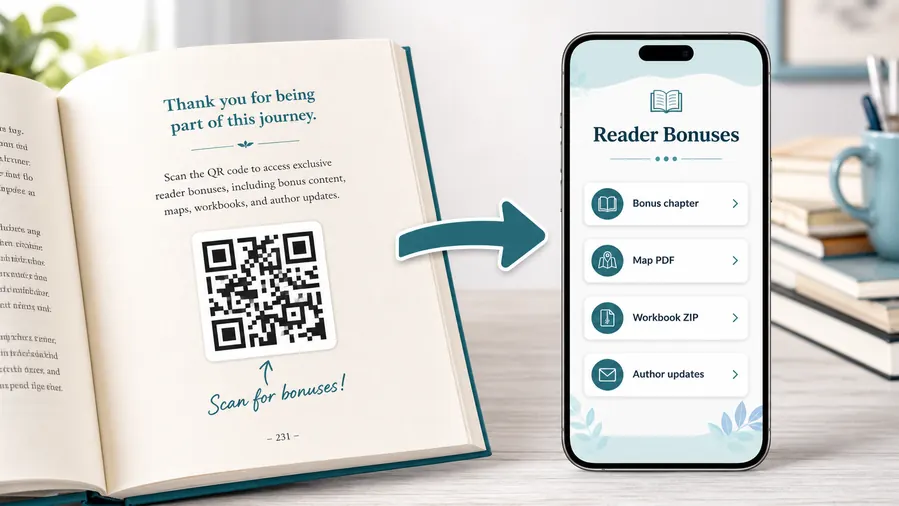
For many authors the practical win is not a fancy website. It is a clean place to upload and share the files readers expect after scanning: a PDF bonus chapter, a map, a worksheet, a TXT reading list, or a ZIP archive with templates and printables. QR Code Lab can host the downloadable files behind a mobile micro-landing page, so the reader sees clear buttons instead of hunting through a website or typing a fragile link from the page.
When a file changes, update the hosted file or destination. The printed QR code can stay the same when you use a dynamic QR flow.Bonus chapters and deleted scenes
Give readers an epilogue, side story, alternate scene, or preview chapter without increasing the page count or changing the KDP interior.
Maps, illustrations, and reference images
Fantasy, history, travel, education, and technical books often need visuals that are better in color, larger format, or updated outside the printed page.
Worksheets, templates, and ZIP downloads
Non-fiction readers can download checklists, spreadsheets, planners, exercises, workbook pages, or a ZIP bundle of printable resources.
Audio, video, and companion media
Send readers to pronunciation guides, author commentary, demos, playlists, interviews, or short explanations that make the book more useful.
Newsletter and next-book previews
A QR code near the author note or final chapter can invite readers into a newsletter, preorder page, series hub, or sample of the next book.
Feedback and author contact
Let readers report errors, ask questions, join a beta-reader list, or send private feedback without publishing a personal email address in the book.
Do not print a fragile file link directly into the book
A dynamic QR destination gives you one stable printed code while the actual files, download buttons, and support pages can be updated later.
Place the QR where the reader expects help
Good spots are a resources page, the end of a chapter that references the bonus, the author note, a workbook exercise, a map page, or the final call-to-action. The code should feel like a useful next step, not a decoration.
KDP print readiness
Make the QR code in a low-content book readable for the lifetime of the paperback
Print checkKDP interiors are not easy to fix after copies are printed. Test the QR at the final trim size, page color, margin, and paper contrast before publishing.

Use enough size and quiet zone
Start with the physical basics: give the QR code enough size for the viewing distance, keep a clean quiet zone around it, and use strong contrast between the code and the background. A decorative frame or brand color is fine only while the finder squares and the pattern remain clear.
Export SVG or PDF when the QR code goes into professional print layouts. Raster files can work for small jobs, but vector output protects sharp edges on packaging, books, posters, labels, inserts, and manuals. Avoid inverted colors unless you test them on several phones, because some combinations look stylish on screen and scan poorly on paper.
Test the printed proof
Do not test only the design file on your monitor. Print a sample at the real size, scan it with a phone from the likely distance, and check it under normal lighting. A QR code in a book margin, on glossy packaging, on a folded flyer, or behind a display window behaves differently from the same code on a bright screen.
When the printed material is expensive to replace, use a dynamic QR code. If the destination changes later, the printed code can keep working while the link, file, offer, feedback form, or microlanding page is updated in QR Code Lab.
Use a companion landing page when the book has more than one resource
A direct URL is enough when every scanner should go to the same single page. For books, manuals, packaging, training material, event handouts, and product inserts, a microlanding page is often more useful because it can collect several clear actions behind one printed QR code.
In QR Code Lab you can make that page practical: upload a cover image or product image, add buttons for the main action, attach a PDF for reading, add a ZIP with bonus files, and include a feedback or contact path. The printed QR code stays simple, while the destination can present the exact next step the scanner needs.
Planner refill pack
Printable pages, calendar templates, habit trackers, and update notes.
Puzzle book extras
Hints, answer pages, correction notes, bonus puzzles, and issue reporting.
Workbook support
Examples, worksheets, spreadsheets, file downloads, and contact path.
Journal companion
Prompts, printable inserts, related titles, and reader feedback.
Print only after the scan path is tested from the real book
A low-content book QR code should work as calmly on paper as it does in the design file.
After-publication control
Keep low-content book QR destinations editable after KDP copies are printed
DynamicOnce a paperback is printed, the QR code may live in reader hands for years. Dynamic QR protects bonus files, author pages, support links, and corrections from becoming stale.
A printed book cannot easily recover from a dead companion link
Static QR is fine only when the destination is permanent. Bonus files, file hosts, author sites, newsletters, and support pages often change.
A broken resource link makes the book feel neglected.
The printed code can keep opening the current resource hub
Dynamic QR lets the book continue to point readers to updated downloads, corrections, instructions, support, and related titles.
This is especially useful for KDP books that keep selling after the first upload.

Bonus file updates
Replace PDFs, ZIP files, templates, spreadsheet links, and printable packs without changing the printed book.
Errata and corrections
Add correction notes, improved examples, answer fixes, or updated instructions after publication.
Author platform changes
Move newsletter, author page, support, or related-book links while keeping one printed QR.
Series expansion
Point older books to newer editions, companion products, bundles, and reader resources.
Use dynamic QR when the book promises a resource that may evolve
The reader should not suffer because a folder, file, or author site changed after print.
Interior and back-matter flow
Make the QR code promise useful extras, not a vague author homepage
Use low content book QR codes in back matter, instruction pages, template sections, bonus pages, covers, launch inserts, companion bookmarks, and support pages. The CTA should say download bonus templates, get printable pages, watch tutorial, open updates, contact support, join the author list, or get refills. Readers are more likely to scan when the benefit is specific and immediately related to the page they are using.
For KDP print, test size, quiet zone, and contrast before ordering copies. Avoid placing the code too close to the binding or trim edge. Dynamic QR codes help protect printed books when bonus files, author pages, email forms, or support links change after launch.
Scan analytics can show whether readers actually use the extras, while the linked host or email tool handles downloads and signups. That feedback can guide the next edition: more templates, clearer instructions, better support links, or fewer unused bonuses. If the book has several bonus sections, use labels that name the exact file or tutorial so readers do not feel sent to a random author page.
Reader scan reading
Use scan data to learn which low-content book resources readers actually open
AnalyticsQR analytics can show whether readers scan from front matter, section pages, back matter, bonus pages, or support prompts. Use the signal to improve future books without overclaiming reader behavior.

All reader scans collapse into one number
A single QR can show general interest, but it cannot tell whether readers wanted bonus files, setup help, answers, corrections, or related books.
Use one code only when resource-level reporting does not matter.
Each reader resource becomes easier to understand
Separate codes can compare front matter, section resources, answer pages, support, and back matter links.
This is directional product feedback, not a complete reader journey, but it helps improve future editions.
Scan volume
See how many readers opened each resource destination.
Time and device
Check when readers scan and which device or browser opens the page.
Broad location
Use approximate location signals carefully, mainly for edition and market context.
Resource comparison
Compare bonus downloads, setup notes, support pages, answers, corrections, and related-title links.
Name codes by book and placement
Use names such as planner-front-bonus, puzzle-answer-notes, workbook-support, or journal-backmatter.
Compare promised bonuses
See whether readers prefer refills, templates, answer notes, examples, support, or related-book paths.
Keep expectations modest
Scan analytics shows resource interest, not whether the reader finished or loved the book.
Books and printed content
Learn whether readers open bonus pages, downloads, updates, or feedback forms from book pages.
Reader scan data is most useful when each code has a resource purpose
Good QR naming turns scans into practical product feedback for future KDP work.






