
Magazine QR Code for Digital Issues, Articles & Offers Online
Create magazine QR codes for digital issues, article pages, subscriptions, bonus content, advertiser pages, reader surveys, and event pages. Add them to print issues, ads, and inserts.
Free QR code generator
Create a QR code online
Generate QR codes for websites, email, phone numbers, vCards, Wi-Fi, plain text, forms, PDF files, and campaign links. Customize colors, add a logo or frame, then download a print-ready PNG or SVG.
Choose QR code type
Website QR code, Email QR code, Phone QR code, vCard QR code, Wi-Fi QR code, Text QR code, SMS, WhatsApp, event, and download links.
Add your content
Enter your website URL, contact details, message, phone number, location, or file destination before generating the QR code.
Customize and download
Adjust QR colors, error correction, logo, frame, size, and margin. Generate QR Code, Download PNG, Download SVG, or Save and track scans.
Print to digital issue
Give printed stories and ads a useful digital next step
A magazine QR code is useful when a printed page creates interest that cannot fully fit on paper. It can open a digital issue, article page, subscription page, bonus interview, video companion, audio clip, advertiser landing page, product page, reader survey, event listing, or campaign offer. Publishers, editors, local magazines, trade publications, independent zines, advertisers, and media teams can use QR codes to connect a reader's attention on the page with a next action on the phone.
The best magazine QR codes add value instead of decorating the layout. A feature article can open a longer interview. A product roundup can open buying details. An advertiser can open a limited offer. An event guide can open live schedule updates. A subscription page can catch interest while the reader is already enjoying the issue. QR Code Lab helps make those links print-ready, updateable, and measurable when you use dynamic codes.
QR Code Lab creates QR codes and can track scans, but it does not sell subscriptions, collect reader data, host publisher platforms, process payments, or manage advertiser campaigns. The code should point to the destination your publishing, ad, survey, or commerce system already controls.
Books, KDP, and author bonuses
Connect magazine pages to the deeper story, offer, or reader action
Reader bonus hubA magazine QR code should extend the printed issue with resources that make sense from the exact page: article sources, video, product links, subscriptions, forms, downloads, archives, or campaign offers.
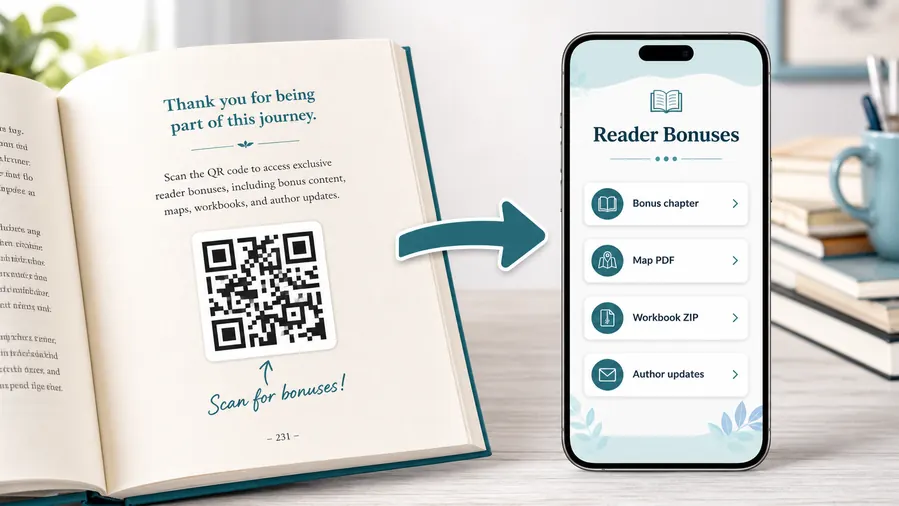
Use the QR for material that would overload the page
Print can introduce the story, but the QR can carry long source lists, behind-the-scenes files, interviews, galleries, templates, maps, downloads, product pages, and reader forms.
The caption should promise the specific extra, not simply say “scan here.”Article sources and extended reading
Link readers from the article to citations, interviews, transcripts, photo galleries, data notes, playlists, maps, or related archive material.
Offers, subscriptions, and reader actions
Use QR codes for subscription forms, issue bundles, advertiser offers, contest entries, survey pages, event registration, and product pages.
Worksheets, templates, and ZIP downloads
Non-fiction readers can download checklists, spreadsheets, planners, exercises, workbook pages, or a ZIP bundle of printable resources.
Audio, video, and companion media
Send readers to pronunciation guides, author commentary, demos, playlists, interviews, or short explanations that make the book more useful.
Newsletter and next-book previews
A QR code near the author note or final chapter can invite readers into a newsletter, preorder page, series hub, or sample of the next book.
Feedback and author contact
Let readers report errors, ask questions, join a beta-reader list, or send private feedback without publishing a personal email address in the book.
Magazine print keeps circulating after links change
A printed issue may stay on tables, shelves, waiting rooms, or reader collections long after an offer expires or a page moves. Dynamic destinations protect that long tail.
Put the QR beside the article promise
A QR near a feature, ad, recipe, interview, product spread, or editor note works best when the reader understands exactly what extra value the scan opens.
Magazine placement
Place magazine QR codes where the reader already wants the next layer
PlacementMagazine QR placement should follow reader intent: source notes beside an article, product links beside a spread, signup beside an offer, video beside a feature, or subscription near the callout.

The code appears without a clear reader promise
A QR tucked into the page design may look modern, but readers often ignore it if they do not know what they get.
Magazine print has limited attention, so the scan promise should be specific and close to the related content.
The QR extends the exact page experience
Put source links beside reporting, videos beside interviews, product links beside shopping pages, and subscription actions beside the offer.
The code should feel like a continuation of the page, not a generic website shortcut.
What is the reader curious about now?
Sources, video, gallery, product, recipe, archive, offer, event, or subscription should shape the destination.
Does the caption name the payoff?
Use “Watch the interview,” “Get the sources,” “Shop the spread,” or “Enter the contest.”
Will the link outlive the issue?
Use dynamic QR for offers, advertiser links, event pages, and pages that may move.
Can the code scan from the printed size?
Small editorial layouts still need quiet zone, contrast, and enough physical size.
Feature article
Open sources, extended interview, gallery, video, transcript, maps, and archive material.
Product spread or ad
Send readers to product pages, advertiser offers, coupon pages, lookbooks, and lead forms.
Recipe or guide
Link to ingredients, printable files, templates, tutorials, videos, and updates.
Subscription or contest callout
Use for signup forms, issue bundles, sweepstakes, surveys, and reader clubs.
Poster or event sign
Best where people pause: registration line, booth, waiting area, seat back, schedule board, or exit path. Weak when people only pass at speed.
Business card
Useful after a conversation because the person already knows why they might save a contact, open a portfolio, book a call, or follow up.
Window sign
Good for after-hours menus, booking, pickup instructions, or quick offers. Avoid complex actions when the person is outside and just walking by.
Cover or front label
Use it only when the promise is immediate and clear. Otherwise the better scan moment is often inside the material or after the first interaction.
Magazine QR placement should reward reader attention
Place the code where the reader has a clear reason to continue beyond print, then make the destination specific.
Magazine print readiness
Print magazine QR codes so they survive layout, paper, and reading distance
Print readyMagazine QR codes compete with typography, photography, ads, folds, gloss, and tight page grids. They need clear contrast, quiet zone, size, and a caption that fits the editorial layout.

Protect quiet zone inside busy layouts
Magazine pages often crowd images, captions, and ads around the QR code. Keep enough blank space so the scanner can read the pattern cleanly.
Avoid placing QR codes too close to folds, binding, page edges, heavy texture, or glossy glare without testing a printed proof.
Match size to how readers hold the issue
A code in a handheld magazine can be smaller than a wall poster, but it still needs enough size for typical phone cameras and lighting.
Test the final paper stock, ink, and page position before sending the issue to print.
Use a mobile landing page when one magazine QR carries several extras
A feature page may need video, sources, downloads, sponsor links, and feedback behind one printed code.
A short mobile landing page can organize those actions without crowding the magazine layout.
Feature story
Open sources, interview clips, galleries, maps, or archives from the article.
Advertiser offer
Send readers to a coupon, product page, lead form, booking page, or limited campaign.
Recipe or tutorial
Link to printable instructions, ingredient lists, templates, and videos.
Subscription callout
Route readers to renewal, issue bundles, newsletter, contest, or reader club signup.
Magazine QR codes need editorial clarity and print discipline
The code should scan cleanly and clearly explain why the reader should leave the page for the phone.
Issue lifespan
Use dynamic QR when magazine links may change after the issue prints
DynamicMagazine issues can circulate for weeks or years while offers, advertiser pages, event links, subscription campaigns, product pages, and article extras change. Dynamic QR protects the printed issue from stale destinations.
A printed issue can outlive the campaign link
A static URL may work on publication day and fail later when an advertiser campaign ends, a product sells out, an event passes, or a source page moves.
Readers may scan old issues from waiting rooms, archives, desks, and saved copies long after the first distribution window.
The same printed QR can move to the current destination
Dynamic QR lets the publisher update article extras, subscription pages, advertiser offers, contest status, or evergreen archives without changing the printed code.
That keeps the scan useful even when the original issue context ages.

Advertiser offers
Redirect expired promotions to a current offer, product page, lead form, or evergreen advertiser landing page.
Article extras
Update sources, galleries, videos, corrections, transcripts, and archive links after publication.
Events and contests
Move scans from registration to recap, winner announcement, waitlist, next event, or closed notice.
Subscription campaigns
Change issue bundles, renewal pages, newsletter offers, and reader club signups over time.
Use dynamic QR when the magazine page has a long tail
If the printed issue may keep circulating after the destination changes, an editable QR keeps reader trust intact.
Reader attention
Place the scan where curiosity is already strongest
Magazine QR placement should respect the reader's flow. A code beside an article should deepen that article, not send people to a generic homepage. A code inside an ad should open the advertised product, offer, booking page, or brand story. A code near a subscription message should open the subscription path directly. Covers, editor notes, product roundups, event listings, advertiser sections, back-page promos, and special issues can all work when the scan has a clear reason.
Use direct labels such as watch the full interview, read the bonus story, open the offer, subscribe online, enter the survey, or view event updates. Dynamic QR codes are especially useful for magazines because advertiser pages, offers, videos, and event details can change after print. QR Code Lab analytics can help compare which pages, advertisers, and placements earned scans. That does not prove a purchase or subscription happened, but it gives publishers a practical signal about which printed moments moved readers to act.
For advertisers, separate codes are often worth the small extra setup. A full-page ad, sidebar mention, coupon box, and event calendar item may all deserve different tracking so the campaign report is not one blended number.






