
QR Code for Book Signings - Author Events & Reader Links
Create QR codes for book signings linking purchase pages, author bios, newsletters, event details, bonus content, social profiles, and reviews. Use them on table signs, bookmarks, and cards.
Free QR code generator
Create a QR code online
Generate QR codes for websites, email, phone numbers, vCards, Wi-Fi, plain text, forms, PDF files, and campaign links. Customize colors, add a logo or frame, then download a print-ready PNG or SVG.
Choose QR code type
Website QR code, Email QR code, Phone QR code, vCard QR code, Wi-Fi QR code, Text QR code, SMS, WhatsApp, event, and download links.
Add your content
Enter your website URL, contact details, message, phone number, location, or file destination before generating the QR code.
Customize and download
Adjust QR colors, error correction, logo, frame, size, and margin. Generate QR Code, Download PNG, Download SVG, or Save and track scans.
Author event action
Help signing-table interest become purchases, follows, and reviews
A QR code for book signings is useful when the signing table needs more than a stack of books and a poster. It can open a purchase page, author bio, newsletter signup, event details, bonus content, social profile, review page, sample chapter, series list, or preorder page. Authors, bookstores, publishers, libraries, event hosts, and book marketers can use QR codes to help readers act while they are already talking about the book.
At a signing, people may be standing in line, holding a book, browsing a table, or trying not to slow down the author. The QR code should support that moment: buy the next book, join the author list, claim a bonus, read the first chapter, follow the author, or find the series order. QR Code Lab helps make those links printable and trackable for each event material.
QR Code Lab creates URL QR codes only. It does not process purchases, collect emails, manage events, or collect reviews. The retailer, newsletter tool, event platform, review site, or author website handles the actual reader action.
Signing table moment
Turn book signing scans into reader follow-up while the meeting is fresh
SigningA book signing QR code should help readers continue after the table: buy the book, join the author list, get event photos, find the series order, claim a bonus, review later, or see the next appearance.

Make the table scan useful for people in a hurry
Use QR codes on table signs, bookmarks, postcards, receipts, and signing inserts so readers can open buy links, newsletter signup, event bonus, author page, or next-book path after the conversation.
The QR should serve both the person who bought and the person who is still deciding.
Keep event-specific actions separate from evergreen author links
An event QR may need signing photos, venue details, preorder bonus, bookstore link, or limited offer; the author hub may need newsletter, series order, and future appearances.
Different promises deserve different destinations when the table is busy.
Update the destination after the signing ends
Dynamic QR lets the same bookmark or table card move from event RSVP to day-of resources, then to photos, reviews, next events, or evergreen reader follow-up.
Signing materials often travel to the next event.A signing QR should preserve the personal author moment
Readers scan because they met the author, noticed the table, or want to continue later. The destination should feel connected to that event and make the next step warm and obvious.
Do not bury the event offer behind a generic author homepage.Buyers
Open bonus claim, care notes, series order, review reminder, and author updates.
Browsers
Offer sample chapter, retailer links, trailer, author bio, and email signup.
Event hosts
Link venue page, schedule, photos, bookstore, and future appearances.
After the event
Redirect to photos, thank-you page, next signing, reviews, and evergreen book links.
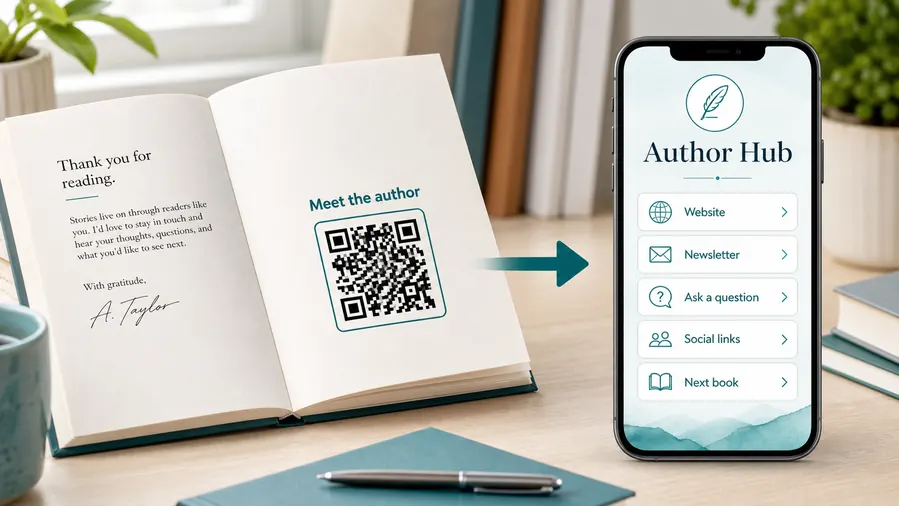
Signing placement
Place book signing QR codes where readers can scan without holding up the line
PlacementBook signing QR placement should respect the table flow: browsers need quick context, buyers need follow-up, and the author needs the line to keep moving.

The QR creates a decision bottleneck at the table
If the destination is vague, readers may stop to ask what the code does while the line builds.
The printed CTA should answer that question before the scan.
The QR gives readers a clear follow-up path
Use table signs for primary event action, bookmarks for keepable author links, and receipts for post-purchase reviews or bonuses.
The scan should be quick enough to use during or after the signing.
Is the scanner buying, browsing, or already a fan?
Each reader type needs a different emphasis: sample, buy link, bonus, newsletter, or series order.
Can the reader scan after stepping aside?
Bookmarks and cards work well when the table is busy.
What changes after the event?
Use dynamic QR for RSVP, event bonus, photos, review reminders, and next appearances.
Is the CTA specific enough?
Say get the bonus, join for release alerts, see event photos, or find the next book.
Table sign
Open the main event action: bonus claim, newsletter, buy links, or author page.
Bookmark
Give readers a keepable path to series order, author hub, reviews, and future events.
Postcard
Use for preorder, next book, sample chapter, reader magnet, or launch offer.
Receipt or insert
Send buyers to thank-you page, review reminder, photos, and bonus downloads.
Event poster
Open RSVP, venue details, schedule, bookstore links, and calendar save.
Book club card
Link discussion questions, author visit request, resources, and follow-up.
Queue sign
Show author bio, books, prices, signing rules, and newsletter offer before the table.
Photo backdrop
Connect readers to event photos, social tags, next appearances, and sharing links.
Signing QR placement should support the line and the relationship
Put the code where it gives readers a clear next step without slowing the author moment.
Signing table flow
Put QR codes on materials readers actually carry away
Use book signing QR codes on table signs, bookmarks, postcards, bookplates, event posters, library flyers, bookstore shelf cards, receipts, author business cards, swag, and launch handouts. The CTA should be clear: buy online, join author list, claim bonus, read sample, leave review, see series order, or preorder the next book. One table can use more than one QR code if the actions are different.
Dynamic QR codes help when retailer links, event pages, bonus pages, newsletter links, and review pages change between events. Separate QR codes for the table sign, bookmark, postcard, and poster can show which materials keep working after the signing. That scan data does not prove a sale or signup, but it shows whether the printed piece moved readers toward the next step. Keep the destination fast on mobile because readers may scan while standing, chatting, or moving through the line.
After the event, the same printed card can continue working as a reader reminder. That makes it useful to point at durable pages such as author hub, series order, or bonus page.
Event signal
Use scan data to compare signing materials without overclaiming book sales
AnalyticsTracking is useful when separate QR codes compare table signs, bookmarks, postcards, posters, receipts, and bookstore displays during or after a signing.

All signing interest becomes one number
A single QR code cannot show whether scans came from the table sign, bookmark, poster, receipt, or bookstore display.
That makes it harder to learn what signing material worked.
Each signing placement becomes a signal
Use different dynamic QR codes for event materials when the author or publisher wants placement-level learning.
Scan reporting is not full book-sales attribution, but it helps compare attention.
Scan volume
Compare scans from table signs, bookmarks, postcards, posters, and receipts.
Timing
See whether scans happen before the signing, during the line, after purchase, or after the event.
Device and browser
Spot basic device patterns that may affect signup, store, photo, or review pages.
Broad location
Use approximate signals to compare bookstore, venue, city, or event promotion.
Table materials
Compare table signs, bookmarks, cards, and QR inserts during the signing.
Bookstore promotion
See whether posters, window signs, and shelf talkers keep scanning before or after the event.
Post-event follow-up
Measure scans for photos, reviews, bonus claims, and next appearances.
Launch tour learning
Compare cities, venues, event types, and printed materials without treating scans as direct sales proof.
Name signing QR codes by material before the event
Tracking helps only when code names match the real table sign, bookmark, poster, receipt, or venue.






