
Book Insert QR Code for Reader Bonuses, Reviews & Offers
Create book insert QR codes for bonus downloads, author newsletters, review links, sample chapters, worksheets, launch offers, and reader pages printed inside books and inserts today.
Free QR code generator
Create a QR code online
Generate QR codes for websites, email, phone numbers, vCards, Wi-Fi, plain text, forms, PDF files, and campaign links. Customize colors, add a logo or frame, then download a print-ready PNG or SVG.
Choose QR code type
Website QR code, Email QR code, Phone QR code, vCard QR code, Wi-Fi QR code, Text QR code, SMS, WhatsApp, event, and download links.
Add your content
Enter your website URL, contact details, message, phone number, location, or file destination before generating the QR code.
Customize and download
Adjust QR colors, error correction, logo, frame, size, and margin. Generate QR Code, Download PNG, Download SVG, or Save and track scans.
Printed insert action
Make the loose card inside the book earn its place
A book insert QR code can open bonus downloads, author newsletters, review links, sample chapters, worksheets, launch offers, reader pages, preorder pages, companion resources, or author contact pages. It is useful for authors, KDP publishers, indie publishers, launch teams, educators, and book marketers who want one extra printed touchpoint inside the book package.
A loose insert is easy to ignore, so the QR promise has to be clear. Do not make the reader guess. Say what the scan gives them: claim the bonus files, join the reader list, leave feedback, read the sample chapter, download worksheets, watch the companion video, or get the next-book update. The code should feel like a useful invitation, not a random marketing square.
QR Code Lab creates the QR code and helps the printed insert stay useful when the link changes. It does not print inserts, collect reviews, host your files, manage your email list, or run a launch offer. Point the code to the page or service where the real reader action happens.
Inside-the-book moment
Use book insert QR codes to give readers a clear next step after purchase
Book insertA book insert QR code should justify the extra card, bookmark, or page by opening something readers actually value: bonus files, setup notes, discussion resources, a newsletter offer, a sample chapter, or the next book.

Make the insert promise specific
Use the printed insert for one clear reader action: download the workbook files, claim a launch bonus, join the author list, find the series order, open discussion questions, or access companion resources.
A specific reward makes the insert feel intentional instead of promotional clutter.
Put extras on a page that feels connected to the book
The destination should show the book title, cover, or series context and then organize the files or actions in a clean mobile layout. Readers should not land in a raw folder or broad author homepage.
The insert should continue the reading experience.
Keep the insert useful across print runs
Insert cards can be packed with books for months. If bonuses, event pages, signup forms, or retailer links may change, use an editable destination so the printed card stays accurate.
A book insert often lives longer than the first campaign URL.A book insert QR code should reward the reader quickly
The reader already bought, borrowed, or opened the book. The scan should deliver on the printed promise with minimal friction and without forcing them to search through unrelated links.
If the scan asks for email, explain the exchange before the form.Bonus delivery
Use inserts for companion PDFs, maps, templates, audio, playlists, illustrations, or exercise files.
Author relationship
Invite newsletter signup, reader magnets, review paths, or event updates with a clear benefit.
Series navigation
Help readers find the next book, reading order, preorder page, or related titles.
Support
For workbooks or manuals, link corrections, replacement files, instructions, or help pages.
Insert value
Make the insert QR code worth keeping with the book
Reader extrasInsert cards work when the QR opens a durable resource readers may return to: downloads, guides, templates, reading order, community links, support notes, or bonus material tied to the book.
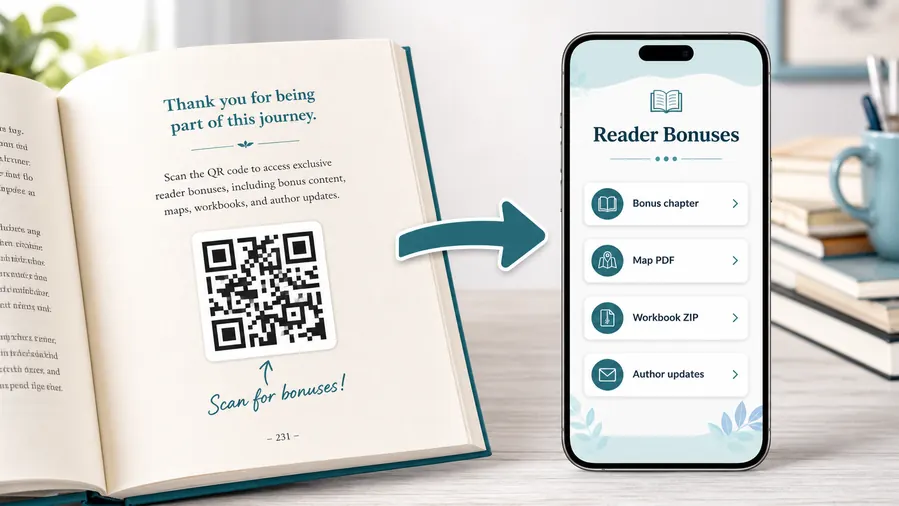
Use file hosting as the simple reader bonus system
For many authors the practical win is not a fancy website. It is a clean place to upload and share the files readers expect after scanning: a PDF bonus chapter, a map, a worksheet, a TXT reading list, or a ZIP archive with templates and printables. QR Code Lab can host the downloadable files behind a mobile micro-landing page, so the reader sees clear buttons instead of hunting through a website or typing a fragile link from the page.
When a file changes, update the hosted file or destination. The printed QR code can stay the same when you use a dynamic QR flow.Companion downloads
PDFs, worksheets, source files, templates, maps, illustrations, recipes, music lists, audio, or ZIP archives.
Reader relationship
Newsletter signup, bonus chapter delivery, author updates, book club material, and reader feedback forms.
Book support
Corrections, updated examples, replacement files, setup instructions, troubleshooting, or errata pages.
Series and launch paths
Reading order, preorder pages, next-book links, launch bonuses, giveaways, and event details.
Newsletter and next-book previews
A QR code near the author note or final chapter can invite readers into a newsletter, preorder page, series hub, or sample of the next book.
Feedback and author contact
Let readers report errors, ask questions, join a beta-reader list, or send private feedback without publishing a personal email address in the book.
Insert links need to survive warehouse and retail time
Cards may sit inside inventory long after a launch campaign changes. Editable destinations help keep reader bonuses, forms, and files current.
Use inserts for actions that deserve room
Good spots are a resources page, the end of a chapter that references the bonus, the author note, a workbook exercise, a map page, or the final call-to-action. The code should feel like a useful next step, not a decoration.
Print handoff
Proof book insert QR cards before they go into inventory
Print readyA book insert QR code has to scan after trimming, coating, packing, shelf time, and reader handling. Test the final card or bookmark, not only the design preview.

Protect scan quality on the actual insert material
Keep the QR large enough for the card size, preserve quiet zone, and avoid low contrast backgrounds, glossy glare, folds, or decorative borders that crowd the code.
Scan a printed sample from the distance a reader will naturally hold a bookmark, card, or insert page. A code that works on a screen can fail after ink, coating, and trimming.
Test the reader destination from the printed card
The destination should open quickly on a phone, show the book or offer context, and deliver the promised file or signup path without confusion.
When cards are packed at scale, use a dynamic QR destination if files, forms, campaigns, or support pages may change after the insert is printed.
Use a landing page when the insert offers several actions
A direct file link is enough for one permanent download. A landing page is better when the insert needs bonus files, newsletter signup, series links, support, and event paths together.
The printed insert stays simple while the destination can organize the reader choices in a mobile-first way.
Bonus card
Open a reader magnet, launch bonus, sample chapter, giveaway, or downloadable companion file.
Bookmark
Link to author hub, series order, reviews, newsletter signup, and event details.
Workbook insert
Send readers to templates, worksheets, audio, examples, corrections, and replacement files.
Signing table insert
Connect event visitors to photos, preorder links, author updates, and next-book offers.
Print inserts only after the scan path is proven
A polished card still fails if the code is too small, the caption is vague, or the reader lands on the wrong resource.
Insert placement
Place book insert QR codes where the reader sees the reward
PlacementA QR insert should sit near the promise it makes: a loose card for bonuses, a bookmark for ongoing author links, a workbook insert for files, or a signing card for event follow-up.

The insert asks for a scan without saying why
A loose card with only a QR code can feel disposable because readers do not know what they will get.
The caption should make the reward clear before the scan.
The insert connects a physical book to a specific digital reward
Use direct copy such as “Download the templates,” “Get the bonus scene,” “Find the series order,” or “Join for release alerts.”
Then make sure the destination fulfills that exact promise.
What should the reader keep?
Bookmarks and cards work well for links readers may return to later.
What belongs inside the book?
Workbook files, errata, templates, and discussion resources should be near the relevant section or insert.
Does the insert travel beyond launch?
If cards may stay in books for months, avoid campaign-only links unless they can be updated.
Is the value obvious without scanning?
The printed text should name the bonus, file, signup benefit, or reader path clearly.
Loose bonus card
Best for reader magnets, downloadable files, launch bonuses, giveaways, and newsletter offers.
Bookmark
Good for author hub, series order, next book, events, reviews, and release list signup.
Workbook insert
Use for templates, exercise files, audio, examples, corrections, and companion resources.
Signing or event card
Connect readers to photos, preorder pages, event recaps, author updates, and book club resources.
Poster or event sign
Best where people pause: registration line, booth, waiting area, seat back, schedule board, or exit path. Weak when people only pass at speed.
Business card
Useful after a conversation because the person already knows why they might save a contact, open a portfolio, book a call, or follow up.
Window sign
Good for after-hours menus, booking, pickup instructions, or quick offers. Avoid complex actions when the person is outside and just walking by.
Cover or front label
Use it only when the promise is immediate and clear. Otherwise the better scan moment is often inside the material or after the first interaction.
The insert QR should earn its place in the book package
Use it when the digital destination adds clear reader value beyond what fits on the printed card.
Insert design
Design the card around one reader action, not five competing asks
Use book insert QR codes on launch cards, bookmark inserts, review request cards, bonus cards, workbook companion cards, preorder cards, event cards, and reader magnet cards. The insert may have room for more copy than a bookmark, but it still works best when the reader sees one main reason to scan. Too many choices can make the card feel like clutter.
Place the QR code with enough white space, a short CTA, and a clear note about what opens. If the insert is small, avoid tiny text and over-styled QR designs. If the insert sits inside shipped books, test it after printing, trimming, and any coating or paper choice that could affect contrast.
Dynamic QR codes are useful because book launches, reader magnets, review links, and bonus pages change over time. Scan analytics can show whether inserts are doing their job after books leave your hands, which is valuable because the physical card may keep circulating long after launch week. If scans continue months later, you know the insert still deserves a live, current destination.






