
Restaurant Loyalty QR Code Generator for Rewards & Signups
Create restaurant loyalty QR codes for rewards pages, signup forms, app downloads, coupons, points balances, birthday offers, and member deals. Use them on receipts, menus, bags, and table tents.
Free QR code generator
Create a QR code online
Generate QR codes for websites, email, phone numbers, vCards, Wi-Fi, plain text, forms, PDF files, and campaign links. Customize colors, add a logo or frame, then download a print-ready PNG or SVG.
Choose QR code type
Website QR code, Email QR code, Phone QR code, vCard QR code, Wi-Fi QR code, Text QR code, SMS, WhatsApp, event, and download links.
Add your content
Enter your website URL, contact details, message, phone number, location, or file destination before generating the QR code.
Customize and download
Adjust QR colors, error correction, logo, frame, size, and margin. Generate QR Code, Download PNG, Download SVG, or Save and track scans.
Loyalty signup path
Make rewards easy to join while the guest still remembers the meal
A restaurant loyalty QR code is useful when guests need a fast path from a table tent, receipt, counter sign, menu, takeaway bag, window sign, flyer, or delivery insert to a rewards page. It can open loyalty signup, app download, points balance, birthday offer, coupon, member deal, referral page, feedback form, or review page. The scan should make the next visit easier, not feel like extra work.
Loyalty works best when it appears at the right guest moment. A table card can invite guests to join before paying. A receipt can offer points after purchase. A takeaway insert can bring people back with a next-order reward. A counter sign can promote an app or coffee card. A delivery flyer can open a member coupon. QR Code Lab helps restaurants create printable, dynamic, trackable QR codes so the same printed placement can keep pointing to the current campaign.
QR Code Lab creates URL QR codes and scan analytics. It does not run a loyalty program, store points, process orders, manage restaurant POS data, send rewards, or collect payment. Your loyalty platform, app, POS, form tool, review site, or restaurant website handles the guest account and offer rules.
Loyalty guest moments
Match restaurant loyalty QR codes to the guest moment that earns the next visit
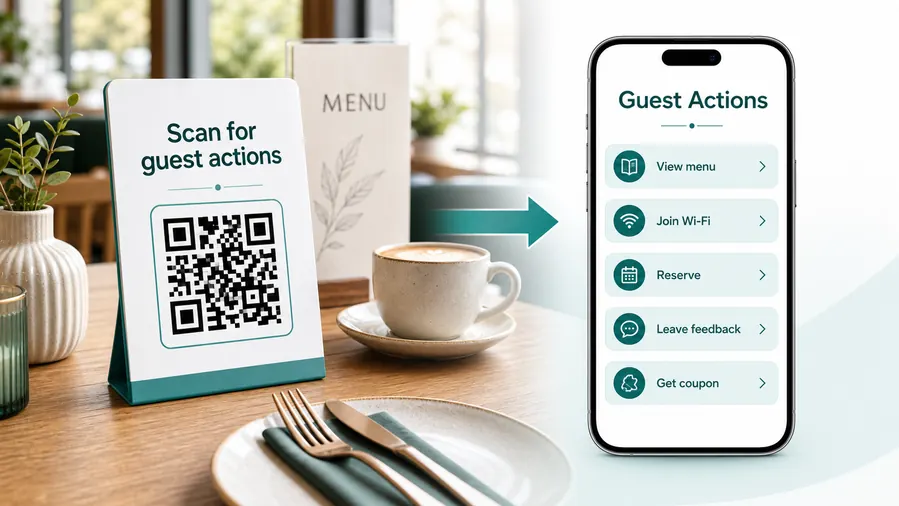
RewardsA restaurant loyalty QR code should open the action that fits the visit: join rewards at checkout, claim points after payment, redeem an offer at the table, reorder from takeout packaging, or give feedback after the meal.
Start with the reward promise, not a generic restaurant homepage
Guests scan loyalty QR codes because they expect value: points, offers, birthday rewards, visit credits, reorder shortcuts, reservation perks, or member-only updates. The first screen should confirm the restaurant and reward action immediately.
Let guests join rewards while the visit is fresh
Use receipts, counter cards, table tents, and pickup bags to open a short loyalty signup with the restaurant name, reward promise, and privacy expectations visible.
Make points and visit credit easy to claim
Route receipt or check QR codes to point lookup, visit credit, account creation, receipt upload, or staff-assisted reward credit.
Turn takeout packaging into the next order
Use bag inserts, labels, and boxes to open reorder pages, favorite meals, member offers, and delivery or pickup links.
Redeem offers without confusing the table flow
Place loyalty QR codes where staff and guests understand whether the scan opens a coupon, reward wallet, birthday offer, or member menu.
Collect feedback before asking for another visit
After payment, route guests to private feedback, review prompts, loyalty support, and then the next-visit reward.
Keep regulars close between visits
Use loyalty QR destinations for SMS or email opt-in, seasonal specials, reservation perks, event nights, and limited member drops.
At checkout
Join rewards, claim points, upload receipt, apply offer, save account.
On takeout packaging
Reorder, rate the meal, claim coupon, join list, save favorite.
At the table
Member menu, offer redemption, birthday reward, feedback, reservation.
After the visit
Review, private feedback, next-visit coupon, loyalty support, referral.
Use dynamic QR for restaurant rewards that change by season, location, and campaign
Loyalty offers, signup forms, reward rules, reservation links, reorder pages, and campaign pages often change after receipts, table cards, and bag inserts are printed.
Do not make guests hunt for the reward after they scan
If the QR opens a hub, the first buttons should match the placement: join rewards on the receipt, claim offer on a table card, reorder on packaging, and support from loyalty emails.
Loyalty placement
Place restaurant loyalty QR codes where guests are ready to join, claim, redeem, reorder, or review
PlacementLoyalty placement should follow the guest journey: signup at checkout, reward redemption at the table, reorder on packaging, feedback after payment, and member offers between visits.

A rewards QR without a clear promise feels like another ad
Guests need to know whether the scan opens signup, points, coupon, reorder, birthday reward, review, or support.
Loyalty scans work when the immediate benefit is visible.
Put the code beside the loyalty action it supports
Use receipts for points, table tents for offers, packaging for reorder, and follow-up cards for reviews or referrals.
The first screen should continue the printed reward promise.
What loyalty action fits this moment?
Join, claim points, redeem offer, reorder, book, review, refer, or contact support.
What value does the guest get?
Discount, points, free item, birthday reward, member menu, faster reorder, or next-visit offer.
Will the reward change?
Use dynamic QR for offers, reward rules, signup forms, campaign pages, reservation links, and reorder flows.
Is the scan easy in a restaurant setting?
Use clear labels and enough contrast on receipts, table tents, counter signs, menus, and packaging.
Receipt
Join rewards, claim points, upload receipt, review, and next-visit offer.
Table tent
Redeem offer, view member menu, birthday reward, feedback, and reservation.
Counter sign
Signup, pickup rewards, app download, SMS opt-in, and loyalty support.
Takeout bag
Reorder, save favorites, claim coupon, review meal, and join list.
Menu insert
Show member specials, rewards terms, limited drops, and reservation perks.
Offer card
Open coupon redemption, expiry details, rules, and follow-up signup.
Email or flyer
Route to campaign landing, booking, reorder, rewards account, and referral.
Staff handout
Explain signup, points, reward rules, and guest support.
Restaurant loyalty QR placement should make the reward feel immediate
If the code does not help the guest join, claim, redeem, reorder, or review, the placement needs a clearer promise.
Scan reading
Compare restaurant loyalty scans by receipt, table tent, takeout bag, counter sign, offer card, and campaign
AnalyticsQR analytics can show which loyalty placements guests actually use. Separate dynamic codes help compare signup, points, offer redemption, reorder, feedback, and referral prompts.

All loyalty scans collapse into one rewards total
A shared QR can show total activity, but it cannot tell whether a receipt, table tent, takeout bag, counter sign, offer card, or campaign drove the scan.
Use one code only when placement comparison does not matter.
Each loyalty placement becomes a guest signal
Separate dynamic QR codes let restaurants compare signup, points, offer redemption, reorder, review, and referral prompts.
The signal is not full attribution, but it helps improve loyalty materials.
Scan volume
See which loyalty placements receive attention.
Time and device
Check when guests scan during or after the visit.
Broad location
Use approximate location carefully for restaurant locations, events, and campaigns.
Prompt comparison
Compare receipts, table tents, takeout bags, menus, counter signs, and offer cards.
Name codes by location and reward action
Use names such as receipt-points, table-offer, bag-reorder, counter-signup, or birthday-reward.
Separate signup and redemption paths
Join, claim points, redeem, reorder, review, and referral codes should stay separate when reporting matters.
Keep interpretation practical
Scans show attention and timing; reward enrollment, spend, and repeat visits still need POS or loyalty systems.
Books and printed content
Learn whether readers open bonus pages, downloads, updates, or feedback forms from book pages.
Loyalty analytics work when every code has a guest action
Clear QR naming turns reward scans into practical signals for restaurant marketing and operations.
Loyalty feedback
Ask restaurant loyalty guests for feedback without turning rewards into review pressure
ReviewsRestaurant loyalty QR codes can invite reviews and private feedback, but the guest should always understand whether they are joining rewards, claiming points, redeeming an offer, or giving feedback.

Ask for a review after the meal or pickup is complete
Use receipts, takeout inserts, and follow-up cards to invite public reviews once the guest has received the food and service.
After dine-in, takeout, delivery, catering pickup, or loyalty redemption. Do not make loyalty points or rewards feel conditional on a positive review.
Give loyalty guests a direct path for issues
Offer private feedback for wrong orders, slow service, missing points, coupon trouble, payment questions, and location-specific concerns.
Receipts, loyalty support pages, takeout packaging, and member follow-up messages. Private feedback should be visible beside review and reward prompts.
Invite the next visit after the guest has a clean path
After review or support options, show next-visit coupons, reorder links, reservation perks, birthday rewards, or referral offers.
Thank-you receipts, member offer cards, takeout inserts, and loyalty emails. Keep the reward action separate from review pressure.Restaurant loyalty feedback should protect trust before asking for repeat visits
The scan should help guests resolve the visit, then make the next visit attractive.
Table, receipt, and takeaway flow
Put loyalty QR codes where guests are ready for the next visit
Useful placements include table tents, receipts, counter signs, pickup shelves, takeaway bags, delivery inserts, menus, window signs, loyalty cards, and event flyers. CTAs should say join rewards, get points, claim next-visit offer, download our app, check balance, get birthday reward, or leave feedback. The offer should be clear before the scan, because guests will not scan for a vague promise.
Dynamic QR codes are helpful because restaurant offers change often. You can switch from a lunch coupon to a holiday campaign, app page, birthday signup, or private feedback form without reprinting every table tent or bag insert. Scan analytics can compare table cards, receipts, counter signs, and takeaway materials so you can see which placement actually drives interest.
Make the landing page quick on mobile. A guest may be at the table, in line, or unpacking food at home. Keep signup short, show the reward early, and avoid asking for too much information before explaining the benefit. If the loyalty experience lives in another system, QR Code Lab can still manage the printed code and measure scan activity.
Payment clarity
Use restaurant loyalty QR codes around payments, tips, rewards, and offers only with clear guest context
PaymentsA loyalty QR near checkout should make clear whether the guest is paying, tipping, claiming points, redeeming a reward, joining a program, or opening a next-visit offer.

Reward-aware checkout
Open point claim, receipt upload, offer redemption, and loyalty signup from receipts, counter cards, and table tents.
Tips and service flows
When tips or service payments are involved, show the restaurant identity, provider, amount context, and receipt expectation clearly.
Coupons and next visits
Route rewards, birthday offers, referrals, and next-visit coupons to pages that explain terms before redemption.
The QR should open a trusted payment provider, not collect card details itself
Keep authentication, receipts, refunds, disputes, and confirmation inside the provider, POS, repair, restaurant, or billing system. The QR is only the shortcut.
Scan analytics only show QR scan activity. A scan does not mean a payment was completed.Restaurant loyalty QR codes need checkout and reward clarity
Guests should know whether they are paying, tipping, joining, claiming, or redeeming before they tap through.
Customer trust
Make restaurant loyalty QR codes trustworthy before guests join, pay, redeem, or share contact details
TrustLoyalty QR codes may open signup, rewards accounts, offers, payments, reviews, and support. The destination should clearly match the restaurant, location, and reward promise.

Anonymous loyalty signup pages
Guests may not share email, phone, birthday, or preferences if the page does not clearly show the restaurant identity and reward value.
Watch for similar-looking domains, long URLs, login or verify keywords, and pages asking for credentials after an unexpected scan.
Expired or unclear offers
Old coupons, moved menus, retired reward rules, and stale campaign pages create staff friction at redemption time.
A trustworthy QR should not make the final destination mysterious, especially on posters, labels, menus, parking signs, or event materials.
Payment and points confusion
Tip, pay, claim points, redeem reward, and refund paths need clear labels so guests do not feel misled.
Before paying, check the domain, HTTPS, amount, recipient, and whether the destination matches the place or brand that printed the QR.Scan like a customer before printing
Confirm the first screen matches the printed CTA, shows the business identity, and opens the current status, loyalty, product, payment, review, or support path.
The current detailed report is a static URL analysis. It helps reveal the encoded content and basic URL risk signals, but it does not guarantee that a destination is safe and does not replace browser, antivirus, payment, or bank security checks.Decoded content
See the raw value inside the QR before opening it.
Content type
Recognize URL, Wi-Fi, mailto, phone, SMS, vCard, or plain text.
URL risk signals
Review HTTPS, shorteners, IP addresses, long URLs, encoded characters, query parameters, and sensitive keywords.
Destination report
For URL codes, view final URL fields, static redirect report fields, domain fields, TLS placeholders, page metadata fields, and risk reasons.
Make your own QR codes easier to trust
A safe-looking QR code is not only about security. It is also about reducing uncertainty for the scanner. Use clear destination text, a branded landing page, normal HTTPS domains, and a visible explanation of what happens after scanning.






