
Food Truck QR Code for Menus, Orders, Reviews & Locations
Create food truck QR codes for menus, order pages, payment links, location updates, coupons, reviews, social profiles, and contact pages. Use them on windows, trucks, signs, and packaging.
Free QR code generator
Create a QR code online
Generate QR codes for websites, email, phone numbers, vCards, Wi-Fi, plain text, forms, PDF files, and campaign links. Customize colors, add a logo or frame, then download a print-ready PNG or SVG.
Choose QR code type
Website QR code, Email QR code, Phone QR code, vCard QR code, Wi-Fi QR code, Text QR code, SMS, WhatsApp, event, and download links.
Add your content
Enter your website URL, contact details, message, phone number, location, or file destination before generating the QR code.
Customize and download
Adjust QR colors, error correction, logo, frame, size, and margin. Generate QR Code, Download PNG, Download SVG, or Save and track scans.
Mobile food service
Use food truck QR codes when a fast line needs fast answers
A food truck QR code can open menus, order pages, payment links, location updates, coupons, reviews, social profiles, catering inquiry pages, and contact pages. It is useful for food trucks, mobile food vendors, market stalls, catering trucks, pop-up food sellers, and local food businesses that need people to decide quickly.
The best food truck QR code reduces line pressure. Customers can view the menu before reaching the window, check allergens, order ahead, follow the truck’s next location, claim a coupon, or leave a review after eating. That helps customers feel less rushed and helps staff spend less time repeating the same details.
QR Code Lab creates URL QR codes and can help with dynamic links and scan reporting. It does not process payments, manage orders, collect forms, run bookings, or operate business software. The QR code should point to the menu, ordering, payment, review, social, or location destination your truck already uses.
A food truck may need more than one QR code. Menu, payment, location, catering, and review actions happen at different moments, so each code should match the customer’s current need.
Restaurants, cafes, and bars
Turn the food truck line into a faster guest action
Guest-first flowA food truck QR code should help people decide, order, pay with the chosen provider, leave a review, join loyalty, or find the truck again without slowing the service window.
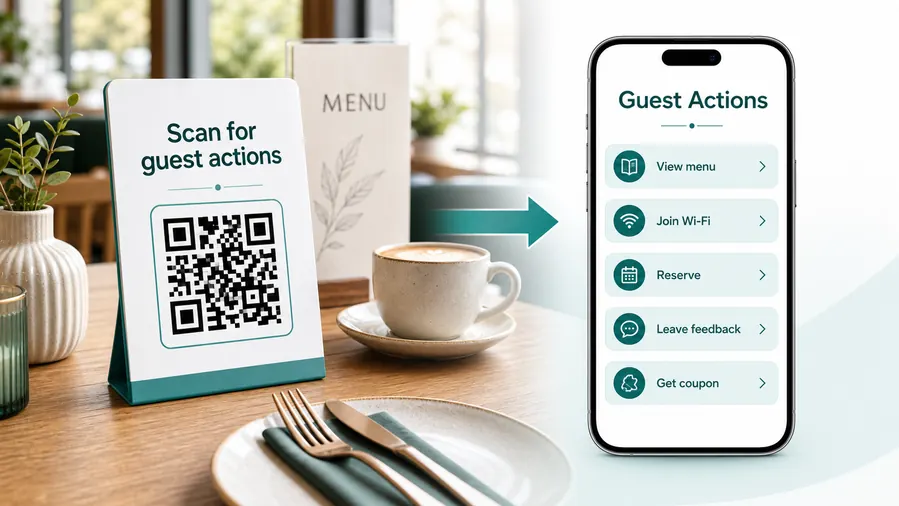
Food truck scans happen while people are hungry, waiting, or walking by
The QR destination has to be fast and specific because the guest may be in a line, holding food, checking a menu from a distance, or trying to decide before reaching the window.
Open the current menu before the window
Put menu QR codes on the truck side, sandwich boards, table signs, and queue cards so guests can choose while they wait instead of reading small print at the counter.
Point to ordering or pickup instructions
If online ordering, pickup slots, or delivery links are available, send guests to the exact ordering path and make pickup expectations clear.
Ask for reviews after the meal
Use receipts, stickers, tray liners, or thank-you cards to send satisfied guests to the review page when the food experience is fresh.
Build repeat visits from temporary locations
Link to today’s location, weekly schedule, Instagram updates, loyalty signup, catering request, or event booking form so guests can find the truck again.
Share allergen and ingredient details
Use a mobile page for allergen notes, dietary options, specials, sold-out items, and preparation details that are too long for a small menu board.
Support tips without confusing payment confirmation
If the code opens a tip or payment link, make the amount, provider, and purpose clear before the scan and confirm payments only inside the payment platform.
At the table
Menu, Wi-Fi, ordering, ask-for-help, specials.
While waiting
Drinks, dessert, event calendar, story behind the dish.
After payment
Review, private feedback, coupon, reservation.
Takeaway or delivery
Reorder link, loyalty signup, coupon, feedback.
Use dynamic QR when the destination may change
Menus, specials, reservation tools, coupons, review flows, seasonal campaigns, and ordering links change. A dynamic QR code keeps the printed code stable while letting you update where it sends the guest.
Do not make the guest solve your whole website
Most guests scan because they want one next action, not a tour of the restaurant site. If the QR code opens a hub, keep the first buttons aligned with the place where the code appears: menu at the table, review or coupon on the receipt, reorder or feedback on packaging.
Food truck placement
Place food truck QR codes where they keep the line moving
PlacementThe best food truck QR placement helps guests act before they reach the service window or right after the meal, not while they are already blocking the line.

The QR appears only at the payment window
If guests first discover the menu QR when they reach the counter, the line can slow while they scan, read, decide, and ask questions.
Payment and pickup QR codes can live at the window, but menu decisions belong earlier in the queue.
The scan helps before the guest needs staff
Put menu, allergen, and ordering QR codes on boards, queue cards, and side panels where people are already waiting.
Use receipts, packaging stickers, and thank-you cards for reviews, loyalty, schedule, and catering follow-up after the food is served.
Is the guest choosing, paying, or following up?
Use different destinations for menu browsing, order links, tip links, reviews, schedule, and catering.
Can the code be scanned from the line?
Match print size and placement to real queue distance and outdoor lighting.
Does the page load fast on mobile data?
Crowded events and street locations make heavy pages feel worse.
What changes during service?
Use dynamic QR when specials, sold-out items, locations, hours, or event menus change.
Queue board
Best for menu, specials, allergens, dietary notes, and order-ahead links.
Truck window
Use for pickup instructions, payment provider link, tip prompt, and short staff-directed actions.
Receipt or packaging sticker
Strong for reviews, loyalty signup, schedule, social follow, and reorder links.
Catering flyer
Send event planners to packages, availability, quote forms, photos, and contact options.
Poster or event sign
Best where people pause: registration line, booth, waiting area, seat back, schedule board, or exit path. Weak when people only pass at speed.
Business card
Useful after a conversation because the person already knows why they might save a contact, open a portfolio, book a call, or follow up.
Window sign
Good for after-hours menus, booking, pickup instructions, or quick offers. Avoid complex actions when the person is outside and just walking by.
Cover or front label
Use it only when the promise is immediate and clear. Otherwise the better scan moment is often inside the material or after the first interaction.
Food truck QR placement should protect service speed
Put decision-making scans before the window and follow-up scans after the meal so the line stays clean.
Payment and tip boundary
Use QR codes for food truck payment links without confusing payment proof
PaymentsQR Code Lab can send guests to a tip, invoice, order, or checkout link. The payment provider handles the actual transaction, receipt, refund, dispute, and confirmation.

Open the trusted tip page
Use QR codes on the window, receipt, or table sign to reduce typing when guests want to leave a tip through the provider you already use.
Send guests to ordering or checkout
If the truck uses an external ordering page, the QR should open the exact menu, cart, or pickup flow rather than a generic homepage.
Keep purpose and provider visible
Printed copy should say whether the scan opens tips, deposits, catering payments, invoices, or order checkout.
A scan is not a completed payment
QR Code Lab does not process food truck payments, tips, refunds, taxes, receipts, chargebacks, or payout disputes.
Check payment status inside the payment provider before treating an order or tip as paid.Separate scan convenience from payment confirmation
Use the QR code to get guests to the right payment page, then rely on the payment platform for proof that money moved.
Line and location
Place QR codes where customers can scan before they need to order
Use food truck QR codes on menu boards, window signs, table tents, packaging stickers, loyalty cards, receipts, catering flyers, market booth signs, social promo cards, napkin holders, and pickup counters. The CTA should say view menu, order ahead, follow location, leave review, claim coupon, or book catering.
Placement should match the customer flow. A menu QR belongs where people wait or browse. A payment QR belongs near checkout. A review QR works better after the meal, on packaging or receipts. A location QR works well on flyers and social cards when customers want to find the truck again.
Dynamic QR helps when menus, locations, coupons, and ordering links change. Scan analytics can show which signs, markets, or packaging placements send customers to the next step, while orders and payments stay in the linked platform.
Use large, simple labels on truck windows and boards. Customers in a moving line do not have time to decode clever copy, so view menu or order ahead usually works best.






