
Hotel Room Service QR Code for Menus, Orders & Guest Help
Create hotel room service QR codes for menus, order pages, allergen info, hours, guest support, payment pages, and feedback forms. Use them in rooms, welcome cards, and table tents.
Free QR code generator
Create a QR code online
Generate QR codes for websites, email, phone numbers, vCards, Wi-Fi, plain text, forms, PDF files, and campaign links. Customize colors, add a logo or frame, then download a print-ready PNG or SVG.
Choose QR code type
Website QR code, Email QR code, Phone QR code, vCard QR code, Wi-Fi QR code, Text QR code, SMS, WhatsApp, event, and download links.
Add your content
Enter your website URL, contact details, message, phone number, location, or file destination before generating the QR code.
Customize and download
Adjust QR colors, error correction, logo, frame, size, and margin. Generate QR Code, Download PNG, Download SVG, or Save and track scans.
In-room ordering help
Give guests menu details without making them call first
A hotel room service QR code can open a menu, order page, allergen information, hours, guest support page, payment page, or feedback form. It is useful for hotels, resorts, guest houses, serviced apartments, hospitality teams, and room service teams that want guests to understand options before calling or ordering.
The practical benefit is fewer simple questions and a smoother guest experience. A QR code can show what is available, when service is open, whether allergens are listed, how to order, what payment page to use, and what to do if the guest needs help. That saves staff time without removing personal service when it is needed.
QR Code Lab creates URL QR codes and can help keep the printed room card flexible. It does not collect orders, accept payments, process bookings, host maps, sell tickets, or run hospitality systems. The QR destination should be the menu, ordering, support, or payment page your hotel already uses.
Use one clear destination for the room service moment. If ordering is separate from menu viewing, make the first screen explain both choices so guests do not need to call just to understand the process.
Restaurants, cafes, and bars
Help guests order room service without calling the desk
Guest-first flowA hotel room service QR code should open the current menu, ordering instructions, hours, allergens, delivery expectations, service charge notes, and follow-up help from the exact room context.
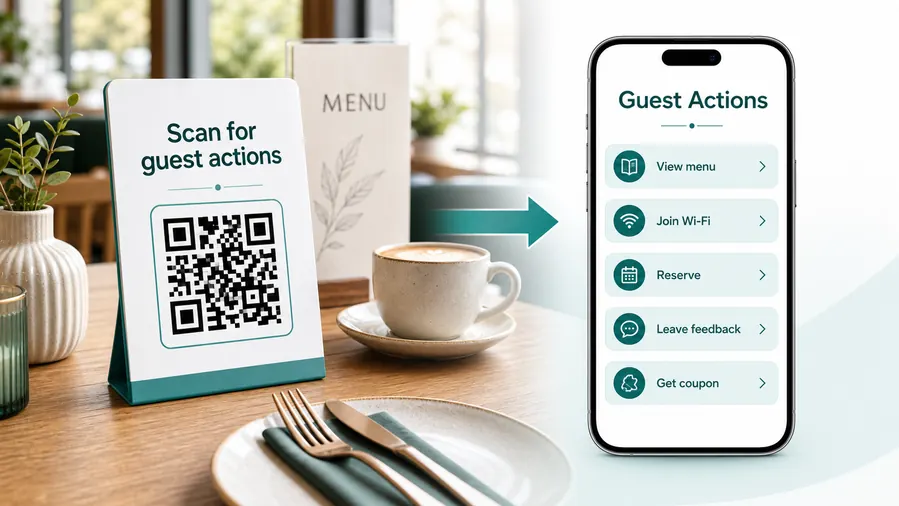
Room service scans happen when guests want a simple answer
The guest may be tired, hungry, traveling with family, or trying to avoid a phone call. The QR destination should make the menu, order path, hours, and next step obvious on a phone.
Open the current in-room menu
Use a QR code on room cards, TV screens, tent cards, or guest directories so guests can see today’s menu, prices, hours, dietary notes, and availability without old printed pages.
Make ordering expectations clear
Tell guests whether they should order online, call the desk, message concierge, use an app, or charge the order to the room. The scan should not leave them guessing.
Handle breakfast, late-night, and limited menus
Separate destinations can explain breakfast cards, minibar replacement, late-night service, poolside ordering, and limited holiday menus without crowding room print.
Route service issues quickly
Add a clear support path for wrong orders, delays, allergen questions, missing items, or cancellation requests so guests do not hunt for the right extension.
Support tips and service charges carefully
If the page includes tips, room charges, or external payment links, explain what is charged where and confirm payments only through the hotel or payment provider.
Keep the page useful after menu changes
Use dynamic QR when prices, hours, availability, chef specials, QR ordering links, or hotel policies change after room cards are printed.
At the table
Menu, Wi-Fi, ordering, ask-for-help, specials.
While waiting
Drinks, dessert, event calendar, story behind the dish.
After payment
Review, private feedback, coupon, reservation.
Takeaway or delivery
Reorder link, loyalty signup, coupon, feedback.
Use dynamic QR when the destination may change
Menus, specials, reservation tools, coupons, review flows, seasonal campaigns, and ordering links change. A dynamic QR code keeps the printed code stable while letting you update where it sends the guest.
Do not make the guest solve your whole website
Most guests scan because they want one next action, not a tour of the restaurant site. If the QR code opens a hub, keep the first buttons aligned with the place where the code appears: menu at the table, review or coupon on the receipt, reorder or feedback on packaging.
In-room placement
Place room service QR codes where guests already look for dining help
PlacementRoom service QR placement should feel like part of the room, not a random sticker. Put it near the menu, phone, TV, guest directory, breakfast card, minibar note, or tray return instructions.

The code is away from the menu decision
If the QR is on a generic lobby sign or buried inside a guest directory, guests may still call the desk to ask what food is available.
Room service QR placement should sit exactly where the guest expects dining information.
The QR appears beside the ordering context
Place it on an in-room dining card, TV welcome screen, breakfast card, minibar sheet, desk tent, or tray note.
The printed copy should tell guests whether the scan opens menu, order form, service hours, allergen notes, or support.
Is the guest choosing or already ordering?
Menu browsing, order forms, breakfast cards, tray return, and support need different wording.
Can the guest find charges before ordering?
Show service fees, delivery charges, tips, taxes, and room-charge expectations clearly.
What changes during the stay?
Use dynamic QR when hours, menu items, pricing, or ordering links may change.
Is there a no-phone fallback?
Keep phone extension or staff contact visible for accessibility, battery, or connection issues.
Room dining card
Best for menu, hours, delivery expectations, allergens, and the main order path.
TV welcome screen
Useful for current specials, QR ordering, hotel app links, and policy updates.
Breakfast card
Works for cutoff time, delivery window, selections, dietary notes, and confirmation.
Tray or receipt
Use for feedback, tip notes, issue reporting, and reorder or minibar follow-up.
Poster or event sign
Best where people pause: registration line, booth, waiting area, seat back, schedule board, or exit path. Weak when people only pass at speed.
Business card
Useful after a conversation because the person already knows why they might save a contact, open a portfolio, book a call, or follow up.
Window sign
Good for after-hours menus, booking, pickup instructions, or quick offers. Avoid complex actions when the person is outside and just walking by.
Cover or front label
Use it only when the promise is immediate and clear. Otherwise the better scan moment is often inside the material or after the first interaction.
Room service QR placement should reduce room calls
Put the code beside the dining decision and make the ordering path clear enough to use without staff explanation.
Menu update control
Use dynamic QR when room service menus and policies change after print
DynamicHotel room cards can stay in use for months while menu items, prices, hours, ordering systems, service charges, and availability change. Dynamic QR keeps the printed code useful.
Old room cards can promise the wrong menu
A static menu link is fine only while the page, prices, hours, and order flow stay final.
When items sell out, breakfast hours change, or the hotel changes ordering systems, old printed room cards can create guest frustration.
The same room QR can open the current dining path
Dynamic QR lets the hotel update the destination while cards, TV screens, directories, and tray notes stay in rooms.
That is useful for seasonal menus, holiday service, renovations, staffing changes, and vendor ordering links.

Menu and price updates
Change dishes, specials, sold-out items, allergen notes, taxes, service charges, and delivery fees.
Hours and availability
Update breakfast cutoff, late-night menus, poolside ordering, minibar service, and holiday schedules.
Ordering system changes
Move guests between phone ordering, hotel app, web form, concierge chat, or external provider links.
Post-order support
Route scans to issue reporting, cancellation, tray pickup, feedback, and reorder instructions.
Use dynamic when printed room cards must outlive the menu
If dining details may change while QR cards stay in rooms, an editable destination prevents stale guest instructions.
Room charge boundary
Separate room service QR convenience from payment confirmation
PaymentsA room service QR code can open a tip, checkout, deposit, or ordering page, but the hotel system or payment provider still handles charges, receipts, refunds, disputes, and room folio confirmation.

Open the right ordering or payment page
Use the QR to reduce typing when guests need to order, leave a tip, pay a deposit, or open a hotel-approved checkout link.
Explain room charges before submission
Show whether payment happens now, at checkout, through the room folio, or through an external provider.
Keep tips and service charges clear
If gratuity, service charge, delivery fee, or tax is included, say so before the guest submits or pays.
A scan does not prove the order or payment is complete
QR Code Lab does not process hotel payments, room charges, tips, refunds, receipts, folios, chargebacks, or disputes.
Confirm order and payment status inside the hotel PMS, POS, ordering system, or payment provider.Use the QR code for access, not accounting
Let the scan open the right room service path, then rely on the hotel or payment platform for transaction proof.
Room placement
Put the menu QR where guests naturally decide what to order
Good placements include room desk cards, bedside cards, minibar cards, in-room welcome books, TV info screens, restaurant tables, elevator signs, front desk materials, tray cards, and checkout folders. The CTA should say view menu, order room service, see hours, check allergens, or request help.
Think like a tired guest. The scan should open quickly on mobile, show the menu clearly, and explain what to do next. If the page requires calling, say so. If ordering is online, make that path obvious. If allergen details are separate, make them easy to find before the guest orders.
Dynamic QR codes are useful because menus, prices, hours, and ordering pages change. Scan analytics can show whether guests use room cards, welcome books, or restaurant signs to reach the menu, while actual orders remain in your hotel or ordering system.
Replace old printed menus only when needed. A dynamic QR lets the card stay in the room while seasonal items, prices, hours, and service notes change behind the link. That saves reprints.






