
Concierge QR Code for Guest Guides, Maps & Booking Links
Create concierge QR codes for guest guides, maps, booking pages, local recommendations, Wi-Fi, room info, support, and reviews. Use them at front desks, rooms, signs, and guest cards.
Free QR code generator
Create a QR code online
Generate QR codes for websites, email, phone numbers, vCards, Wi-Fi, plain text, forms, PDF files, and campaign links. Customize colors, add a logo or frame, then download a print-ready PNG or SVG.
Choose QR code type
Website QR code, Email QR code, Phone QR code, vCard QR code, Wi-Fi QR code, Text QR code, SMS, WhatsApp, event, and download links.
Add your content
Enter your website URL, contact details, message, phone number, location, or file destination before generating the QR code.
Customize and download
Adjust QR colors, error correction, logo, frame, size, and margin. Generate QR Code, Download PNG, Download SVG, or Save and track scans.
Guest help hub
Help guests find answers without waiting in line
A concierge QR code can open guest guides, maps, booking pages, local recommendations, Wi-Fi information, room info, support pages, review links, amenity details, transportation options, attraction lists, or restaurant suggestions. It is useful for hotels, boutique stays, resorts, guest houses, short-term rentals, concierges, and hospitality teams.
The best concierge QR does not replace service; it handles the simple repeat questions so staff can focus on better guest care. Where is breakfast? How do I book spa time? Where can I park? How do I connect to Wi-Fi? What is nearby? How do I request help? A clear QR link can answer those questions at the moment they appear.
QR Code Lab creates URL QR codes and can help keep guest-facing links flexible. It does not host maps, process bookings, sell tickets, run hotel systems, or manage guest services. Point the QR to the guide, booking page, map, support page, or service destination your team maintains. The code simply removes the friction of finding that page and makes the guest’s next step feel obvious.
Guest service
Use concierge QR codes to give guests the right help without waiting at the desk
ConciergeA concierge QR code should open the hotel or venue help guests need in the moment: local recommendations, maps, room service, Wi-Fi, amenities, transport, booking requests, or staff support.
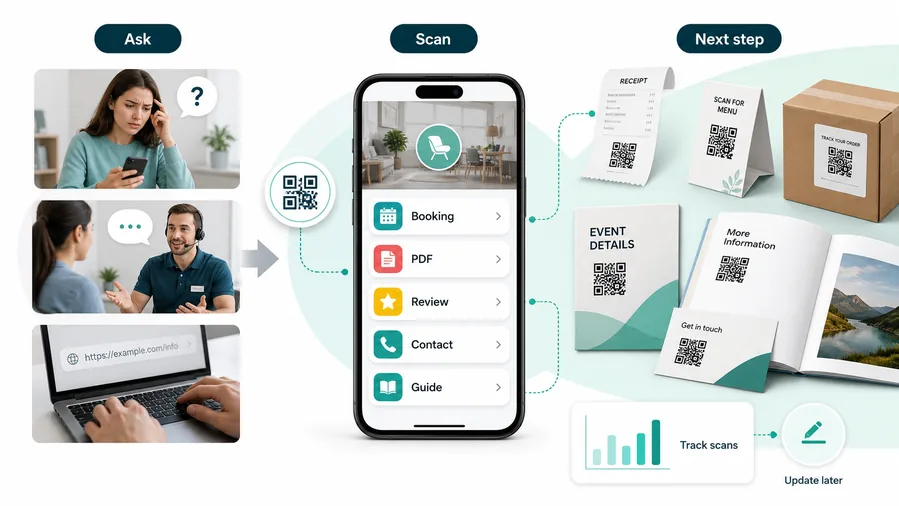
The scan opens a broad hotel page and makes guests search
A guest scanning from a lobby sign, room card, or elevator poster usually has a specific need: food, directions, transport, Wi-Fi, checkout, or help.
A generic homepage can feel slower than asking the desk.
The QR opens the service path for that location
Use room cards for in-room help, lobby signs for local recommendations, elevator signs for amenities, and event desk signs for maps or schedules.
For customers, the strongest QR code use cases are usually the repetitive questions and next actions people already have. QR Code Lab helps turn those moments into clear buttons, files, forms, microlanding pages, editable destinations, and measurable scan activity.
Answer repeated guest questions
Open Wi-Fi, breakfast hours, parking, checkout, pool rules, luggage storage, airport transfer, and front desk contact without repeating the same instructions.
Recommend local places with context
Send guests to curated restaurants, attractions, maps, walking routes, taxis, tours, pharmacies, and emergency contacts from a mobile-friendly guide.
Route service requests cleanly
Use QR destinations for room service, housekeeping, maintenance, extra towels, lost items, booking requests, and support forms.
Keep guest materials current
Dynamic destinations help when restaurants, hours, amenities, policies, transport notes, or event details change after room cards and signs are printed.
The page should feel like the property is helping now
Use clear hotel or venue branding, simple buttons, and practical labels. Guests should not need to understand your internal departments to get help.
Restaurants and venues
Menus, Wi-Fi, booking, reviews, loyalty signup, event details, and feedback can live exactly where guests already pause.
Books and education
Bonus PDFs, ZIP files, worksheets, source files, updates, examples, and reader feedback can sit behind a single page-level QR code.
Retail and packaging
Care guides, warranty, setup instructions, reorder links, product education, recipes, safety notes, and reviews can follow the item home.
Services and events
Booking, contact save, registration, schedules, maps, check-in, forms, portfolio links, and follow-up pages become reachable without manual searching.
Concierge QR codes should reduce desk pressure without losing hospitality
Use them when the mobile destination answers common guest needs clearly and still gives an easy path back to staff.
Guest placement
Place concierge QR codes where guests already have the question
PlacementConcierge QR placement works when the code appears beside the guest moment: room, lobby, elevator, breakfast area, event desk, shuttle stop, or checkout path.

The code exists but guests do not find it when they need help
A QR buried in a binder or low on a wall is easy to miss when a guest is tired, carrying luggage, or looking for a quick answer.
Placement should fit the physical guest journey, not only the print layout.
The QR sits beside the service question
Put Wi-Fi and room help inside the room, local recommendations in the lobby, amenity details near elevators, and event support at the registration desk.
A short caption should say what the guest gets after scanning.
What is the guest trying to solve here?
Wi-Fi, food, transport, amenities, event rooms, checkout, or support should drive placement.
Can the guest scan comfortably?
Avoid tiny codes, dark corners, reflective signs, and high-traffic bottlenecks.
Does the destination match this area?
Room cards, lobby signs, and event desks should not all open the same generic page if the guest need is different.
Is staff support still visible?
The QR should reduce repeated questions, not hide the front desk or urgent help path.
Room card or welcome guide
Best for Wi-Fi, room service, checkout, amenities, housekeeping, maintenance, and guest support.
Lobby or concierge desk
Use for local recommendations, transport, maps, events, luggage storage, and booking help.
Elevator or hallway sign
Good for breakfast hours, pool rules, gym access, meeting rooms, and property navigation.
Event or conference desk
Send attendees to schedules, room maps, speaker details, support forms, and nearby services.
Poster or event sign
Best where people pause: registration line, booth, waiting area, seat back, schedule board, or exit path. Weak when people only pass at speed.
Business card
Useful after a conversation because the person already knows why they might save a contact, open a portfolio, book a call, or follow up.
Window sign
Good for after-hours menus, booking, pickup instructions, or quick offers. Avoid complex actions when the person is outside and just walking by.
Cover or front label
Use it only when the promise is immediate and clear. Otherwise the better scan moment is often inside the material or after the first interaction.
Concierge QR placement should feel like timely service
Put the code where guests already pause and make the destination answer that exact question first.
Guest access
Use concierge QR codes for Wi-Fi only with a clear guest network boundary
Wi-FiA concierge QR code can help guests join Wi-Fi or read access instructions, but the network, policy, support path, and private system boundaries still need to be clear.
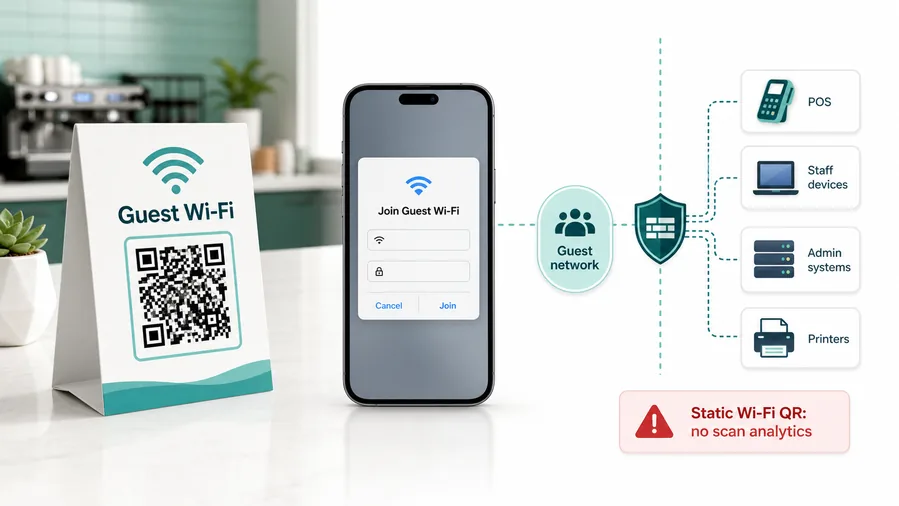
Keep guest Wi-Fi separate from staff systems
The QR should connect guests to the network intended for visitors, not POS devices, admin tools, cameras, printers, or staff-only systems.
This is why static Wi-Fi QR is often better than dynamic for joining a network. A redirect URL cannot open the same native Wi-Fi flow.Show the network name beside the code
Guests should recognize the SSID before joining, especially in hotels, venues, lobbies, coworking areas, and rentals with multiple nearby networks.
If you need analytics, you can track a landing page, but the experience becomes a web page with Wi-Fi instructions, not a native join-network QR.Provide a fallback when joining fails
Some devices, scanners, or captive portals need extra instructions. A concierge QR page should explain the fallback or staff path without making guests wait.
Use a guest network, client isolation, router-level limits, and a password rotation process. QR codes make access easier; they do not make the network safe.Do not publish sensitive access details casually
Anyone who can scan the printed code may see or use the access path. Keep private credentials, admin links, and staff-only instructions out of public guest QR pages.
Configure network security on your router, firewall, access point, or IT management system.Concierge Wi-Fi QR should remove typing while keeping boundaries visible
Use QR for guest convenience, then rely on the property network setup and support process for real control.
Hospitality flow
Use focused QR codes for specific guest decisions
Use concierge QR codes at the front desk, lobby, elevators, room cards, in-room welcome books, restaurant tables, spa desks, tour counters, shuttle signs, local recommendation displays, and checkout materials. The printed CTA should match the placement: open local guide, book spa, see breakfast hours, request help, view map, or leave a review.
Focused QR codes usually serve guests better than one giant list of links. A code in the room can open room information. A lobby code can open local tips. A shuttle sign can open transport details. A restaurant table code can open menu or booking. The scanner should see the right answer quickly on a phone.
Dynamic QR codes help keep maps, local recommendations, booking pages, offers, and service pages current. Scan analytics can show which guest touchpoints are actually being used, so hospitality teams can improve signs and reduce repeated questions without removing personal service. It is a quiet support layer, not a replacement for staff. If lobby scans are high and room-card scans are low, placement may need a rethink.
Guest UX
Make the concierge scan feel immediate, branded, and useful
Scan UXGuests scan concierge QR codes because they want help now. The first screen should identify the property, show the relevant service, and avoid making them search through a full website.
The guest knows this page belongs to the property
hotel name, venue, room, event, support contextUse the property name, logo, or location cue near the top so guests trust the page and know they scanned the right code.
This matters most for Wi-Fi, payments, room requests, local transport, and event support.
The main service is visible immediately
Wi-Fi, room service, map, transport, amenities, front deskIf the code is on a room card, room help should appear first. If it is in the lobby, local recommendations or transport should be easy to find.
Avoid broad navigation that makes a guest do the desk’s job on a phone.
Staff help is still easy to reach
front desk, urgent help, maintenance, lost item, accessibilityNot every guest problem should be solved by a QR page. Include a clear staff path for urgent, sensitive, accessibility, or account-specific needs.
A good concierge QR reduces routine questions while preserving hospitality.
Does the page match the placement?
Room, lobby, event desk, and checkout QR codes should not all lead to the same first screen if the guest need differs.
Can guests use it on slow Wi-Fi or mobile data?
Concierge pages should be lightweight because they are often used at arrival or while moving.
Is urgent support visible?
Keep front desk, emergency, or staff contact instructions available when the QR is not enough.
Concierge QR succeeds when it feels like service, not self-service homework
Use it to answer common questions quickly while keeping human help easy to find.






