
Airbnb QR Code for Guest Guides, Wi-Fi & House Rules Online
Create Airbnb QR codes for Wi-Fi, house rules, check-in instructions, local maps, reviews, and guest support. Add them to welcome books, signs, fridge cards, and rentals for guests.
Free QR code generator
Create a QR code online
Generate QR codes for websites, email, phone numbers, vCards, Wi-Fi, plain text, forms, PDF files, and campaign links. Customize colors, add a logo or frame, then download a print-ready PNG or SVG.
Choose QR code type
Website QR code, Email QR code, Phone QR code, vCard QR code, Wi-Fi QR code, Text QR code, SMS, WhatsApp, event, and download links.
Add your content
Enter your website URL, contact details, message, phone number, location, or file destination before generating the QR code.
Customize and download
Adjust QR colors, error correction, logo, frame, size, and margin. Generate QR Code, Download PNG, Download SVG, or Save and track scans.
QR solutions for this use case
Guest stay support
Use Airbnb QR codes to make the stay easier without turning every question into a host message
An Airbnb QR code can open a guest guide, Wi-Fi information, house rules, check-in instructions, parking details, local map, appliance guide, review link, support contact, checkout steps, or a simple welcome page. It is useful for Airbnb hosts, vacation rental managers, guest house owners, property managers, and hospitality teams that want the stay to feel organized from the first minute.
QR Code Lab creates the QR code and can help you use dynamic links when the destination may change. It does not manage bookings, collect applications, process payments, run property portals, or replace your guest communication system. The QR code should send guests to the guide page, document, map, form, file, or platform resource you already trust.
The goal is fewer repeated support messages and a smoother guest experience. Put each QR code where the question appears: Wi-Fi near the router or welcome card, house rules in the guidebook, parking details near the entry, appliance steps near the appliance, and checkout instructions near the door. Guests should not have to dig through old messages for simple answers.
Guest arrival
Use Airbnb QR codes to make the stay easier after check-in
Guest guideAn Airbnb QR code works best when it opens the information guests need in the property: Wi-Fi, house rules, parking, appliance notes, local recommendations, checkout steps, and host support.
Put the guide where guests start asking questions
Use QR codes on welcome cards, fridge notes, entry tables, Wi-Fi signs, guest books, appliance labels, and checkout reminders so guests can find the right answer without messaging the host for every detail.
The scan should feel like a helpful house guide, not a marketing detour.
Separate Wi-Fi, house rules, and local recommendations
Guests scan with different intentions during the stay. Wi-Fi should be immediate, house rules should be easy to review, and local tips should help them choose food, transport, activities, or emergency contacts.
One clean mobile guide can organize several useful paths behind one printed code.
Update the destination when property details change
Parking instructions, smart lock notes, checkout rules, appliance guides, restaurant lists, and host contact paths change more often than printed cards. Dynamic QR keeps the same sign useful between guest stays.
Editable destinations protect printed guest materials from becoming stale.A rental QR code should reduce guest friction during the stay
The best destination answers the question the guest has in that room, at that moment. It should be mobile-friendly, calm, and specific to the property instead of sending everyone to a broad homepage.
Keep private access codes, payment details, and sensitive owner information out of public printed QR destinations.Arrival
Open Wi-Fi, parking, entry notes, and first-night basics from a welcome card or entry table.
During the stay
Link appliance instructions, local recommendations, house rules, trash notes, and host support in a simple mobile guide.
Checkout
Place a QR near the exit or kitchen with checkout tasks, return instructions, and review prompts.
Updates
Use dynamic QR when the guide may change between bookings, seasons, repairs, or host policy updates.
Rental Wi-Fi boundary
Share Airbnb Wi-Fi without exposing the wrong network
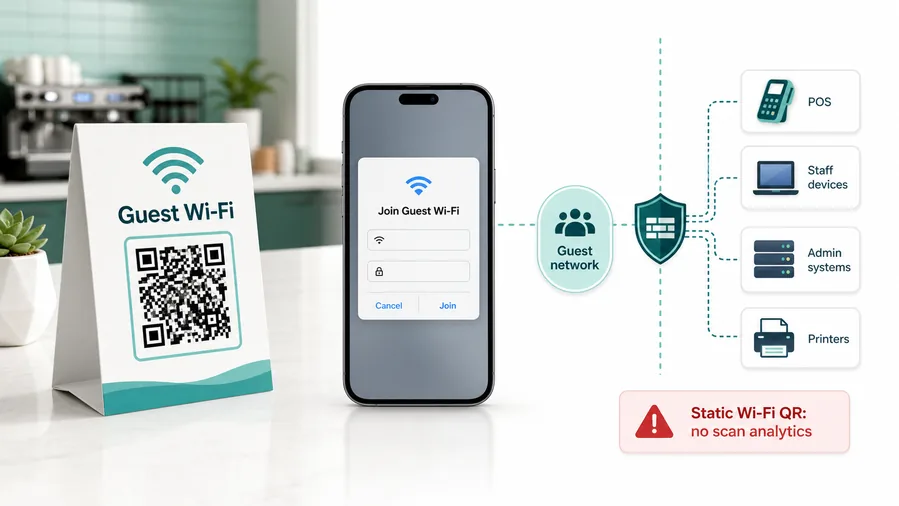
Wi-FiA rental Wi-Fi QR code saves guests from typing passwords, but the property still needs a clear guest network, simple labeling, and a fallback if the phone does not recognize the Wi-Fi payload.
Use a guest network for the property
The QR should connect guests to the network intended for renters, not owner devices, cameras, smart-home admin tools, or private systems that should stay separated.
This is why static Wi-Fi QR is often better than dynamic for joining a network. A redirect URL cannot open the same native Wi-Fi flow.Print the network name beside the QR
Guests should recognize the SSID before joining. A small caption prevents confusion when nearby apartments, routers, or extenders show similar names.
If you need analytics, you can track a landing page, but the experience becomes a web page with Wi-Fi instructions, not a native join-network QR.Keep the fallback human
If a phone cannot join from the QR, the welcome guide should still show the network name, password path, or host support instruction clearly enough for a tired traveler.
Use a guest network, client isolation, router-level limits, and a password rotation process. QR codes make access easier; they do not make the network safe.Do not put private access details into a public QR page
Door codes, payment details, owner contact data, and sensitive security notes should be handled through the booking platform or a controlled guest process, not exposed on a printed QR destination.
Configure network security on your router, firewall, access point, or IT management system.Wi-Fi QR should make joining easy and boundaries clear
Use QR for convenience, then rely on proper network setup and host process to protect private systems and guest information.
Guest placement
Place Airbnb QR codes where the guest question happens
PlacementRental QR codes work when they are placed beside the moment they answer: arrival, Wi-Fi setup, appliance use, local planning, checkout, or host support.

One hidden QR code makes guests hunt for answers
A single code buried in a binder or small wall sign may be missed when the guest is trying to join Wi-Fi, park correctly, use the thermostat, or check out.
If the question happens in a specific room or at a specific time, the QR should be there.
Each placement opens the guide for that guest moment
Put Wi-Fi near the entry or desk, appliance help near the appliance, checkout steps near the exit or kitchen, and local recommendations in the guest book or welcome area.
The printed CTA should name the promise: scan for Wi-Fi, house guide, checkout steps, or local tips.
What is the guest trying to do right now?
Arrival, Wi-Fi, parking, appliance use, local planning, support, and checkout each deserve clear placement.
Can the QR survive cleaning and guest turnover?
Use durable cards, frames, labels, or laminated signs where they will not be removed accidentally.
Does the destination match the room?
A thermostat QR should not open a generic rental homepage; it should open the thermostat instruction or house guide section.
Is the host support path obvious?
For urgent issues, the page should explain whether guests should message the host, use the booking platform, or follow posted emergency guidance.
Welcome card or entry table
Best for Wi-Fi, parking, house guide, check-in notes, host contact rules, and first-night essentials.
Kitchen or appliance labels
Use for coffee maker, thermostat, laundry, trash, heating, streaming, or safety instructions that guests need in context.
Guest book or local guide
Good for restaurants, transport, activities, maps, discount partners, and recommendations that guests browse during downtime.
Checkout note
Place near the exit, kitchen, or key return point for checkout tasks, cleaning expectations, review prompts, and return instructions.
Poster or event sign
Best where people pause: registration line, booth, waiting area, seat back, schedule board, or exit path. Weak when people only pass at speed.
Business card
Useful after a conversation because the person already knows why they might save a contact, open a portfolio, book a call, or follow up.
Window sign
Good for after-hours menus, booking, pickup instructions, or quick offers. Avoid complex actions when the person is outside and just walking by.
Cover or front label
Use it only when the promise is immediate and clear. Otherwise the better scan moment is often inside the material or after the first interaction.
The best rental QR code is found before the guest has to ask
Place each code where it removes friction from the stay, then keep the destination specific enough that guests trust it.
Rental placement
Match each QR code to a guest question
A single general QR code can open a full digital guide, but focused codes often work better for common moments. Use a Wi-Fi QR where guests first try to connect, a checkout QR where they pack up, a local guide QR near the dining table, and a review QR after the stay instructions. The placement should meet the guest at the exact moment they need the answer.
Dynamic QR codes are useful for guide pages, maps, checkout rules, seasonal recommendations, parking notes, and support details because those things change. If a restaurant closes, a check-in step changes, or a house rule is updated, you can change the destination without reprinting every card in the property.
For direct Wi-Fi joining, a static Wi-Fi QR can be more convenient because the phone can open the native network prompt. Just be careful with privacy and security: use a guest network, keep the password current, and avoid placing private owner or admin network details where any guest can copy them. Clear QR codes should make the stay easier without exposing the wrong information.
Between-stay updates
Use dynamic QR when Airbnb instructions change between guests
DynamicRental information changes with seasons, repairs, lock settings, parking rules, local partners, and host process. Dynamic QR helps printed guest materials stay useful without replacing every card.
Printed cards keep pointing to outdated instructions
Static QR is fine for a permanent page, but rentals rarely stay completely static.
If Wi-Fi notes, checkout steps, parking instructions, appliance guides, or local recommendations move, guests keep scanning the old destination until the printed material is replaced.
The same welcome card can open the current guide
Dynamic QR lets the host update the destination after cards are printed, rooms are staged, or listings are already active.
That is useful when the property guide needs seasonal changes, urgent repairs, updated house rules, or a better mobile page.

Wi-Fi and arrival notes
Update network instructions, parking directions, gate notes, or first-night details without reprinting the welcome card.
House guide changes
Move guests to current appliance instructions, trash schedules, thermostat notes, streaming help, or local recommendations.
Checkout and review prompts
Change checkout tasks, key return steps, cleaning expectations, and review requests as hosting operations evolve.
Maintenance and temporary notices
Route guests around repairs, closed amenities, seasonal rules, or emergency instructions without leaving stale print in the room.
Use dynamic when the printed rental guide must outlive today’s instructions
A rental QR code is often part of the property setup. Editable destination control keeps it useful across bookings instead of freezing one version of the guest experience.






