
Salon Tip QR Code - Stylist Tips, Payments & Reviews
Create salon tip QR codes linking stylist tip pages, payment links, booking pages, thank-you pages, reviews, and service feedback forms. Use them on mirrors, counters, cards, and receipts.
Free QR code generator
Create a QR code online
Generate QR codes for websites, email, phone numbers, vCards, Wi-Fi, plain text, forms, PDF files, and campaign links. Customize colors, add a logo or frame, then download a print-ready PNG or SVG.
Choose QR code type
Website QR code, Email QR code, Phone QR code, vCard QR code, Wi-Fi QR code, Text QR code, SMS, WhatsApp, event, and download links.
Add your content
Enter your website URL, contact details, message, phone number, location, or file destination before generating the QR code.
Customize and download
Adjust QR colors, error correction, logo, frame, size, and margin. Generate QR Code, Download PNG, Download SVG, or Save and track scans.
Salon tipping path
Make stylist tips easier without pretending QR Code Lab processes payments
A salon tip QR code is useful when clients should be able to open a stylist tip page, payment link, thank-you page, booking page, review page, or service feedback form from a mirror card, checkout sign, receipt, stylist card, appointment reminder, or aftercare sheet. It gives the client a simple next step after the service.
Tip QR codes work best when the printed material makes the action clear. A stylist station card can open that stylist’s tip link. A receipt can open tipping, review, and rebooking. A thank-you card can open a payment page and the stylist’s profile. QR Code Lab helps create dynamic QR codes, update destinations after printing, and track scans from each placement.
QR Code Lab creates URL QR codes and scan analytics. It does not process tips, store card details, move money, issue receipts, or replace a salon POS. Your payment provider, booking system, review platform, or salon software handles the actual tip, appointment, and client record. This lets the QR code stay simple while the payment tool handles the sensitive work.
Salon tip moments
Salon tip moments payment, tip, and checkout teams with payment links, tip pages, checkout, invoices, donations, and receipts
Tip QRUse QR codes to move payment, tip, and checkout teams from counters, receipts, tip cards, invoices, signs, merch tables, and printed handouts to payment links, tip pages, checkout, invoices, donations, and receipts without asking people to type a long payment URL.
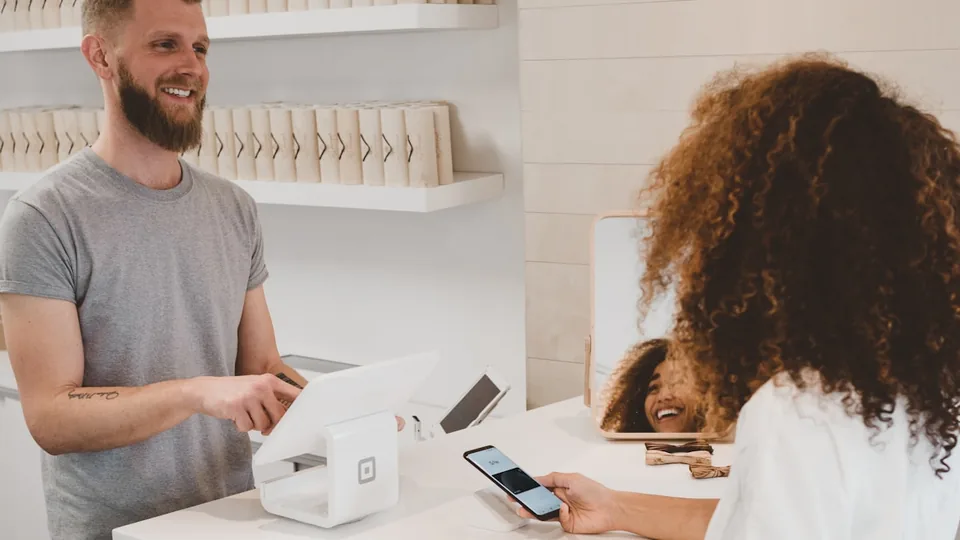
Let clients tip after the service feels complete
Place the QR near checkout, mirror stations, stylist cards, receipts, or aftercare notes so clients can tip when the haircut, color, nails, lashes, facial, massage, or spa service is finished.
The scan should name the provider or team the tip supports.
Keep stylist identity and amount context clear
Clients should know whether the QR opens one stylist, a shared team tip, a front-desk pool, or a specific service provider. If suggested amounts are shown, the payment provider should handle the transaction.
QR Code Lab routes the scan; it does not confirm that a tip was paid.
Use tip QR together with booking, reviews, and aftercare
A good salon follow-up can let clients tip, rebook, review, save stylist contact, open aftercare instructions, or view product recommendations without crowding the checkout counter.
Keep the first action clear so tipping does not feel buried.Salon tip QR should make appreciation simple and transparent
The client should see who receives the tip, which payment provider opens, and what to do after payment. That clarity matters for trust at the end of a personal service.
Use CTAs such as tip your stylist, thank the team, leave a gratuity, rebook with your provider, or review your visit.Provider identity
Show stylist, barber, nail tech, spa provider, or team name before payment.
Payment boundary
Let the trusted payment platform handle amount, receipt, refunds, and confirmation.
Checkout timing
Place the QR where clients pause after service, not where it interrupts consultation or care.
Follow-up value
Pair tipping with rebooking, reviews, aftercare, products, or loyalty when it helps the client.
Tip payment boundary
Use salon tip QR codes for payment links, not payment processing
TipsQR Code Lab can create the code, manage the destination, and show scan activity. The linked payment provider handles tip amount, checkout, receipt, refunds, disputes, and payout.

Open the right stylist or team tip page
Use the QR code to reduce typing and send clients to the exact tipping destination for a stylist, barber, nail tech, spa provider, or shared team pool.
Keep payment trust with the provider
The client should recognize the payment platform, see the recipient, understand the tip purpose, and complete the transaction inside that provider.
Make tip follow-up easier to manage
Dynamic destinations can move a printed salon card from one provider link to another when staff, services, or payment accounts change.
Payment confirmation stays outside QR Code Lab
QR Code Lab is not a POS system, bank, wallet provider, escrow service, payroll tool, or merchant of record for salon tips.
A scan shows interest in the tip page; it does not prove a tip was completed.Separate tip scans from tip confirmation
Use QR Code Lab to get clients to the correct tip page, then use the payment provider to confirm the money moved.
Salon client moments
Turn a finished salon visit into a tip, rebook, review, or aftercare action
SalonA salon QR code should match the client moment: tipping a provider, rebooking the next appointment, reviewing the visit, saving stylist contact, or opening aftercare instructions.

Make appreciation easy after service
Use checkout signs, mirror cards, receipts, and stylist cards to open the correct tip page for the provider or team.

Help clients book before they forget
Send clients to the right booking page for color maintenance, haircuts, nails, lashes, facials, massage, or follow-up care.

Ask while the result is fresh
Invite reviews after the service is complete and keep private feedback visible for anything that needs attention.

Send clients to care instructions
Open color care, product routines, lash instructions, nail care, skin-care notes, or post-treatment guidance from a phone.

Recommend the right retail follow-up
Link to the shampoo, treatment, styling product, or refill the provider recommended during the appointment.

Keep the provider relationship easy to continue
Let clients save contact details, follow the stylist, join a waitlist, or message the salon through the proper channel.

Salon clients scan when the next step feels personal
The visit has just ended, the result is visible, and the client knows which provider helped them. The QR code should make the next action easy in that exact moment.
Salon QR codes can reduce front-desk friction
Separate links for tipping, rebooking, reviews, aftercare, and product follow-up help the team avoid repeated explanations at checkout.
Place the code where the client can act calmly
Salon placement
Place salon tip QR codes where the client can thank the right provider
PlacementTip QR placement should match the end of the service: checkout, mirror station, receipt, stylist card, aftercare sheet, or private treatment room.

A tip QR too early can feel like pressure
Clients should not be pushed to tip during consultation, processing, washing, treatment, or before they know the final result.
The strongest moment is after the service is complete and the provider identity is clear.
Put the code where gratitude already happens
Checkout counters, mirror stations, receipts, thank-you cards, and aftercare notes let clients tip, rebook, or review when the appointment is closing.
The printed CTA should name the recipient or team so the scan feels transparent.
Who receives the tip?
Stylist, barber, nail tech, esthetician, massage therapist, assistant, or shared salon team.
What should happen after the scan?
Tip, rebook, review, save contact, open aftercare, or buy recommended products.
Is the client ready?
Use the QR after service, at checkout, or on take-home material rather than during the appointment.
Is payment trust clear?
Show the provider name and trusted payment destination before asking the client to continue.
Checkout counter
Best for tipping, rebooking, reviews, loyalty, and final follow-up when the visit is complete.
Mirror station
Works for stylist tips, aftercare, product recommendations, and social follow-up after the result is visible.
Receipt
Useful for tip links, review requests, rebooking, product follow-up, and manager contact.
Stylist card
Let clients tip, save contact, follow the provider, view portfolio, or book the next appointment.
Aftercare sheet
Pair tips with care instructions, product routines, support, and next-visit reminders.
Treatment room
Use discreetly for spa, massage, facial, waxing, and private-service follow-up.
Product shelf
Link recommended retail items to provider notes, refills, or care routines.
Thank-you card
Invite tipping, reviews, referrals, and rebooking after the client leaves the chair.
Salon tip QR placement should feel helpful, not forced
Use the code at the close of the service, with the provider identity and payment destination clear.
Salon review and tip trust
Keep tipping, reviews, and private feedback clearly separate
TrustA salon follow-up QR can support tips and reputation, but clients should not feel that payment, praise, and issue reporting are all the same action.

Let clients thank the right provider
Use a tip path when the service is complete and the client can see who receives the gratuity.
Checkout, mirror station, receipt, stylist card, aftercare sheet, or private treatment room. Do not hide the payment provider, recipient, or tip purpose.
Ask for reviews after the client has a real result
Haircuts, color, nails, lashes, facials, and spa treatments need enough context before asking for a public rating.
After checkout, thank-you card, loyalty follow-up, or rebooking confirmation. Do not pressure clients into positive-only reviews or mix review requests with tip confirmation.
Give clients a quiet way to report problems
If color, timing, comfort, cleanliness, billing, or service expectations missed the mark, private feedback should reach the salon before the relationship is lost.
Receipts, follow-up cards, post-appointment pages, and manager contact flows. Keep support visible even when the page also offers tipping and reviews.A salon QR should protect trust at checkout
Use one clear first action, then offer tipping, rebooking, reviews, and support without blurring the boundaries.
Stylist station flow
Place salon tip QR codes where the client feels ready to thank, rebook, or review
Useful placements include stylist station cards, checkout signs, receipts, appointment cards, aftercare sheets, mirrors, thank-you cards, and service menus. CTAs should say tip stylist, leave thank-you, rebook with stylist, review your visit, or send feedback. If the code is for one stylist, make the name visible so the client knows the tip goes to the right place.
Dynamic QR codes are practical because stylist links, booking pages, and review destinations can change. You can update the destination without reprinting every card. Scan analytics can compare station cards, receipts, and checkout signs, helping the salon see where clients engage without claiming that every scan became a completed tip.
Keep the payment destination trustworthy. If the scan opens Venmo, Cash App, Stripe, Square, or another provider, make that expected on the printed card. QR Code Lab manages the QR path and scan counts, while the payment provider handles transactions, disputes, privacy, and receipts. For multi-stylist salons, use separate codes or a clear landing page so clients do not tip the wrong person.






