
QR Code for Small Business Marketing - Campaigns & Coupons
Create QR codes for small business marketing linking campaign pages, coupons, reviews, loyalty signups, forms, catalogs, social profiles, and maps. Use them on storefronts, receipts, packaging, and ads.
Free QR code generator
Create a QR code online
Generate QR codes for websites, email, phone numbers, vCards, Wi-Fi, plain text, forms, PDF files, and campaign links. Customize colors, add a logo or frame, then download a print-ready PNG or SVG.
Choose QR code type
Website QR code, Email QR code, Phone QR code, vCard QR code, Wi-Fi QR code, Text QR code, SMS, WhatsApp, event, and download links.
Add your content
Enter your website URL, contact details, message, phone number, location, or file destination before generating the QR code.
Customize and download
Adjust QR colors, error correction, logo, frame, size, and margin. Generate QR Code, Download PNG, Download SVG, or Save and track scans.
Local campaign path
Turn small business print into coupons, reviews, bookings, and leads
A QR code for small business marketing is useful when flyers, business cards, table signs, posters, packaging, receipts, window decals, mailers, and local ads need a direct digital next step. It can open campaign pages, coupons, review links, booking pages, lead forms, catalogs, maps, social profiles, loyalty signup, and contact cards without asking people to type a URL.
For a small business, the value is simple: more useful customer touchpoints without a big integration project. A receipt can invite a review. A flyer can open a quote form. A window sign can show hours or offers after closing. A package insert can bring someone back to reorder. A table card can open a menu, Wi-Fi, or feedback. QR Code Lab helps create print-ready dynamic codes and scan analytics for these everyday materials.
QR Code Lab creates URL QR codes and tracks scans. It does not run your ads, process payments, manage bookings, collect forms, or operate your CRM. Your website, form tool, booking platform, payment provider, review site, or social profile handles the customer action.
Low-cost customer touchpoints
Make small business marketing print easier to act on, update, and measure
Practical benefitsA QR code is useful when it turns offline attention into a specific business action: claim an offer, book, call, review, join a list, view a product, pay, or get support.
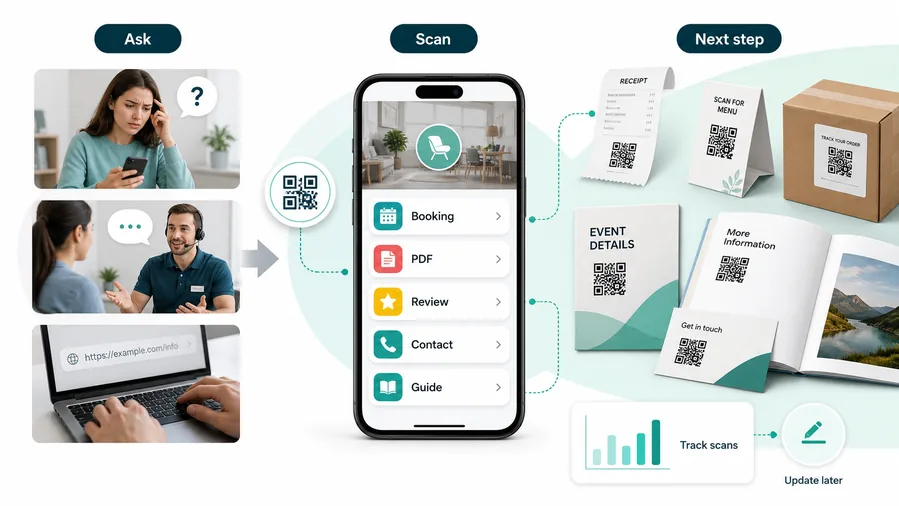
Offline interest often leaks away
A flyer, receipt, card, poster, package, or storefront sign can create attention, but customers still have to type, search, remember, or ask staff what to do next.
That gap turns simple marketing into missed bookings, forgotten offers, repeated questions, and weak follow-up.
A focused QR code makes the next step immediate
A well-labeled QR code sends the customer from the printed moment to the exact landing page, booking form, coupon, review path, payment page, or support resource.
For customers, the strongest QR code use cases are usually the repetitive questions and next actions people already have. QR Code Lab helps turn those moments into clear buttons, files, forms, microlanding pages, editable destinations, and measurable scan activity.
Reduce typing and search friction
Replace long URLs, social handles, booking links, offer codes, and file names with one scan from the printed surface.
Match the scan to the campaign promise
Use the QR where the need appears: card, flyer, receipt, package, storefront, estimate, handout, or sign.
Keep print current after launch
Use editable destinations for offers, forms, menus, calendars, files, seasonal pages, and local campaigns that change.
Learn which placements earn attention
Use separate tracked codes when flyers, receipts, signs, cards, or neighborhoods need their own scan readout.
A cheap layer of extra customer contact
QR codes increase useful touch frequency without a CRM project, mobile app, custom integration, or staff training. One printed code can open a guide, download, booking page, feedback form, review request, support path, or updated resource. The customer feels helped, not chased.
Restaurants and venues
Menus, Wi-Fi, booking, reviews, loyalty signup, event details, and feedback can live exactly where guests already pause.
Books and education
Bonus PDFs, ZIP files, worksheets, source files, updates, examples, and reader feedback can sit behind a single page-level QR code.
Retail and packaging
Care guides, warranty, setup instructions, reorder links, product education, recipes, safety notes, and reviews can follow the item home.
Services and events
Booking, contact save, registration, schedules, maps, check-in, forms, portfolio links, and follow-up pages become reachable without manual searching.
Small business QR marketing works when every code has one clear job
If the scan does not help the customer act faster or help the business follow up better, the placement needs a sharper purpose.
Small business marketing moments
Turn small business print into offers, bookings, reviews, referrals, payments, and repeat customers
Local growthSmall business QR codes should connect each printed touchpoint to a useful action: call, book, claim offer, view products, join rewards, pay, review, refer, or get support.

Make promotions easy to claim
Use flyers, postcards, window signs, and counter cards for coupons, seasonal offers, lead magnets, and campaign landing pages.

Move interest into appointments or quote requests
Open booking, quote forms, service menus, contact, availability, and intake details from cards and signs.

Connect print to product detail or ordering
Route shelves, packaging, catalogs, and flyers to product pages, stock, care notes, reorder, and support.

Ask after the customer experience is complete
Use receipts and follow-up cards for public reviews, private feedback, referrals, and issue recovery.

Open trusted checkout or invoice pages
Use invoices, estimates, and counters for deposits, balances, tips, pickup, and billing support with clear context.

Turn one customer into future visits
Connect buyers to loyalty, SMS, email, reorder, next booking, referral, or customer support.

Customers scan when the next step is specific and valuable
The destination should match the printed promise and remove effort: claim, book, buy, pay, review, save, reorder, or ask for help.
Editable QR lets small businesses reuse print across campaigns
Dynamic QR lets the same cards, flyers, receipts, and signs point to current offers, booking pages, forms, menus, files, and support pages.
Match small business QR placement to the campaign job
Campaign placement
Place small business QR codes where customers are ready to claim, book, buy, pay, review, or return
PlacementQR placement should follow the customer moment: discovery on a flyer, decision on a card, checkout on a receipt, support on packaging, and repeat business in follow-up print.

A generic QR does not make a campaign measurable or useful
If customers do not know whether the scan opens an offer, booking, product page, review, payment, or support, the code becomes decoration.
Small business print needs a clear promise because attention is brief.
Put the code beside the action the print is asking for
Use flyers for offers, cards for contact or quote, receipts for reviews and loyalty, invoices for payment, and packaging for support or reorder.
The first screen should continue the printed CTA.
What is the campaign asking?
Call, book, quote, claim, buy, join, pay, review, refer, download, reorder, or get support.
What should open first?
Landing page, booking form, coupon, product page, payment, review, file, support, or contact save.
Will the destination change?
Use dynamic QR for offers, calendars, forms, menus, files, ads, events, payment links, and seasonal campaigns.
Can the code scan in context?
Use enough size, contrast, and CTA clarity on flyers, receipts, cards, signs, labels, and packaging.
Flyer or postcard
Open campaign offer, booking, quote request, event page, or local landing page.
Business card
Share contact, portfolio, booking, quote, reviews, and services.
Receipt
Route to review, private feedback, loyalty, coupon, support, and reorder.
Storefront sign
Show hours, menu, pickup, services, booking, offer, and social proof.
Invoice or estimate
Open payment, approval, support, warranty, and project notes.
Package or label
Link product care, warranty, instructions, reorder, and reviews.
Counter card
Promote signup, offer, booking, payment, loyalty, and feedback.
Event handout
Connect attendees to offer, contact, resources, follow-up, and referral.
Small business QR placement should make marketing easier to act on
If the code does not support a concrete customer action or business follow-up, it needs a clearer purpose.
Scan reading
Compare small business QR scans by flyer, receipt, card, sign, package, invoice, and campaign
AnalyticsQR analytics can show which offline marketing pieces earn attention. Separate dynamic codes help compare offers, bookings, reviews, payments, products, support, and local campaigns.

All marketing scans collapse into one broad number
A shared QR can show total activity, but it cannot tell whether a flyer, receipt, card, sign, package, invoice, or campaign caused the scan.
Use one code only when placement comparison does not matter.
Each print placement becomes a campaign signal
Separate dynamic QR codes let small businesses compare offers, bookings, reviews, payments, products, support, and follow-up prompts.
The signal is directional, but it helps improve future print and local marketing.
Scan volume
See which printed placements receive attention.
Time and device
Check when customers scan and which device opens the destination.
Broad location
Use approximate location carefully for neighborhoods, stores, events, and service areas.
Placement comparison
Compare flyers, receipts, cards, signs, invoices, packages, and handouts.
Name codes by campaign and placement
Use names such as spring-flyer, receipt-review, card-quote, invoice-pay, package-reorder, or window-pickup.
Separate lead and retention scans
Offers, bookings, reviews, payments, support, and loyalty should not share one code if reporting matters.
Keep attribution practical
Scans show attention and timing; leads, sales, payments, and repeat visits still need their own systems.
Books and printed content
Learn whether readers open bonus pages, downloads, updates, or feedback forms from book pages.
Small business analytics work when every code has a campaign name
Clear QR naming turns print into useful marketing and operations signals.
Cheap extra touchpoints
Use QR codes where customers are already looking or waiting
Good placements include checkout counters, receipts, package inserts, flyers, service cards, appointment cards, storefront windows, event booths, menus, stickers, and local mailers. CTAs should be specific: get coupon, book appointment, request quote, leave review, view catalog, follow updates, join rewards, or save contact. A QR code works better when it replaces friction, not when it is added as decoration.
Dynamic QR codes are helpful because small business campaigns change quickly. You can reuse the same printed sign while sending people to a holiday offer, booking page, review request, loyalty signup, or new service page. Scan analytics can compare print pieces and locations so you know whether the counter sign, flyer, receipt, or package insert actually gets attention.
Think about the customer moment. A person waiting at the counter may scan a loyalty offer. A person holding a package may scan reorder or support. A person outside a closed shop may scan hours or booking. Matching the code to that moment makes the experience feel helpful instead of pushy.
After-print control
Keep small business QR campaigns useful when offers, forms, menus, booking pages, and files change
DynamicSmall business print often circulates after campaigns change. Dynamic QR keeps flyers, receipts, signs, cards, invoices, and packaging connected to current destinations.
Old print can keep sending customers to stale campaigns
Static QR is risky when offers expire, forms move, menus change, calendars update, files are replaced, or payment links change.
A stale destination wastes paid print and makes the business look less organized.
One printed code can keep opening the current campaign path
Dynamic QR lets the printed piece stay stable while the destination behind it changes.
That is useful for seasonal offers, local campaigns, booking pages, payment links, and support resources.

Offers and campaigns
Update coupons, landing pages, lead magnets, event pages, and seasonal promotions.
Bookings and forms
Change appointment calendars, quote forms, intake pages, menus, and service pages.
Payments and files
Refresh invoice links, deposits, PDFs, catalogs, downloads, and product resources.
Reviews and retention
Update review pages, loyalty signup, referrals, support, and reorder paths.
Use dynamic QR for marketing print that may outlive the campaign
If the destination may change before the printed piece disappears, keep the QR editable.
Customer trust
Make small business QR codes trustworthy before customers book, pay, join, or share details
TrustSmall business QR codes may open offers, forms, payments, reviews, files, loyalty, and support. The destination should clearly match the business and printed promise.

Anonymous landing pages
Customers hesitate if the scan does not show the business name, offer context, location, or reason for the form.
Watch for similar-looking domains, long URLs, login or verify keywords, and pages asking for credentials after an unexpected scan.
Expired campaigns and old links
Retired offers, moved forms, stale menus, wrong calendars, and dead payment links make print feel careless.
A trustworthy QR should not make the final destination mysterious, especially on posters, labels, menus, parking signs, or event materials.
Unclear payment or signup paths
Deposits, invoices, loyalty, email signup, and customer data forms need trusted context before customers act.
Before paying, check the domain, HTTPS, amount, recipient, and whether the destination matches the place or brand that printed the QR.Scan like a customer before printing
Confirm the first screen matches the printed CTA, shows the business identity, and opens the current booking, quote, payment, review, aftercare, or support path.
The current detailed report is a static URL analysis. It helps reveal the encoded content and basic URL risk signals, but it does not guarantee that a destination is safe and does not replace browser, antivirus, payment, or bank security checks.Decoded content
See the raw value inside the QR before opening it.
Content type
Recognize URL, Wi-Fi, mailto, phone, SMS, vCard, or plain text.
URL risk signals
Review HTTPS, shorteners, IP addresses, long URLs, encoded characters, query parameters, and sensitive keywords.
Destination report
For URL codes, view final URL fields, static redirect report fields, domain fields, TLS placeholders, page metadata fields, and risk reasons.
Make your own QR codes easier to trust
A safe-looking QR code is not only about security. It is also about reducing uncertainty for the scanner. Use clear destination text, a branded landing page, normal HTTPS domains, and a visible explanation of what happens after scanning.






