
Static vs Dynamic QR Code Guide for Tracking, Links & Print
Compare static and dynamic QR codes before printing. Learn when to use direct codes, editable destinations, redirects, scan tracking, analytics, campaign reports, and link updates.
Free QR code generator
Create a QR code online
Generate QR codes for websites, email, phone numbers, vCards, Wi-Fi, plain text, forms, PDF files, and campaign links. Customize colors, add a logo or frame, then download a print-ready PNG or SVG.
Choose QR code type
Website QR code, Email QR code, Phone QR code, vCard QR code, Wi-Fi QR code, Text QR code, SMS, WhatsApp, event, and download links.
Add your content
Enter your website URL, contact details, message, phone number, location, or file destination before generating the QR code.
Customize and download
Adjust QR colors, error correction, logo, frame, size, and margin. Generate QR Code, Download PNG, Download SVG, or Save and track scans.
Format choice
Choose static for direct device behavior and dynamic for control after printing
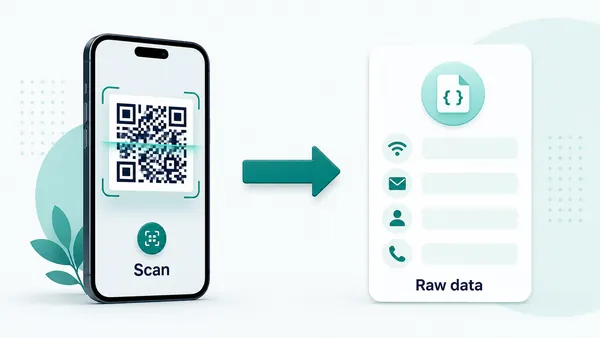
Static and dynamic QR codes are not just two versions of the same thing. They behave differently after the scan. A static QR code contains the real data directly in the QR pattern: a URL, Wi-Fi credentials, vCard contact, email command, phone number, SMS text, calendar event, or plain text. Because the device receives that real data immediately, static codes can trigger native phone actions cleanly.
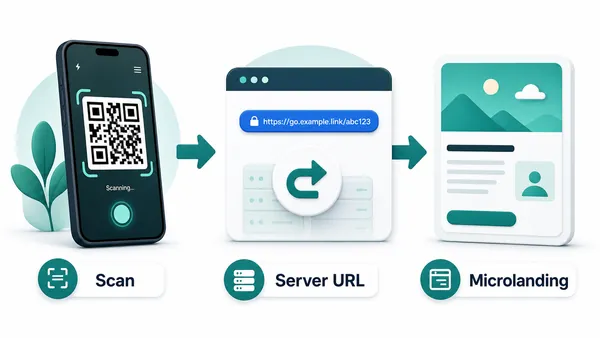
A dynamic QR code contains a managed URL first. That redirect layer is what makes editing and scan analytics possible. QR Code Lab can receive the scan, record useful signals, and send the visitor to the current destination. The printed code can stay the same while the destination changes later, which is a big advantage for campaigns, menus, packaging, books, labels, posters, and files.
The trade-off is practical. Use static when the information is permanent and the direct phone action matters more than tracking. Use dynamic when the printed code must stay manageable after it leaves your hands. If a link, PDF, offer, menu, or landing page may change, dynamic usually saves more trouble than it adds.
Choose static or dynamic QR by what must stay controllable after launch
DecisionStatic and dynamic QR codes solve different publishing problems. Static is best when the encoded data is final and direct phone behavior matters. Dynamic is best when a printed code may need edits, measurement, campaign comparison, or a corrected destination later.
Static QR code: direct data, no managed layer
A static QR code contains the actual payload inside the QR pattern. That payload might be a URL, Wi-Fi network, vCard, email command, phone number, SMS message, calendar event, or plain text value.
Because the device receives the final data immediately, static QR can feel fast and native. A Wi-Fi code can show the join prompt, a vCard can open a save-contact screen, and a phone code can start the dialer prompt without a web redirect.
The cost of that simplicity is permanence. After a static QR code is printed, QR Code Lab cannot change the destination, pause the code, replace a file, or collect scan analytics through a dashboard.
Dynamic QR code: editable destination, measurable scans
A dynamic QR code stores a managed URL first. When someone scans it, QR Code Lab receives the request and sends the visitor to the current destination assigned to that code.
That redirect layer makes editing and analytics possible. You can replace a PDF, update a menu, change a campaign URL, move a booking page, correct a form link, or point old printed material to a new resource.
Dynamic QR is usually safer for posters, flyers, packaging, menus, signs, books, events, retail displays, and long-lived documents where the printed code may outlive the first destination.
Quick decision
After-print control
Use dynamic QR when the printed code must survive changed destinations
DynamicThe static-versus-dynamic decision matters most before printing. A code on paper, packaging, signage, or a book may stay in circulation long after the first URL, file, form, or offer has changed.
The printed pattern is locked to the first payload
A static QR code keeps opening the same encoded data. That is fine for permanent Wi-Fi, phone, contact, email, SMS, calendar, or text values.
For web destinations, the risk appears when a page moves, a PDF is replaced, a menu changes, a campaign expires, or a form link is corrected after the code has already been printed.
The same printed code can open the current destination
A dynamic QR code separates the printed image from the final destination. The visible code stays the same while the managed link behind it can be updated.
That makes dynamic QR useful for campaigns, events, retail, packaging, restaurants, education, manuals, brochures, and any workflow where replacing printed material would waste time or money.

Menus and service pages
Update prices, booking links, delivery pages, service lists, or seasonal content without reprinting table cards or signs.
Campaign and event pages
Move scans from old offers, ticket pages, agenda files, registration forms, or follow-up pages to the current destination.
Product and packaging resources
Replace instructions, warranty pages, safety notes, product education, batch notices, or reorder paths after inventory is shipped.
Documents and downloads
Swap PDFs, brochures, worksheets, manuals, catalogs, or source files while printed references keep working.
Use dynamic when correction matters more than absolute simplicity
Static is clean when the data is final. Dynamic is practical when the QR code becomes part of a printed workflow that may need updates, reporting, or a safer fallback after launch.
Scan measurement boundary
Use analytics only when the QR code passes through a managed link
AnalyticsStatic QR codes that open direct device actions do not report scans through QR Code Lab. Dynamic URL QR codes can be measured because the scan opens a managed redirect before the final destination.

The device reads the QR without reporting back
When a static QR stores Wi-Fi, vCard, phone, SMS, email, calendar, text, or a direct URL, the phone can act on that data immediately.
Because QR Code Lab is not in the path after the scan, there is no dashboard event to count for that direct static behavior.
The redirect creates a measurable event
When a dynamic QR is scanned, the managed URL records useful scan signals and then sends the visitor to the current destination.
That makes analytics possible for campaigns, print materials, placements, locations, devices, browsers, and broad scan timing patterns.
Scan volume
See how many scans a dynamic code received during the selected period and whether activity changes after distribution.
Time and device
Review when people scanned and which device, browser, or operating system opened the managed destination.
Broad location
Use approximate location signals to compare regions or placements without treating scan data as exact identity.
Code comparison
Compare separate dynamic codes when campaigns, teams, venues, labels, or print materials need their own readout.
Campaign reporting
Compare flyers, posters, emails, landing pages, and offline placements by scan activity.
Print placement review
Use separate codes for signs, counters, packages, inserts, and handouts to learn which placements earn attention.
Destination testing
Spot dead periods, unexpected devices, strange locations, or traffic after a campaign should have ended.
Iteration planning
Use scan patterns to decide what to repeat, remove, rename, or redirect before the next print run.
Do not promise analytics from direct static codes
Static QR explains direct behavior. Dynamic QR adds the managed layer required for scan reporting, destination updates, and placement comparison.
Decision rule
Think about what happens after the code leaves your hands
If the QR code will be printed once and forgotten, ask whether the data might change. A typo, moved page, replaced PDF, new menu, expired offer, changed phone number, or updated campaign can make a static printed code expensive to fix. Static is simple, but the simplicity comes with a hard limit: the data inside the pattern is locked.
Static is often best for Wi-Fi joining, direct contact saving, phone calls, email drafts, SMS actions, and plain text because the phone can understand the data without opening a redirect first. Dynamic is usually better for web destinations, downloadable files, landing pages, marketing campaigns, books, packaging, posters, and printed materials where you want edits or scan reporting.
A helpful rule is this: if the QR code is mostly a device command, consider static. If the QR code is part of a printed workflow, campaign, or content system, consider dynamic. QR Code Lab gives the most value when the code needs to be updated, measured, named clearly, and reviewed after people start scanning.
Quick answers
QR code questions that change the publishing decision
FAQUse these answers to choose the safer QR setup before printing, sharing, or measuring a code.
Static QR basics
Static codes are simple because the final data is encoded directly.
Can I edit a static QR code after printing?
No. A static QR code contains the final value inside the pattern. If the URL, file, or data changes, the printed code has to be replaced.
When is static QR enough?
Static is enough for final data, native phone actions, short-lived uses, or low-risk codes that do not need analytics.
Do static QR codes have scan analytics?
Direct static payloads do not report scans through QR Code Lab because the phone reads the value without a managed redirect.
Is static QR faster for Wi-Fi or vCard?
Often yes. Wi-Fi, vCard, phone, email, SMS, calendar, and text codes can trigger native phone behavior without a web step.
Dynamic QR basics
Dynamic codes add a managed link so the destination can be updated.
What can I change in a dynamic QR code?
You can update the destination URL, file, form, menu, campaign page, or landing page assigned behind the same printed QR code.
When should I choose dynamic?
Choose dynamic for print runs, campaigns, packaging, signs, menus, events, documents, or any code that may need edits later.
Does dynamic QR change the scanner experience?
It behaves like a web link because the scan passes through a managed URL before opening the final destination.
Can dynamic QR prevent every mistake?
No. It helps fix destination mistakes, but the printed size, CTA, placement, and final landing page still need to be tested.
Print readiness
Printed QR codes need physical testing before distribution.
How big should a printed QR code be?
Base size on scan distance and material. Cards and labels can be smaller than posters, windows, banners, and signs.
What makes a printed QR code fail?
Common causes include low contrast, missing quiet zone, tiny size, glare, folds, curves, damaged print, and a destination that loads poorly.
Should I test the QR from a screen or paper?
Use paper or the final material. A code that scans from a monitor may fail after printing, coating, trimming, or placement.
Can a logo make scanning worse?
Yes, if it covers important pattern areas, reduces contrast, or encourages a smaller code. Test the branded version at final size.
Tracking expectations
Analytics are useful only when the QR workflow supports measurement.
What does QR scan tracking measure?
Dynamic QR can show scan volume, timing, device/browser/OS signals, broad location, and comparisons between separate codes.
Does a scan prove a sale or signup?
No. Scan analytics show attention and entry activity, not guaranteed downstream conversion unless your destination system measures that separately.
Why use separate QR codes for placements?
Separate codes make reports meaningful by showing which flyer, poster, label, sign, event, or region produced scan activity.
Can I track direct Wi-Fi or vCard scans?
Not through QR Code Lab if the code is direct static data. Tracking requires a managed web-link step.
Design and branding
For logos, colors, frames, CTA labels, and print-ready styling.
Can I add a logo?
Yes, but keep enough QR modules visible and test the result. A logo should support the design, not damage scanning.
Can QR codes be colored?
Yes. Keep strong contrast between foreground and background, and avoid colors that make the QR pattern too light.
Can I invert colors?
Only after testing. Some scanners handle inverted codes poorly, especially on glossy or low-contrast print.
What is the quiet zone?
It is the empty margin around the QR code. Do not crop it or place text, borders, or graphics too close to the code.
Safety and trust
For unknown QR codes, public print, payment links, and security checker pages.
How do I know what is inside a QR code?
Use a QR safety checker to decode the QR image and preview the raw content before opening it.
Can a QR code hide a phishing link?
Yes. The QR pattern hides the link until it is decoded, so unknown public QR codes should be inspected carefully.
What should I check before opening?
Look at the domain, HTTPS, shorteners, unusually long URLs, encoded characters, sensitive keywords, and whether the destination matches the physical context.
Does the checker guarantee safety?
No. It helps preview decoded content and basic risk signals, but it does not replace browser, antivirus, bank, or payment security checks.
Native actions
For Wi-Fi, email, phone, SMS, calendar, and vCard QR codes.
Why does Wi-Fi QR behave differently?
A static Wi-Fi QR stores structured network data, so many phones can show a native join-network prompt.
Can dynamic QR open native Wi-Fi directly?
Usually no. A dynamic QR contains a URL first, so the phone treats it like a web link rather than direct Wi-Fi credentials.
Can a QR start email or phone actions?
Yes, if the QR contains formats such as mailto:, tel:, or sms:. The device decides how to handle the action.
When should I use static for native actions?
Use static when the direct device action matters more than editability, redirects, or scan analytics.
Scan experience
For mobile pages, micro-landings, CTAs, forms, and post-scan clarity.
What should users see after scanning?
They should see a mobile-friendly page or native action with one obvious next step.
How many buttons should a landing page have?
Keep it focused. One to five buttons usually works better than a full website navigation menu.
Should QR go to the homepage?
Usually no. It should open the exact action promised next to the printed code.
How do I reduce confusion?
Add a short label near the QR code and make the destination match the printed context: menu, file, booking, feedback, payment, or contact.
Choose by risk, not by habit
Static, dynamic, design, print size, and analytics are all tradeoffs. Pick the setup that protects the real scan moment.






