
Editable QR Code Generator for Changeable Print Links & Campaigns
Create editable QR codes that keep the same printed image while the destination URL changes later. Use them for menus, packaging, events, support links, campaigns, and printed guides.
Free QR code generator
Create a QR code online
Generate QR codes for websites, email, phone numbers, vCards, Wi-Fi, plain text, forms, PDF files, and campaign links. Customize colors, add a logo or frame, then download a print-ready PNG or SVG.
Choose QR code type
Website QR code, Email QR code, Phone QR code, vCard QR code, Wi-Fi QR code, Text QR code, SMS, WhatsApp, event, and download links.
Add your content
Enter your website URL, contact details, message, phone number, location, or file destination before generating the QR code.
Customize and download
Adjust QR colors, error correction, logo, frame, size, and margin. Generate QR Code, Download PNG, Download SVG, or Save and track scans.
Post-print control
Use an editable QR code when the printed image must stay useful after the link changes
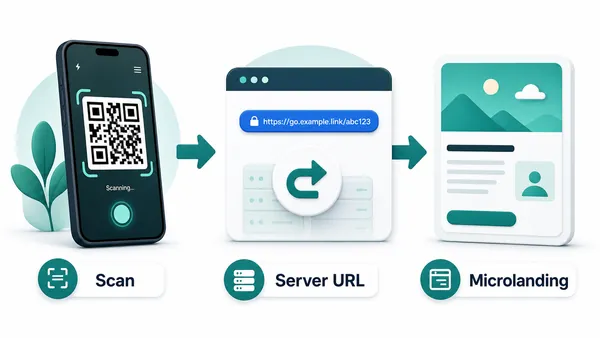
An editable QR code is a dynamic QR code: the printed pattern opens a managed QR Code Lab URL first, and the final destination can be changed later in your account. That makes it useful for menus, packaging, event signs, flyers, posters, manuals, labels, books, table tents, business cards, stickers, and campaigns where reprinting is expensive, slow, or simply annoying.
A static QR code cannot be edited after printing because the final data is stored directly inside the QR pattern. If the URL changes, the printed static code still points to the old data. An editable QR code adds a redirect layer so the printed image can stay the same while the destination behind it changes. That can save a campaign when a page moves, a PDF is replaced, or a seasonal offer changes.
The trade-off is important: editable QR codes behave like web links, not native Wi-Fi, vCard, email, SMS, or phone commands. Use them when flexibility, tracking, and post-print control matter more than direct device actions.
After-print control
Use editable QR when the printed code must survive destination changes
DynamicEditable QR codes are built for the practical problem of print: the code may stay on a package, poster, menu, card, label, or manual long after the first destination changes.
The printed pattern is locked to the first destination
A static QR works while the encoded URL or data remains final, but it cannot follow a moved page, replaced PDF, updated menu, changed form, or corrected campaign link.
When the code is already printed, even a small URL mistake can become a reprint or support problem.
The printed code can stay while the destination changes
Editable QR uses a managed link so the visible QR image does not need to change when the final destination is updated.
That gives teams room to fix links, rotate offers, change files, update landing pages, and keep long-lived print useful.

Menus and price lists
Update seasonal menus, delivery links, booking pages, and PDF files without replacing table cards or flyers.
Product packaging
Change manuals, warranty pages, setup guides, batch information, or support resources after items ship.
Campaign materials
Move posters, handouts, badges, and ads from one landing page or offer to the next.
Docs and files
Replace outdated PDFs, downloads, forms, and microsites while the printed QR code remains the same.
Use editable QR when reprinting would hurt
If a destination may change after the code leaves your screen, dynamic editability is usually worth more than a slightly simpler static setup.
Choose static or dynamic QR by whether the destination may need edits
EditabilityStatic QR is final because the destination is encoded into the pattern. Editable QR uses a managed link first, so the printed code can keep working while the final destination changes.
Static QR is simple but locked after print
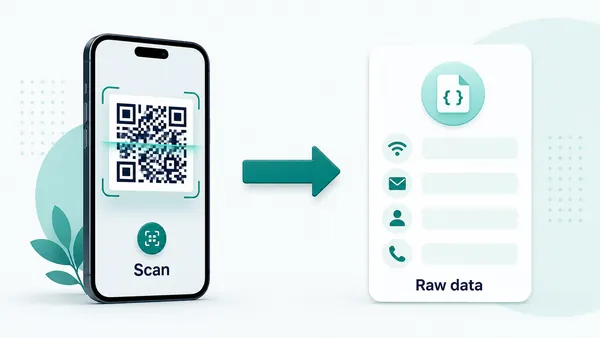
A static QR code stores the final URL or data inside the pattern itself, so the scan can open without a managed redirect.
That is fine for permanent Wi-Fi, text, phone, email, vCard, calendar, or final URL data that will not change.
The tradeoff is permanence: after printing, the destination cannot be edited in QR Code Lab and scan analytics cannot be collected.
Editable QR uses a managed link you can update
An editable QR code stores a managed URL first, then sends scanners to the current destination behind that link.
That managed layer is what lets you replace a PDF, update a menu, change a campaign URL, fix a typo, or move visitors to a new page without reprinting the code.
Use it when printed material may outlive the first destination or when the team needs control after launch.
Quick decision
Editable scan UX
Make the editable QR scan match the promise printed beside the code
Scan UXChanging a destination later is useful only when the scanner still lands on something that feels expected, mobile-friendly, and connected to the original print context.
Use the managed link for destinations that may move
PDF, menu, form, landing page, offerAn editable QR code gives the team a stable printed code and a destination that can be changed behind it.
The destination should still match the CTA beside the code, even after the page or file is updated.
Use a landing page when the scan needs several actions
Buttons, files, contact, support, bookingA microlanding page can present buttons, files, images, contact paths, forms, and fallback links without crowding the printed material.
That works well for packaging, books, menus, events, manuals, campaigns, and support cards.
Check the destination after every edit
Speed, mobile fit, CTA, fallbackChanging the target URL is not enough. The updated destination should load quickly, fit the phone, and explain the next action.
Use separate codes when different placements need different destinations or reporting.
Does the updated page still match the printed CTA?
A code printed as download the guide should not later open an unrelated homepage or vague campaign page.
Can the scanner act immediately on a phone?
Check buttons, files, forms, login requirements, and page speed after each destination update.
Should placements use separate editable codes?
Use different QR codes when posters, packages, menus, branches, or teams need different destinations or analytics.
Editable QR is only valuable when the new destination is better
Treat each edit as a small relaunch: confirm the promise, phone experience, and tracking before relying on the printed code.
Reprint risk
Editable QR codes are insurance against real-world changes
Editable QR codes are most valuable when the physical asset has a longer life than the link behind it. A menu changes, an event page moves, a product manual is revised, a campaign offer ends, a support article is replaced, or a file gets renamed. With a static code, that becomes a reprint problem. With an editable code, it becomes a dashboard update.
Use clear names and notes when creating editable QR codes. Six months later, you should know which printed asset uses which code, what destination is live, and why the link was changed. This is not just admin neatness. It prevents teams from editing the wrong code or losing track of what a label, flyer, menu, or package insert currently opens.
Scan analytics then help you decide whether the printed placement is still worth keeping. If a code is still being scanned, updating it is usually better than letting the old destination fade into a broken or outdated page. Treat old scans as proof that old print is still alive.






