
Trackable QR Code Generator for Print Campaign Analytics
Create trackable QR codes for flyers, posters, packaging, receipts, table cards, business cards, and book inserts. Measure scans, compare placements, and update links without reprinting.
Free QR code generator
Create a QR code online
Generate QR codes for websites, email, phone numbers, vCards, Wi-Fi, plain text, forms, PDF files, and campaign links. Customize colors, add a logo or frame, then download a print-ready PNG or SVG.
Choose QR code type
Website QR code, Email QR code, Phone QR code, vCard QR code, Wi-Fi QR code, Text QR code, SMS, WhatsApp, event, and download links.
Add your content
Enter your website URL, contact details, message, phone number, location, or file destination before generating the QR code.
Customize and download
Adjust QR colors, error correction, logo, frame, size, and margin. Generate QR Code, Download PNG, Download SVG, or Save and track scans.
Measurable QR codes
Create a QR code when the printed placement needs scan tracking
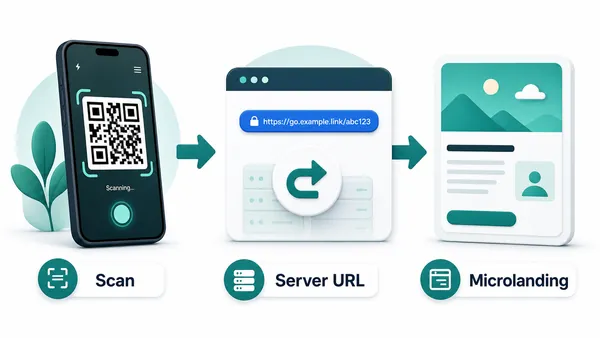
A trackable QR code is a dynamic QR code that opens a managed URL first. That managed layer is what makes scan analytics possible: QR Code Lab receives the scan, records useful signals, and then sends the visitor to the current destination. Use it when you do not only need the QR code to work, but also need to know whether people actually scanned it.
This matters for print campaigns, product packaging, flyers, menus, posters, labels, direct mail, table tents, event badges, and local promotions. A printed code can look good on a design mockup and still get weak results in the real world. Tracking gives you a practical way to compare placements, timing, devices, and broad scan patterns instead of guessing from opinions.
The trade-off is simple. A trackable QR behaves like a web link because the redirect is part of the measurement. That is excellent for URLs, files, landing pages, menus, offers, and campaign pages. For direct device actions like Wi-Fi, vCard, email, phone, or SMS, a static QR code may feel smoother because the real data is stored directly in the QR pattern.
Placement tracking
Create trackable QR codes so every placement reports separately
TrackingA trackable QR code is most useful when each printed asset, campaign channel, location, or team has its own named code. The scan experience can stay simple while the dashboard shows which placements actually earned attention.

One code hides which placement worked
If every poster, flyer, package insert, badge, and table card uses the same QR code, the dashboard can only show one blended scan total. That number may prove there was interest, but it cannot show where the interest came from.
This makes follow-up weaker. A team may reprint the wrong material, remove a strong placement, or miss a location that quietly produced most of the scans because the tracking setup did not separate the signals.
Each code becomes a campaign signal
Create a separate trackable QR code for each important placement and give it a name that matches the real material: lobby poster, receipt card, package insert, booth banner, direct mail piece, or event badge.
The scanner still opens the intended destination, but QR Code Lab can record scan volume, timing, device patterns, browser signals, and broad location trends for that specific code. That is the practical difference between counting scans and learning from them.
Scan volume
Review how many scans each named code receives, then compare placements instead of reading one campaign total as if every material performed the same way.
Time and device
Use scan timing, device type, browser, and operating system signals to spot launch spikes, event windows, mobile issues, or moments when people are most ready to act.
Broad location
Approximate location signals can reveal regional patterns, store-level differences, or unexpected scan areas. Treat them as directional campaign context, not personal identity data.
Scan history
Review individual scan rows when you need the detail behind the charts: when the scan happened, which code was scanned, and what technical context was recorded.
Campaign materials
Track posters, flyers, direct mail, handouts, inserts, and table cards separately so the next print run can be based on actual scan behavior.
Events and booths
Give badges, sponsor signs, session doors, registration desks, and booth banners their own codes when organizers need to compare attendee actions.
Packaging and labels
Use trackable codes on product labels, warranty cards, setup inserts, and batch-specific packaging when the team needs to see which items drive scans.
Multi-location teams
Separate codes by branch, region, rep, store, or local campaign when scan reporting needs to show where attention is coming from.
Track the placement, not just the destination
The destination can be the same across many QR codes, but the reporting should not be. Use a distinct trackable QR code whenever the placement, team, material, or channel needs its own result in the dashboard.
Use dynamic QR when scan history and campaign changes matter
DynamicStatic QR is fine for final data that never needs reporting. A trackable QR code needs a managed destination first, because that redirect is what makes scan history, campaign comparison, and later destination changes possible.
Static QR code
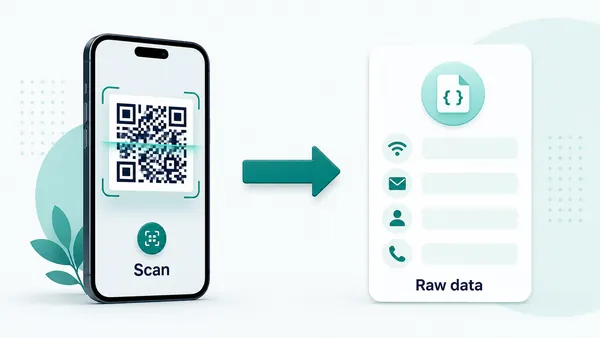
A static QR code contains the actual data inside the QR pattern. For Wi-Fi, that usually means the network name, encryption type, and password are encoded directly, so most phones can show the native "join this network" prompt after scanning.
The same idea applies to email, phone, SMS, vCard, calendar, and plain text codes. The device receives a format it already understands: open the mail app, start a call, prepare a message, or show the interface for saving a contact.
That direct behavior is the main advantage of static QR codes. There is no redirect step and no intermediate page, so the scan feels immediate and familiar. The trade-off is also clear: because nothing passes through QR Code Lab after the scan, the destination cannot be edited and scan statistics cannot be collected.
Dynamic QR code
A dynamic QR code always contains a managed URL first. That redirect is what makes editing and analytics possible: QR Code Lab receives the scan, records useful signals, and then sends the visitor to the current destination.
Because the QR payload is a URL, the device usually treats it like a web link, not like a native Wi-Fi, email, contact, or calendar command. For those use cases, dynamic often means showing a small landing page where the visitor can continue to the real action.
The benefit is control after printing. You can replace a PDF, change a campaign URL, update a menu, swap a file, or measure whether a book, flyer, label, or package is actually being scanned without reprinting the code.
Quick decision
After-print control
Keep tracked QR campaigns useful after the material is printed
EditableTrackable QR codes are not only about analytics. They also protect printed campaigns when a URL changes, an offer ends, a PDF is replaced, or a team realizes that each placement needs clearer reporting.
Printed codes can outlive the first destination
A campaign can look final on launch day and still change later. Pages move, forms are rebuilt, PDFs are replaced, menus update, event links expire, and teams discover that one shared code was not enough for reporting.
With a static QR code, the printed pattern keeps opening whatever was encoded at export. If that destination breaks or the tracking plan changes, the fix often requires reprinting every physical asset.
The same printed code can keep working
A trackable dynamic QR code separates the printed image from the final destination. You can keep the same printed code while updating the link, replacing the destination, or correcting a campaign that changed after materials were distributed.
That control matters most for posters, packaging, table cards, badges, direct mail, labels, handouts, and signs. The more expensive the material is to replace, the more valuable it is to keep the destination editable and measurable.

Campaign redirects
Move scanners from an expired offer to a new landing page while keeping the printed QR code and scan history intact.
Files and PDFs
Replace a brochure, menu, guide, ticket, worksheet, or product document without asking people to scan a new code.
Placement cleanup
Rename and separate tracked codes when teams need clearer reporting by branch, booth, room, package, poster, or campaign owner.
Long-lived print
Use dynamic control when the QR code appears on material that may stay in circulation long after the first destination changes.
Use trackable QR when reprinting would slow the campaign
If the destination may change or the scan report matters, dynamic tracking is usually safer than a static code. It gives the campaign room to adapt after the printed material has already left your hands.
Print experiments
Give each meaningful placement its own trackable QR code
If one QR code is reused everywhere, the analytics become blurry. You may know that the campaign received scans, but not whether the poster, flyer, package insert, menu, receipt, table card, or window sign did the work. Separate trackable codes let you compare the places where people actually meet the code and decide which printed materials deserve another run.
This is especially useful when the scan moment is not obvious. A code on a front door may be seen by many people, but their phone may be in a pocket. A code after checkout, on a receipt, near a table, or inside a package may get better action because the person is already holding the phone or thinking about the next step. Tracking helps prove that difference.
Dynamic control also protects printed assets. If the destination changes, a trackable QR code can point to a new URL, file, offer, form, or landing page without changing the printed image. Name each code clearly in QR Code Lab so the report still makes sense weeks later.






