
QR Code for Musicians - Music, Tour Dates & Fan Links
Create QR codes for musicians linking music pages, videos, tour dates, tip pages, merch shops, booking pages, social profiles, and fan hubs. Ready for print and digital use.
Free QR code generator
Create a QR code online
Generate QR codes for websites, email, phone numbers, vCards, Wi-Fi, plain text, forms, PDF files, and campaign links. Customize colors, add a logo or frame, then download a print-ready PNG or SVG.
Choose QR code type
Website QR code, Email QR code, Phone QR code, vCard QR code, Wi-Fi QR code, Text QR code, SMS, WhatsApp, event, and download links.
Add your content
Enter your website URL, contact details, message, phone number, location, or file destination before generating the QR code.
Customize and download
Adjust QR colors, error correction, logo, frame, size, and margin. Generate QR Code, Download PNG, Download SVG, or Save and track scans.
Related QR code generators
Music fan paths
Use QR codes to move listeners from the room to the next music action
QR codes for musicians can point to music pages, videos, tour dates, tip pages, merch shops, booking pages, social profiles, fan hubs, set lists, release pages, presave links, or lesson booking pages. They are useful for musicians, bands, DJs, performers, music teachers, buskers, venues, and labels that meet listeners through shows, posters, merch tables, lessons, flyers, packaging, and live events.
The strongest destination depends on the moment. A stage sign may point to a tip page or follow hub. A merch card may point to the shop. A poster may point to tour dates. A lesson flyer may point to booking. A release sticker may point to the new track or video. A venue sign may point to the set list or upcoming shows.
QR Code Lab creates URL QR codes only. It does not publish music, host portfolios, manage social accounts, process payments, collect leads, or operate creator platforms. The QR code simply makes the destination easier to reach when the listener is already paying attention.
Musician fan moments
Use musician QR codes to move listeners from a live or printed moment into the right fan path
Music QRA musician QR should help someone who just heard the artist, saw a poster, bought merch, or opened a release card continue naturally: stream, follow, save, buy tickets, join the list, or support the artist.

Turn live attention into repeat listening
Use QR codes on posters, merch tags, venue signs, album inserts, setlist cards, flyers, business cards, and festival materials when fans should open music, tickets, socials, or a fan hub quickly.
The CTA should say stream the track, save the album, buy tickets, join the list, or follow the artist.
Match the destination to the listening moment
A poster may need tickets, a merch table may need streaming and mailing list, an album insert may need lyrics and credits, and a venue card may need the next show.
Music scans should continue the moment instead of sending fans to a generic homepage.
Keep releases, shows, and fan links current after print
Dynamic QR helps when release links, tour dates, ticket pages, setlists, merch drops, fan club pages, pre-save campaigns, and social profiles change after posters or cards are printed.
Music campaigns move from pre-save to release to tour to merch.A musician QR should make it easy for fans to come back
The fan may have only a few seconds after a show, poster, recommendation, or merch purchase. The QR should make the next music action immediate and memorable.
Use separate QR codes for venues, posters, merch, releases, and tour materials when reporting matters.Fan action
Open streaming, pre-save, tickets, tour dates, merch, fan club, mailing list, or social profile.
Release context
Match the QR to the song, album, show, tour, venue, or merch item that created the scan.
Destination control
Use dynamic QR when links, profiles, offers, invites, tour dates, or campaign pages may change.
Readable reporting
Name QR codes by placement, campaign, venue, material, sponsor, product, or release before launch.
Fan journey
Use musician QR codes for the fan action that matters in the moment
Fan actionsMusic QR codes are useful when they remove a search: stream the release, save the artist, buy tickets, join the list, open merch, watch the video, or share the track.
A generic link hub can bury the music moment
A fan who scanned a show poster, merch tag, or album insert usually has one strong intent first.
Lead with that action before showing every possible channel.
The best QR destination continues the music context
Use a release page for release print, a ticket page for show posters, a fan hub for merch, and an EPK path for industry contacts.
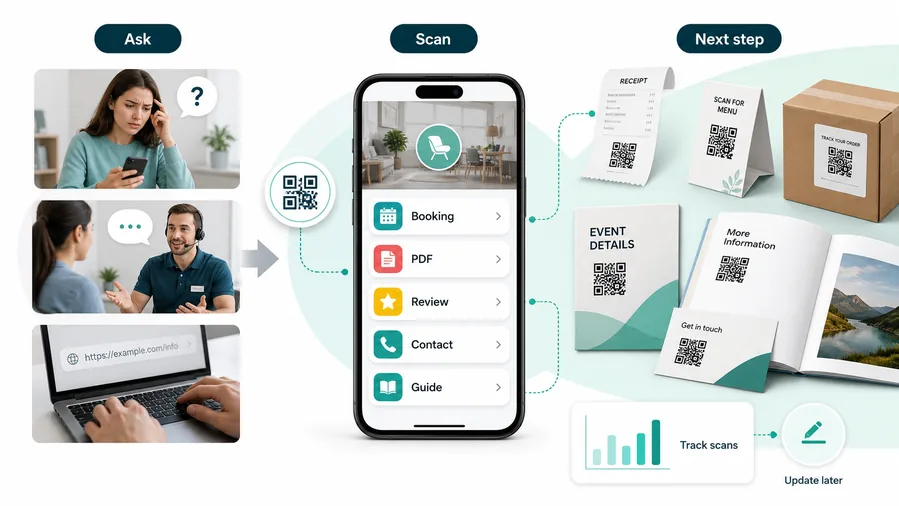
For customers, the strongest QR code use cases are usually the repetitive questions and next actions people already have. QR Code Lab helps turn those moments into clear buttons, files, forms, microlanding pages, editable destinations, and measurable scan activity.
More repeat listening
Send fans to streaming, pre-save, playlist, video, lyrics, or release pages without making them search by artist name.
Better show conversion
Use posters, venue signs, and handouts to open tickets, tour dates, reminders, maps, and after-show follow-up.
Stronger fan ownership
Move fans from platforms into mailing lists, communities, merch, memberships, and direct support paths.
Cleaner promotion data
Use separate QR codes for venues, merch, posters, flyers, releases, and campaigns when scan comparison matters.
A cheap layer of extra customer contact
QR codes increase useful touch frequency without a CRM project, mobile app, custom integration, or staff training. One printed code can open a guide, download, booking page, feedback form, review request, support path, or updated resource. The customer feels helped, not chased.
Restaurants and venues
Menus, Wi-Fi, booking, reviews, loyalty signup, event details, and feedback can live exactly where guests already pause.
Books and education
Bonus PDFs, ZIP files, worksheets, source files, updates, examples, and reader feedback can sit behind a single page-level QR code.
Retail and packaging
Care guides, warranty, setup instructions, reorder links, product education, recipes, safety notes, and reviews can follow the item home.
Services and events
Booking, contact save, registration, schedules, maps, check-in, forms, portfolio links, and follow-up pages become reachable without manual searching.
Music QR should make the next fan action obvious
Choose the destination that turns the physical music moment into a durable fan relationship.
Music placement
Place musician QR codes where fans are ready to listen, follow, or buy
PlacementMusician QR placement works when the code sits beside the song, show, poster, merch, release, or venue moment that made someone interested.

A QR without music context feels like another promo mark
If the scan does not explain whether it opens a song, tickets, merch, or social profile, fans may not bother.
The CTA should make the destination and benefit obvious before the phone comes out.
Put the QR where the fan already wants the next step
Use the QR near posters, merch, setlists, album art, venue tables, or release cards that create music intent.
The physical context should make the scan feel useful, not decorative.
What created the scan intent?
Live show, poster, merch table, album insert, release card, venue sign, playlist, or street flyer.
What should happen next?
Stream, save, buy tickets, join list, follow, watch video, buy merch, or support.
Is one link enough?
Use direct links for one clear action and a hub when several actions are equally useful.
Will the campaign move?
Use dynamic QR when the promoted link, invite, release, offer, or event page may change.
Merch table
Open streaming, tour dates, merch store, mailing list, or fan club while interest is fresh.
Gig poster
Send people to tickets, event details, artist profile, newest release, or reminders.
Album insert
Open lyrics, credits, behind-the-scenes, videos, liner notes, or bonus files.
Venue sign
Help fans find set times, artist links, venue map, tickets, or after-show offers.
Release card
Move from pre-save to streaming, video premiere, tour page, or merch drop.
Festival handout
Route to schedule, artist page, playlist, tickets, map, or post-event content.
Business card
Offer EPK, booking contact, music links, social profiles, and tour dates.
Street flyer
Use a clear CTA for the one action fans can take immediately after scanning.
Musician QR placement should convert attention before the moment fades
Use the QR where the physical material already creates enough reason to act.
Music scan UX
Make musician scans open the fan action that fits the moment
Scan UXMusic QR scans should move smoothly from discovery to listening, saving, buying tickets, joining the list, or following without making fans search.
Use direct music links when one release is the promise
Song, album, pre-save, videoA direct release link works when the print promotes one song, album, video, or pre-save campaign.
The destination should confirm the identity and offer before asking for a tap.
Use a fan hub when several music actions matter
Stream, tickets, merch, socialsA fan hub can combine streaming platforms, tickets, merch, mailing list, videos, lyrics, socials, and contact.
This is stronger for merch, events, posters, business cards, and broad discovery materials.
Use dynamic routing for releases, shows, and tour changes
Pre-save, release, tour, merchPrinted materials can outlive the first campaign destination.
Dynamic QR keeps the same physical code connected to the current page, offer, event, or fallback path.
Does the first screen match the physical material?
Confirm the page references the artist, release, show, venue, merch item, or fan offer that appears near the QR.
Is the main action obvious on mobile?
Put stream, save, buy tickets, join list, follow, watch, or shop where fans can act quickly.
Will the destination change?
Use dynamic QR when social profiles, campaign pages, invites, offers, releases, ticket links, or merch pages may change.
Music scans should make the fan relationship easier to continue
Choose the destination that fits the physical moment and keeps the next action clear.
Live context
Make the scan fit the fan attention window
Fans may scan during a break, after a set, at the merch table, while holding a poster, or while deciding whether to follow the artist. Put the QR code where the phone is already likely to be out and where the next action feels obvious: tip, follow, save the song, buy merch, join the list, watch the video, book the artist, or see tour dates.
Use different QR codes when the job changes. A busking sign can focus on tips and follows. A tour poster can focus on tickets. A merch tag can focus on shop or fan club. A lesson flyer can focus on booking. A release card can focus on the latest single or video.
Use dynamic QR codes for tour posters, merch tags, venue signs, and printed cards because music links change often. Scan analytics can compare shows, merch tables, flyers, and placements. QR Code Lab manages the QR destination and scan counts; music platforms, shops, payment tools, and booking pages handle the final action after the fan taps through.
After-print control
Use dynamic QR when releases, ticket links, and fan destinations change
DynamicMusic campaigns move through phases: pre-save, release day, video launch, tour dates, merch drops, playlists, and post-show follow-up. Dynamic QR keeps printed materials current.
A fixed link can miss the next campaign phase
A static QR can work for a permanent artist site, but music links change when pre-save becomes streaming, tickets sell out, or tour dates move.
Printed posters, cards, and merch may still circulate after the first link is no longer the best destination.
Editable routing keeps fan materials useful
Dynamic QR lets the same printed code move from pre-save to streaming, tickets, merch, fan club, video, or follow-up page.
It also helps compare interest by venue, poster, merch item, release, city, or campaign material.

Release campaigns
Move from pre-save to streaming, video, lyrics, playlist, press, or merch after launch.
Shows and tours
Update tickets, waitlists, venue info, maps, setlists, reminders, and after-show content.
Merch and inserts
Route fans to authenticity, bonus tracks, care notes, shop, fan club, or future drops.
Industry materials
Keep EPKs, booking contacts, press kits, tour assets, and collaboration links current.
Use dynamic when the music campaign will evolve
If the printed material supports a release, tour, or fan campaign, keep the QR destination editable.






