
QR Code for Gift Shops - Products, Catalogs & Offers Online
Create QR codes for gift shops linking product pages, catalogs, coupons, loyalty forms, reviews, event pages, social profiles, and maps. Use them on tags, bags, shelves, receipts, and displays.
Free QR code generator
Create a QR code online
Generate QR codes for websites, email, phone numbers, vCards, Wi-Fi, plain text, forms, PDF files, and campaign links. Customize colors, add a logo or frame, then download a print-ready PNG or SVG.
Choose QR code type
Website QR code, Email QR code, Phone QR code, vCard QR code, Wi-Fi QR code, Text QR code, SMS, WhatsApp, event, and download links.
Add your content
Enter your website URL, contact details, message, phone number, location, or file destination before generating the QR code.
Customize and download
Adjust QR colors, error correction, logo, frame, size, and margin. Generate QR Code, Download PNG, Download SVG, or Save and track scans.
QR solutions for this use case
Retail discovery path
Connect shelf browsing with product stories, offers, maps, and reviews
A QR code for gift shops is useful when a shopper pauses at a shelf, picks up a product, reads a receipt, notices a window sign, or receives a packaged gift later. It can open product pages, catalogs, coupons, loyalty forms, review pages, event pages, social profiles, maps, maker stories, local guides, and seasonal collections. The goal is not to replace the shop experience. It is to make the moment more useful.
Gift shops often sell items that people want to remember, share, or understand. A shelf tag can open the maker story or product details. A receipt can open a review or loyalty offer. A window sign can open hours, maps, or a seasonal collection after the store is closed. A package insert can help a gift recipient discover where the item came from. QR Code Lab helps create printable QR codes, dynamic links, and scan analytics for those touchpoints.
QR Code Lab creates URL QR codes only. It does not process payments, manage orders, collect forms, run memberships, or operate POS software. The linked ecommerce, catalog, review, loyalty, or social platform handles the customer action.
Gift-shop customer path
Help gift-shop shoppers discover product stories, offers, care notes, and return paths
Retail momentsA gift-shop QR code should connect shelf signs, product tags, gift wrap, receipts, bags, loyalty cards, and window displays to useful actions: product details, gift guides, coupons, reviews, care notes, local maker stories, or reorder pages.
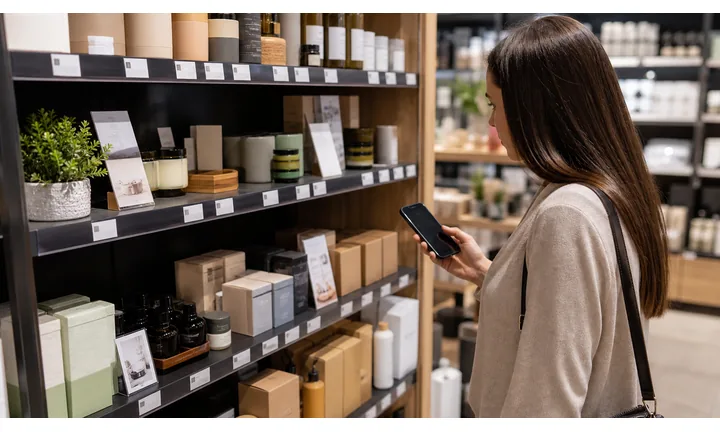
Turn product curiosity into confident gift choices
Use QR codes on shelf talkers, tags, display cards, and maker labels to open product stories, materials, origin, size details, care notes, and gift-use ideas.
The scan should help shoppers decide while they are holding or comparing the item.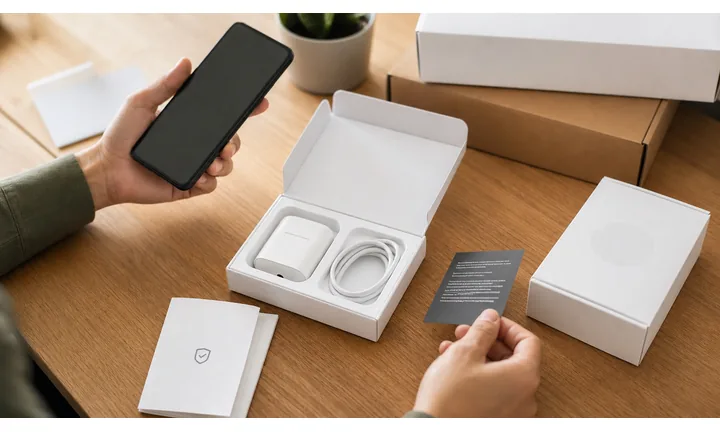
Make gift wrap and receipts useful after checkout
QR codes on bags, receipts, inserts, and gift cards can open exchange policy, care instructions, recipient notes, reorder pages, loyalty signup, and review paths.
Post-purchase scans should help both the buyer and recipient.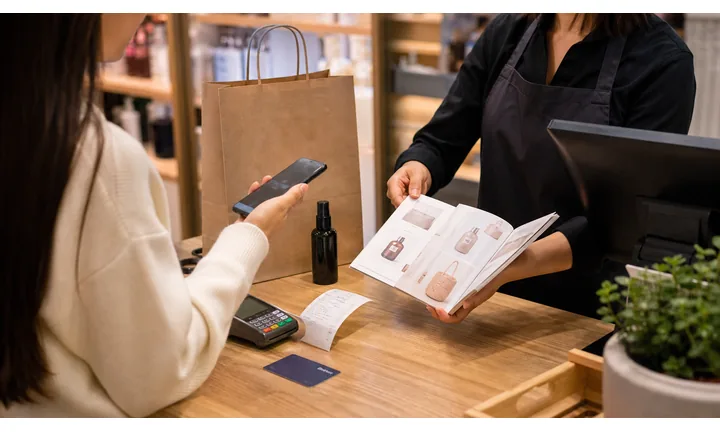
Keep seasonal displays and offers editable
Dynamic QR helps when holiday collections, local-maker pages, coupons, inventory, event pages, gift guides, and online shop links change after signs are printed.
Gift-shop merchandising changes often; print should keep up.A gift-shop QR should make the product feel easier to choose and remember
Shoppers scan when they want confidence, a story, a care instruction, a gift idea, a discount, or a way to return later. The QR destination should answer that moment with warmth and clarity.
Use CTAs such as learn the maker story, see care notes, claim gift offer, join loyalty, check exchange policy, or shop this collection.Before purchase
Open product details, maker stories, gift guides, sizes, materials, inventory, and recommendations.
At checkout
Use receipts and counter cards for loyalty, coupons, reviews, exchange policy, and follow-up.
For the recipient
Put QR codes on gift inserts for care notes, product story, reorder, and support.
Seasonal displays
Keep holiday collections, event pages, and limited offers editable after signs are printed.
Gift packaging scan moments
Turn gift-shop tags and packaging into product stories, care, support, and return visits
Gift packagingA gift-shop packaging QR code should answer the shopper or recipient question: what is this, who made it, how do I use it, can I exchange it, and where can I find more like it?
Show the story behind the gift
Send shoppers to maker profiles, origin notes, materials, craftsmanship details, charity context, or collection pages that make the item feel more meaningful.

Open care notes without crowding the tag
Use inserts, labels, and tags for washing, cleaning, storage, setup, safety, sizing, and use instructions.
Help the recipient after the gift is opened
Link gift inserts to exchange policy, support contact, reorder, matching items, and product information without exposing buyer details.
Bring shoppers back after the occasion
Use holiday bags, wrapping inserts, and receipts to open return-visit coupons, loyalty signup, event pages, and seasonal collections.
Give handmade and local products more context
Use QR codes for maker videos, sourcing, collection notes, restock alerts, and local shop events.
The scan should help shoppers choose and recipients understand
Before purchase, shoppers may want story, size, origin, care, or matching items. After purchase, recipients may need instructions, exchange details, support, or a way to find the shop.
Dynamic QR keeps gift-shop packaging useful after displays change
Seasonal collections, inventory, maker pages, coupons, events, policies, and product pages change often. A dynamic destination keeps printed tags and inserts current.
Put the code where the gift question happens
Gift-shop customer moments
Turn gift-shop attention into confident purchases and return visits
Local retailGift-shop QR codes should help customers choose, buy, remember, and return: product stories, local maker notes, gift guides, loyalty offers, reviews, events, and online shop links.

Help shoppers decide faster in-store
Use shelf signs and counter cards to open gift guides by occasion, budget, recipient, material, or local collection.

Give small items more story and context
Use tags and display cards to show materials, maker notes, size, care, origin, and matching products.

Invite return visits after checkout
Use receipts, bags, and counter cards for loyalty signup, birthday offers, events, and next-purchase coupons.

Promote local maker nights and seasonal drops
Use window signs and displays to open event pages, workshops, restock alerts, and limited collections.

Ask after the shopping experience is complete
Use thank-you cards and receipts to request reviews or private feedback while the visit is still remembered.

Connect offline discovery to online buying
Route shoppers to the matching online collection, reorder page, shipping options, or wishlist path.

Gift-shop scans start from curiosity and occasion
The customer may be comparing gifts, learning a maker story, checking care notes, buying for an occasion, or returning after checkout. The QR should make the next step feel natural.
Printed retail materials become easier to compare
Dynamic QR and scan reporting help show which tags, shelves, windows, receipts, bags, and seasonal displays earn attention.
Place the code where shoppers can act
Gift-shop placement
Place gift-shop QR codes where shoppers are already comparing, buying, or remembering
PlacementGift-shop QR placement should match the retail moment: browsing a display, holding a product, checking out, opening a gift, or deciding whether to come back.

The code appears without helping the gift decision
A QR on a shelf or bag can be visible but ignored if it does not explain whether it opens product details, care, coupon, loyalty, or exchange policy.
Gift shoppers scan when the code answers a question they already have.
The code supports the product or occasion
Use product tags for details, shelf signs for gift guides, receipts for loyalty, gift inserts for recipient help, and windows for events.
The scan should add useful context without replacing friendly shop service.
What is the shopper deciding?
Product fit, maker story, care, price, occasion, recipient, exchange policy, or return visit.
What should happen next?
Read story, compare options, claim coupon, join loyalty, view online collection, review, or get support.
Is the code near the product question?
Tags and shelf signs should open product or gift context; receipts and bags should open follow-up actions.
Will the display change?
Use dynamic QR for holiday collections, maker pages, events, coupons, policies, and online shop links.
Product tag
Open maker story, materials, care notes, matching items, and product details.
Shelf sign
Show gift guides, collection pages, local maker notes, and comparison help.
Gift insert
Help recipients with care, exchange policy, product story, support, and reorder.
Receipt
Invite loyalty signup, reviews, feedback, coupons, and return-visit offers.
Shopping bag
Route to online shop, seasonal collection, events, social follow, and gift guide.
Window display
Open hours, directions, event pages, limited collections, and holiday offers.
Counter card
Use for loyalty, newsletter, gift wrapping, local events, and review paths.
Market booth
Connect temporary retail displays to online inventory, contact, and future events.
Gift-shop QR placement should make the gift easier to choose
Use each code where it adds product confidence, recipient help, or a reason to return.
Gift-shop scan reporting
Use scan data to compare gift-shop tags, displays, receipts, and seasonal offers
AnalyticsTracking helps gift shops compare which materials earn attention: product tags, shelf signs, window displays, bags, receipts, gift inserts, maker cards, and holiday campaigns.

All retail scans become one unclear number
A single QR code can show total interest, but it cannot tell whether a tag, shelf sign, receipt, bag, or window display produced the scan.
That makes merchandising and seasonal campaign decisions weaker.
Each display and product surface becomes a signal
Use separate dynamic QR codes for tags, shelves, receipts, bags, windows, and holiday cards when comparison matters.
Scan data shows attention and timing; sales attribution remains in POS or ecommerce systems.
Scan volume
Review how many scans each gift-shop material received during a season, event, or display period.
Time and device
See when shoppers scanned and which device or browser opened the destination.
Broad location
Use approximate location signals for local campaigns without treating them as shopper identity.
Code comparison
Compare tags, shelf signs, receipts, bags, windows, gift inserts, and maker cards side by side.
Product story tags
See whether maker notes, care pages, and product stories earn interest from specific displays.
Seasonal collections
Compare holiday, local-maker, event, and gift-guide signage by scan activity.
Receipt follow-up
Review loyalty, review, coupon, and exchange-policy scans after checkout.
Operational cleanup
Find expired event pages, stale coupons, zero-scan displays, and old product links.
Name gift-shop QR codes by product, display, and season
Tracking works best when each code name matches the real shelf, tag, bag, receipt, event, or campaign.
Shelf, receipt, and gift flow
Place QR codes where shoppers pause, compare, or want to remember an item
Use gift shop QR codes on shelf tags, product cards, packaging inserts, receipts, counter signs, window decals, coupon cards, event flyers, loyalty cards, and local visitor displays. The CTA should say view product story, claim offer, join rewards, see local makers, find us on the map, browse collection, or leave a review. For souvenir and museum shops, QR codes can also connect physical gifts to exhibit pages, artist profiles, or local visitor information.
Dynamic QR codes help when seasonal offers, event pages, catalog links, product pages, and local guides change. Scan analytics can show whether shelf tags, receipts, or window signs create the most follow-up. That is useful when a shop wants more customer contact without adding a complex retail integration.
Keep the scan friendly for gift recipients too. If someone opens the code at home, they should quickly understand the product story, store name, care note, reorder path, or related collection without needing the original receipt. For shelf tags, place the code near the item name and price so it feels like product help, not random decoration.
Retail link control
Keep gift-shop QR destinations editable as seasons, products, and offers change
DynamicGift-shop print changes with holidays, inventory, makers, events, and promotions. Dynamic QR keeps tags, bags, receipts, displays, and inserts useful when the page behind them moves.
Printed gift materials can point to old collections
Static QR works only while the product page, collection, coupon, event, or policy stays fixed.
Gift-shop displays and seasonal campaigns change quickly, and old tags or bags may stay in circulation.
The same printed code can open the current retail path
Dynamic QR lets the shop update product stories, maker pages, coupons, online collections, event pages, loyalty links, and policies behind the same printed code.
That protects beautiful retail materials from becoming outdated.

Seasonal collections
Update holiday, birthday, wedding, local-maker, and limited-edition gift pages after signs are printed.
Product and maker pages
Move tags to current materials, care notes, maker stories, restocks, and matching items.
Receipts and bags
Change loyalty, coupons, review pages, exchange policy, and online shop links as campaigns rotate.
Events and workshops
Update maker nights, pop-ups, workshops, markets, and window-display destinations without reprinting cards.
Use dynamic QR when gift-shop merchandising keeps changing
If the printed material may outlive the product, offer, or event page, editable destinations are safer.






