
Venue QR Code Generator for Maps, Menus & Event Info
Create venue QR codes for maps, event calendars, menus, Wi-Fi, parking info, booking pages, safety notes, reviews, and visitor guides. Help guests find the right venue information fast.
Free QR code generator
Create a QR code online
Generate QR codes for websites, email, phone numbers, vCards, Wi-Fi, plain text, forms, PDF files, and campaign links. Customize colors, add a logo or frame, then download a print-ready PNG or SVG.
Choose QR code type
Website QR code, Email QR code, Phone QR code, vCard QR code, Wi-Fi QR code, Text QR code, SMS, WhatsApp, event, and download links.
Add your content
Enter your website URL, contact details, message, phone number, location, or file destination before generating the QR code.
Customize and download
Adjust QR colors, error correction, logo, frame, size, and margin. Generate QR Code, Download PNG, Download SVG, or Save and track scans.
Venue visitor path
Give visitors the right venue detail at the moment they need it
A venue QR code is useful when guests, vendors, event teams, or visitors need maps, event calendars, menus, Wi-Fi, parking details, booking pages, safety notes, review links, or visitor guides. It can appear in lobbies, rooms, parking areas, table tents, tickets, wristbands, posters, welcome cards, and event handouts.
A good venue QR code is not one generic code for everything. It follows the visitor path. A lobby sign can open the event calendar. A parking sign can open lot directions. A table card can open menus or Wi-Fi. A room sign can open booking rules or AV notes. A safety notice can open emergency details. Each code should answer the question people have where they are standing.
QR Code Lab creates URL QR codes, dynamic destinations, and scan analytics. It does not run bookings, configure Wi-Fi, manage maps, process reviews, or operate venue systems. Your venue website, booking tool, menu platform, map provider, review page, Wi-Fi setup, or visitor guide handles the actual guest service.
Venue guest moments
Venue guest moments event, wedding, venue, and attendee teams with registration, RSVPs, ticket pages, schedules, maps, guest details, and follow-up
Venue QRUse QR codes to move event, wedding, venue, and attendee teams from invitations, banners, badges, programs, table cards, venue signs, and attendee handouts to registration, RSVPs, ticket pages, schedules, maps, guest details, and follow-up without making guests search or type a long URL.

Help guests move through the venue without asking staff
Use QR codes at entrances, desks, tables, signs, rooms, bars, and event areas to open maps, schedules, menus, help pages, Wi-Fi, and guest services in the moment they are needed.
The scan should answer the question created by the physical place.
Give each venue touchpoint a clear destination
A lobby code, table code, room code, stage code, and ticket desk code should not all open the same homepage. Each placement can support a different guest action and a different operational need.
Specific placement beats generic scan copy.
Keep venue information editable after signs are printed
Dynamic QR protects printed cards and signs when events, menus, room assignments, maps, Wi-Fi instructions, accessibility notes, or support paths change.
Venue print often stays up while operations keep moving.A venue QR code should make the place easier to use
Guests are usually standing in the venue, looking for a room, table, menu, schedule, Wi-Fi, ticket help, accessibility route, or staff support. The destination should continue that exact physical context.
Use one clear promise per placement: map, menu, schedule, Wi-Fi, check-in, service, accessibility, or feedback.Wayfinding and maps
Open room maps, entrances, parking, pickup points, restrooms, accessibility routes, and help desks.
Food and service
Send guests to menus, ordering, table service, bar specials, receipts, and issue support.
Event operations
Connect signage to agendas, tickets, check-in, speaker rooms, sponsor pages, and live updates.
Guest trust
Make venue identity, staff help, Wi-Fi instructions, payment boundaries, and privacy expectations clear.
Events, conferences, and weddings
Match venue QR codes to the guest action at that location
Attendee flowVenue QR codes work best when the scan opens a specific action tied to the physical space: map, menu, Wi-Fi, schedule, ticket help, room directions, service request, or feedback.

Open venue maps and directions
Use entrance signs, lobby cards, room doors, parking signs, and event boards for maps, routes, pickup points, restrooms, accessibility, and help desks.

Connect tables and counters to service
Route guests to menus, ordering, bar specials, payment context, receipts, staff help, and issue support without hiding the human fallback.

Support event schedules and live updates
Use room signs, programs, badges, and screens to open agendas, room changes, speaker materials, check-in, and sponsor pages.

Offer Wi-Fi without exposing more than needed
Provide guest Wi-Fi instructions, network name, password handling, acceptable-use notes, and privacy context in a clean mobile page.

Collect feedback at the right moment
Use exit signs, receipts, follow-up cards, or guest-service desks for private feedback, reviews, lost-and-found, support, and return-visit offers.
Guests need the page to match the place
The first screen should confirm venue, location, and action before asking for details or sending someone to an external provider.
Venue teams need QR codes that can follow operational changes
Dynamic destinations help when rooms, menus, schedules, Wi-Fi, routes, and support links change faster than printed signs.
Give every venue placement one clear job
Venue placement
Place venue QR codes where guests already need the next step
PlacementVenue placement should match the physical moment: arriving, checking in, finding a room, sitting down, joining Wi-Fi, ordering, paying, asking for help, or leaving feedback.

A visible venue QR can still feel vague
A code on a wall or table is not useful if guests cannot tell whether it opens a map, menu, Wi-Fi, schedule, payment page, or support form.
The CTA should describe the action before the scan.
Put the QR beside the venue decision
Use entrance codes for maps and check-in, table codes for menus and service, room signs for agendas, and lobby cards for Wi-Fi or help.
The landing page should continue the exact promise printed near the code.
Where is the guest standing?
Entrance, lobby, table, room door, bar, ticket desk, parking sign, event board, or service counter.
What do they need now?
Map, schedule, check-in, menu, Wi-Fi, payment, help, accessibility, lost-and-found, or feedback.
Will venue details change?
Use dynamic QR for room moves, schedule updates, menus, Wi-Fi instructions, provider links, and event pages.
Is the CTA specific?
Print open venue map, view today’s schedule, join guest Wi-Fi, order from table, or request help.
Entrance sign
Open maps, check-in, tickets, security notes, accessibility routes, and event overview.
Lobby desk
Use for Wi-Fi, local guide, room directions, guest services, lost-and-found, and support.
Table card
Open menu, ordering, specials, payment, receipt, staff help, and feedback.
Room door
Show agenda, room changes, speaker details, capacity notes, and materials.
Event board
Route to live schedule, sponsors, venue map, session list, and updates.
Parking sign
Open pickup points, walking route, payment, shuttle, and accessibility notes.
Bar or counter
Use for specials, ordering, tips, receipts, loyalty, and support.
Exit card
Ask for feedback, reviews, lost-and-found, newsletter signup, or return-visit offers.
Venue QR placement should reduce staff questions
If guests still need to ask what the code opens, the printed prompt or destination is not specific enough.
Guest Wi-Fi privacy
Use venue Wi-Fi QR codes with clear access and privacy expectations
Wi-FiA venue Wi-Fi QR can reduce front-desk questions, but guests should understand the network name, access limits, password handling, acceptable use, and where to get help.
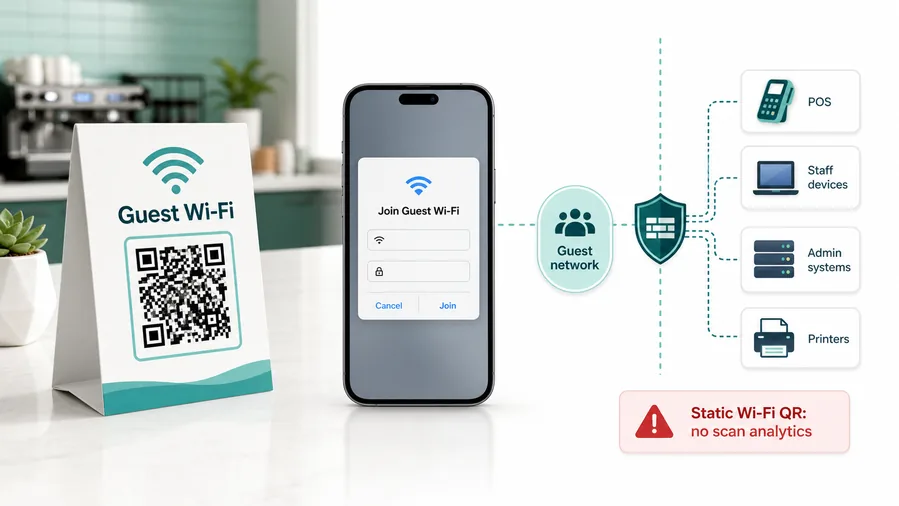
Make the network identity obvious
The printed sign and landing page should show the venue name, guest network, password or join instructions, and whether staff help is available.
This is why static Wi-Fi QR is often better than dynamic for joining a network. A redirect URL cannot open the same native Wi-Fi flow.Do not overpromise privacy
A QR code can simplify joining, but network monitoring, terms, captive portal rules, and device behavior belong to the venue and Wi-Fi provider.
If you need analytics, you can track a landing page, but the experience becomes a web page with Wi-Fi instructions, not a native join-network QR.Keep access current
Dynamic QR helps when passwords, guest-network names, event Wi-Fi, captive portals, or help instructions change after signs are printed.
Use a guest network, client isolation, router-level limits, and a password rotation process. QR codes make access easier; they do not make the network safe.Guest Wi-Fi is a trust moment
People are connecting personal devices. Keep the destination official, explain the network clearly, and avoid collecting unnecessary information.
Configure network security on your router, firewall, access point, or IT management system.A venue Wi-Fi QR should make access easier and trust clearer
The guest should know which network they are joining, who provides it, and where to get help before connecting.
Scan reporting
Use venue QR analytics to compare locations, signs, and guest actions
AnalyticsTracking is useful when entrances, tables, rooms, event boards, Wi-Fi signs, bars, and service desks need separate scan readouts.

One venue QR hides which placement helped guests
A shared QR code can show total scans, but it cannot explain whether the lobby, table, room sign, event board, Wi-Fi card, or exit card created the action.
That makes venue operations harder to improve.
Separate venue codes turn placements into operational signals
Use different dynamic codes for maps, menus, Wi-Fi, schedules, feedback, payments, and service points when comparison matters.
Scan data is not a complete guest journey, but it helps show which physical prompts get used.
Scan volume
See which venue signs, cards, rooms, tables, or service areas receive scans.
Time and device
Compare event times, meal periods, check-in windows, weekends, and device patterns.
Broad location
Use approximate location to catch stale signs, off-site scans, or unexpected use.
Destination comparison
Compare maps, menus, Wi-Fi, schedules, support, payment, and feedback pages.
Wayfinding cleanup
Find entrances, room signs, parking signs, and maps that guests actually scan.
Table and service usage
Compare menu, ordering, payment, and support scans by dining area or service point.
Event operations
Measure schedule, room, sponsor, and material scans without claiming full attendance.
Old sign detection
Spot retired Wi-Fi cards, old event boards, and outdated maps still receiving scans.
Name venue QR codes by placement and purpose
Use names like lobby-map, patio-menu, room-a-schedule, guest-wifi-frontdesk, or exit-feedback so reports stay readable.
Guest and facility flow
Use several focused venue QR codes instead of one confusing catch-all
Useful placements include lobby signs, room signs, table tents, parking signs, tickets, wristbands, posters, safety notices, welcome cards, menus, and visitor maps. CTAs should say view events, open map, connect to Wi-Fi, book this room, see menu, read safety notes, get parking info, or leave a review. The words around the code matter because visitors decide in seconds whether the scan is worth it.
Dynamic QR codes are practical for venues because calendars, room pages, parking rules, menus, Wi-Fi notes, and event guides change often. A printed sign can stay in place while the destination changes behind it. Scan analytics can compare entrances, rooms, parking zones, table cards, and event signs, which helps teams see which physical touchpoints actually support guests.
Keep the destination light and task-focused. A guest scanning a parking sign does not want the full venue homepage. A person scanning a table tent wants the menu or Wi-Fi, not a broad directory. QR Code Lab manages the QR link and scan reporting, while your venue tools handle bookings, guest records, payments, Wi-Fi access, reviews, and daily operations.
Scan trust
Make venue QR codes trustworthy before guests follow maps, join Wi-Fi, or pay
TrustVenue QR codes can open maps, menus, Wi-Fi, payments, tickets, forms, and support. The destination should clearly belong to the venue and match the printed promise.

Public sign tampering
QR codes on tables, doors, lobbies, parking signs, and event boards can be covered or replaced.
Watch for similar-looking domains, long URLs, login or verify keywords, and pages asking for credentials after an unexpected scan.
Old operational details
Guests lose trust when codes open retired schedules, old Wi-Fi passwords, moved rooms, or expired menu links.
A trustworthy QR should not make the final destination mysterious, especially on posters, labels, menus, parking signs, or event materials.
Unclear payment or data request
Payment, Wi-Fi, lead forms, and guest-service pages should explain provider, purpose, and support before asking for action.
Before paying, check the domain, HTTPS, amount, recipient, and whether the destination matches the place or brand that printed the QR.Scan the printed proof like the visitor will
Confirm that the destination shows the right organization, HTTPS page, action, form, map, schedule, or support path before people rely on the QR code.
Public QR codes need more trust signals because anyone can scan them and some placements can be tampered with.Venue identity match
Confirm the page names the same venue, event, room, table, or service area shown on the print.
Destination clarity
Check that map, menu, Wi-Fi, payment, ticket, or support action is obvious on the first screen.
Public placement check
Inspect signs and table cards for replacement stickers or old print after each event setup.
Fallback path
Keep staff help, front desk, accessibility, payment support, or technical support visible.
Publish QR codes people can verify
The printed CTA, page title, organization identity, and first action should all describe the same destination.






