
SMS QR Code Generator for Text Messages, Support & Bookings
Create SMS QR codes that open a text message with a phone number and optional prefilled message. Use them for bookings, support, quotes, events, lead capture, and local ads today fast.
Free QR code generator
Create a QR code online
Generate QR codes for websites, email, phone numbers, vCards, Wi-Fi, plain text, forms, PDF files, and campaign links. Customize colors, add a logo or frame, then download a print-ready PNG or SVG.
Choose QR code type
Website QR code, Email QR code, Phone QR code, vCard QR code, Wi-Fi QR code, Text QR code, SMS, WhatsApp, event, and download links.
Add your content
Enter your website URL, contact details, message, phone number, location, or file destination before generating the QR code.
Customize and download
Adjust QR colors, error correction, logo, frame, size, and margin. Generate QR Code, Download PNG, Download SVG, or Save and track scans.
Prepared text message
Use SMS QR when a short reply is easier than a form or phone call
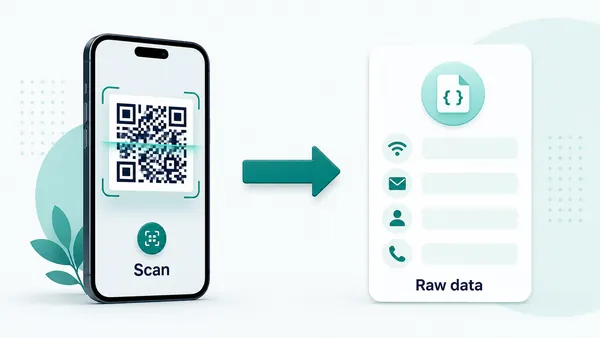
An SMS QR code opens the phone messaging app with a recipient number and optional pre-filled message. It is useful when the next step should be quick and low-friction: request a quote, confirm interest, ask for support, send a booking question, join an event update list, report an issue, confirm arrival, ask for pickup details, or start a simple service conversation from print. The scan removes the typing step but keeps the user in control.
The message is not sent automatically. The scanner can review, edit, and confirm it before sending. That makes SMS QR codes practical for situations where you want to remove friction but still let the person decide what to send. It is also why the pre-filled message should be helpful rather than pushy. A short prompt can save time; a long scripted message can feel awkward.
Keep the pre-filled text short and specific. A good SMS QR might prepare “I would like a quote for...”, “I am here for my appointment”, or “Please send more details about this property.” If the interaction needs multiple fields, file uploads, consent language, or structured answers, a mobile form or microlanding page is usually a better destination.
SMS scan moments
Turn printed intent into a ready-to-send text message
Prepared SMSAn SMS QR code is useful when the scanner should not type a number or compose the first message from scratch. It can prepare a short text for support, quotes, booking changes, event help, check-ins, local services, or simple follow-up.
Make the message match the printed moment
Use SMS QR codes on flyers, appointment cards, service stickers, event signs, receipts, packaging inserts, and local business materials when the scanner already knows why they are contacting you.
The prepared message should feel like a helpful shortcut, not an awkward script.
Keep the text short enough to review
The phone should open a message the scanner can understand and approve quickly. Use a clear prompt such as I need a quote, I am here for my appointment, I need support, or Please send me the details.
The scanner still chooses whether to send the message.
Use another destination when the reply needs structure
If you need multiple fields, file uploads, consent language, payments, account lookup, or long explanations, a form or landing page is usually stronger than trying to pack everything into one SMS.
SMS works best for one lightweight conversation starter.The QR code prepares the message; the user stays in control
QR Code Lab can encode the SMS recipient and draft text, but the phone, carrier, messaging app, and user confirmation decide what happens after the scan. The message should be clear enough that people are comfortable sending it.
Do not use SMS QR when the scanner needs a full workflow before contacting you.Name the reason to text
Use nearby print copy such as text for a quote, request support, confirm arrival, join updates, ask a question, or get booking help.
Write a message people can edit
Short templates work better than long scripts. Leave room for the scanner to add details without deleting half the message.
Check number format and routing
Test country code, regional dialing, short codes, reply handling, and whether the recipient line is monitored when people are likely to scan.
Choose forms for structured data
If the business needs exact fields, attachments, consent, or payment details, send the scanner to a mobile form instead of SMS.
Choose static SMS QR for final text actions and dynamic QR when the contact path may change
DecisionSMS QR codes usually work as direct static actions because the number and message live inside the QR pattern. Dynamic QR is better when the printed material should open a contact page first or when routing may change later.
Static SMS QR opens the messaging app directly
A static SMS QR code stores the recipient number and optional message inside the QR pattern, so the scanner’s phone can prepare the text.
This is useful for stable support lines, quote requests, appointment confirmations, event help, local service cards, and simple printed prompts where a text reply is the expected action.
The tradeoff is permanence. After printing, QR Code Lab cannot change the encoded number or message, and static SMS scans do not pass through QR Code Lab for analytics.
Dynamic QR can route to an editable contact flow
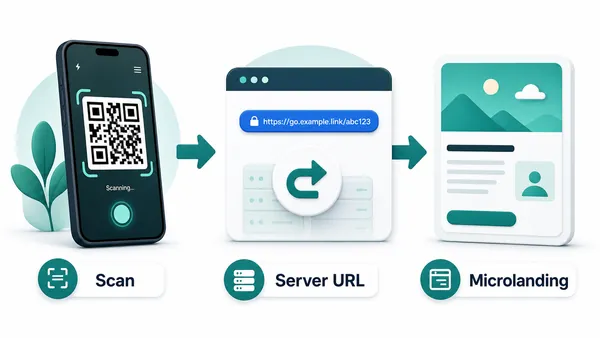
A dynamic QR code stores a managed URL first, then redirects scanners to the current destination you choose.
For SMS intent, that destination might be a contact page with text buttons, business hours, service choices, a short form, or updated instructions before the message is sent.
Use this when the recipient, message, campaign routing, or reporting needs may change after the printed material is distributed.
Quick decision
SMS scan experience
Make the prepared message clear before the scanner sends it
Scan UXAn SMS QR code should open a message that feels expected, editable, and safe to send. The scanner should understand the recipient, the reason for the text, and what response they can expect.
The phone controls the message composer
Support text, quote request, booking question, event helpWhen the QR contains SMS data, the device chooses how to open the messaging app, display the recipient, and show the draft text.
Keep the recipient recognizable and the message short. The best experience is a draft the scanner can review, edit, and send without decoding your intent.
A landing page helps when people need choices
SMS button, call button, form, hours, service areaIf the scanner may need to choose a department, check hours, attach details, or decide between call and text, a mobile contact page is better than a direct SMS prompt.
Use the page to make SMS one obvious option while giving people a fallback path when texting is not convenient.
Dynamic QR can compare printed SMS placements
Flyers, counter signs, event posters, service labelsDynamic QR can record scan interest by placement before sending people to a text-focused page.
Keep measurement honest: scans show interest in the contact path, while delivered messages, replies, and conversions belong to the messaging platform or CRM.
Does the printed CTA explain the text?
Use wording such as text for a quote, text support, confirm by SMS, ask a question, or join event updates.
Is the draft message short and editable?
Avoid long scripts. The message should be specific enough to help routing but flexible enough for the scanner to add context.
Will someone answer the message?
Check the recipient line, business hours, auto-replies, routing rules, and whether replies reach the team that can actually help.
SMS QR should start a useful conversation quickly
Use SMS when a short text is the natural next step. Use a form or landing page when the interaction needs structure before contact.
SMS placement timing
Place SMS QR codes where a short reply makes sense
PlacementSMS works best when the scanner can send a quick message without stopping for a long form or live call. The placement should make the text purpose obvious before the phone opens the composer.

A visible SMS QR can still feel intrusive
People may ignore a text prompt if they are walking past, unsure who receives it, or unclear what message will be prepared.
Because SMS uses a personal messaging app, the printed context needs more trust and specificity than a generic web link.
SMS works when the reply is small and timely
Use SMS QR when the scanner has a simple reason to contact you right now: ask, confirm, request, report, join, or get help.
The code should sit beside the reason to text, with enough privacy and time for the person to review the draft before sending.
What just happened?
The person saw a service offer, arrived for an appointment, noticed an issue, finished a purchase, attended an event, or picked up a printed card.
What should happen next?
The scan should prepare one clear text: quote request, support question, booking change, check-in note, feedback prompt, or update signup.
Is texting easier than calling?
SMS fits moments where a live call is too much but a short message is still easier than typing a number and composing from scratch.
Is the recipient trustworthy?
Name the business, team, or purpose near the QR code so people know where the message is going.
Local service flyer
Useful for quote requests, availability questions, booking help, and simple lead capture when the person wants a low-pressure first contact.
Appointment or reception card
Prepare arrival notes, reschedule requests, check-in messages, or quick questions without forcing a phone call.
Event sign or badge
Help attendees text organizers, join updates, request assistance, or ask a question while the event is still happening.
Support sticker or product label
Start a support text with enough context for the team to route the issue, especially when calling is inconvenient.
Receipt or thank-you card
Invite feedback, reorder questions, loyalty signup, or support requests after the transaction is complete.
Classroom or workshop sheet
Let participants send attendance, questions, help requests, or follow-up interest without copying a number.
Property or rental sign
Prepare inquiries about availability, viewing times, pricing, or access instructions while the person is at the location.
Direct mail or coupon
Use SMS QR when claiming the offer or asking for details should happen through a short text rather than a full form.
Use SMS QR where one short message is enough
If the scanner needs several fields, files, payment, identity checks, or long explanations, send them to a form or landing page instead.
Reply moment
Design the SMS QR around one useful message people are willing to send
SMS QR is strongest when the visitor already knows why they are contacting you. On a repair sticker, it can prepare a support request. On an event sign, it can prepare a check-in or help message. On a flyer, it can start a quote request. On a local service card, it can remove the annoying step of copying a phone number into the messaging app. The scan should feel like the obvious next step, not a random invitation to text.
The words beside the code matter. “Text for a quote,” “Send arrival message,” “Ask about this listing,” “Text support,” or “Join SMS updates” explains the action better than “scan me.” If the user may pay normal SMS fees, contact a public number, or share personal information, keep the request respectful and clear. Do not use SMS QR for sensitive data that belongs in a secure form.
SMS QR is not the same as WhatsApp QR and not the same as a phone-call QR. Choose SMS when ordinary text messaging is the expected channel. Choose WhatsApp when your audience expects chat there. Choose phone QR when the goal is a live call.